



Amira van Weegen
Marketing Manager
January 12, 2026
Room Booking or Outlook: The Ultimate Comparison for Optimal Room Management 2026
5 min.
Introduction: What is Room Booking with Outlook vs. Specialized Software and Why is Choosing the Right One Crucial?
Room booking with specialized software or Outlook? This is a crucial question for companies wanting to efficiently manage their meeting spaces. As the person responsible for office organization, you face the choice: Is Outlook's tried-and-tested room booking sufficient, or do you need specialized room booking software?
Important to know: Specialized tools don't replace Outlook, they complement it. They integrate seamlessly with Microsoft 365, allowing your employees to continue booking their rooms directly through Outlook, with the added benefits of features like analytics, easy bookings, or cross-location management.
In this comprehensive guide, you will discover the differences between Microsoft Outlook and dedicated room booking tools. You'll learn how both approaches work, what their advantages and disadvantages are, and receive a practical step-by-step guide for implementation.
Understanding Room Booking: Outlook vs. Specialized Software in Detail
Outlook-based Room Booking
The Outlook room booking is based on resource mailboxes in Microsoft Exchange Server or Microsoft 365. You set up each meeting room as a separate resource that functions like a separate email inbox.
This is how scheduling works with Outlook:
You create a new appointment in your Outlook calendar
The Scheduling Assistant shows you available rooms
You add the desired room as a resource
Microsoft Exchange automatically checks availability
If the room is available, you receive a confirmation; in case of conflicts, a rejection
Integration with Microsoft Teams, OneDrive, and SharePoint enables seamless hybrid meetings. The room finder helps you find suitable meeting rooms based on number of participants and equipment.
Core Functions of the Outlook Environment:
Automatic conflict detection for double bookings
Recurring appointments for regular meetings
Delegated booking rights for assistants
Email notifications to all participants
Calendar synchronization across all Microsoft products
Specialized Room Booking Software
Dedicated room booking tools like anny, Deskly, or Envoy significantly enhance the basic functions. These solutions offer you a central platform for managing all resources from meeting rooms to desks to parking spaces and can be seamlessly integrated into Outlook.
Advanced Features of Specialized Software:
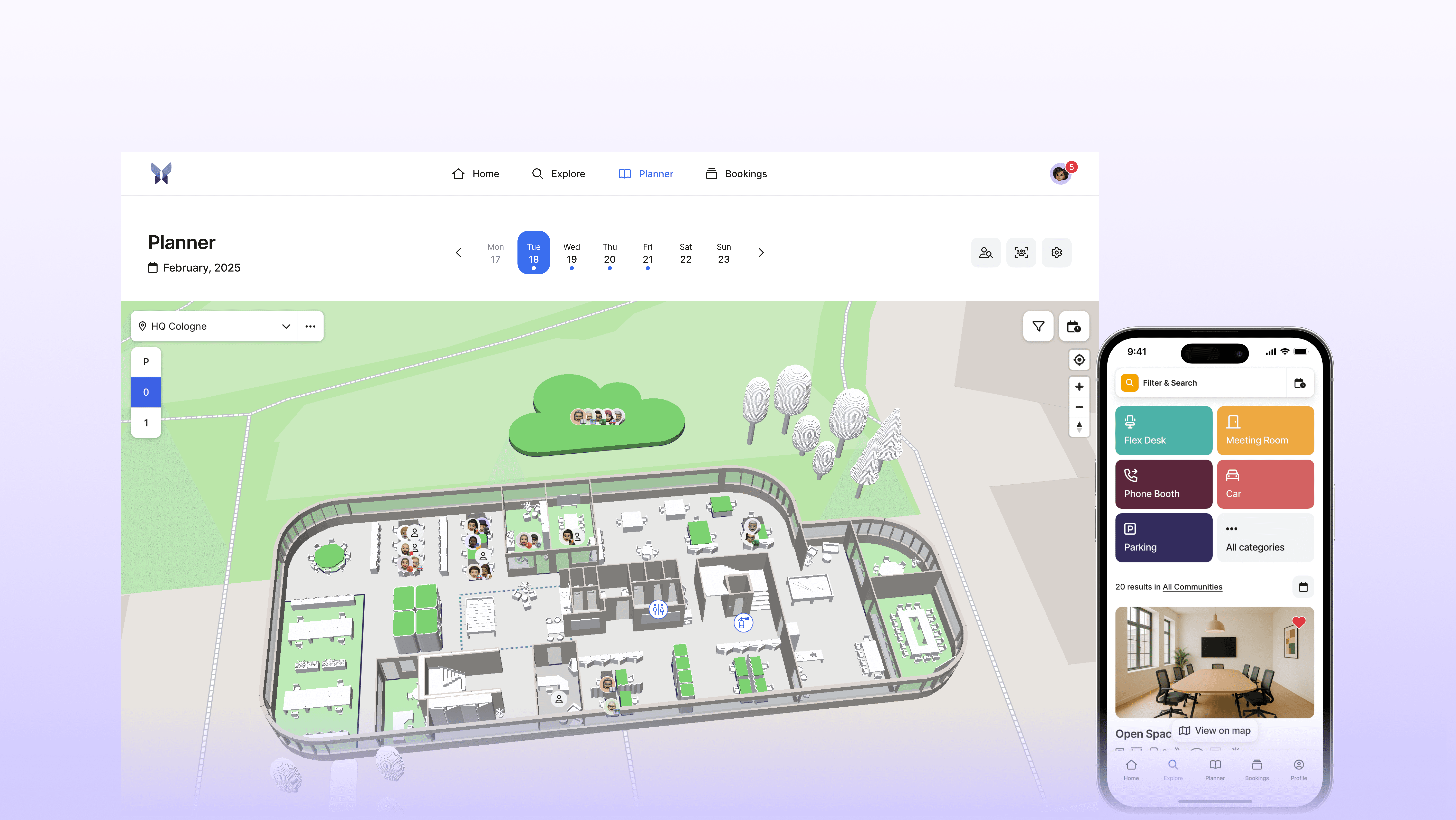
Interactive floor plans with a visual display of availability
Approval processes for conference rooms
Resource management for projectors, beamers, and catering
Multisite management with central overview
Mobile apps for booking on the go
Detailed analytics for room utilization and cost optimization
The connection to Outlook remains: Modern tools use add-ins and APIs to integrate seamlessly into your existing Outlook environment. You can continue booking via Outlook, but gain additional features and better overview.
Why Choosing Between Room Booking and Outlook is Crucial
The choice between Outlook and specialized room booking software with Outlook add-in has a direct impact on productivity and employee satisfaction in your company.
Cost savings through efficient room usage:
Reduction of vacancies
Avoiding double bookings saves noticeable time
Better utilization of available rooms
Scalability for growing companies: While Outlook is sufficient for 10-20 employees, it quickly reaches its limits with more complex requirements. Specialized software grows with your needs and supports multiple locations, various resource types, and individual booking rules.
Comparison Table: Outlook vs. Room Booking Software
Criterion | Outlook/Exchange | Specialized Software (e.g., anny) |
|---|---|---|
Cost | Included in Microsoft 365 | from €4 per room |
Functionality | Basic room booking | Advanced features + Analytics |
User-friendliness | Familiar, yet limited | Intuitive, specialized UI |
Scalability | Limited to Microsoft environment | High, multi-location |
Integration | Seamless in Microsoft 365 | Add-ins + custom APIs |
Analytics & Reporting | Very limited | Comprehensive dashboards |
Step-by-Step Guide: Setting Up Room Booking
To find out which solution suits you best, you can easily test both options. Below, you'll find a guide for both scenarios. Afterwards, you'll find practical tips on how to measure the success of the approaches.
Set up room booking with Outlook
Create resource mailboxes in Microsoft 365 Admin Center:
Access Admin Center: Log into the Microsoft 365 Admin Center
Add resource: Navigate to “Resources” → “Rooms & Equipment” → “Add Room”
Enter room details: Define name, email address, capacity, and location
Set booking policies: Configure maximum booking duration, lead times, and automatic approval
Define user permissions and booking deadlines:
Determine who can book rooms (all employees, specific groups)
Define booking deadlines (e.g., maximum 30 days in advance)
Configure conflict resolution and overbooking rules
Checklist for basic configuration:
[ ] All meeting rooms created as resource mailboxes
[ ] Booking policies defined and tested
[ ] User permissions assigned
[ ] Room equipment (projector, capacity) recorded in descriptions
[ ] Test bookings conducted
Implement anny as a room booking solution
Installation and setup of anny in your organization:
Demo and needs analysis: Schedule a free demo and clarify your specific requirements
Tenant setup: anny sets up your individual tenant in the cloud
Add-in installation: The Outlook add-in is centrally deployed for all users
Import room data: Existing room configurations from Exchange are adopted
Integration with existing Outlook calendars:
Bidirectional synchronization between anny and Exchange
Existing appointments remain intact and visible
New bookings via anny automatically appear in Outlook
Configuration of approval processes and special rules:
Define approval workflows for special rooms or large events
Set up automatic cancellations for no-shows
Configure booking rules by department or hierarchy level
Training for employees and administrators:
Online training for end users
Administrator training for advanced features
Provision of video tutorials and quick-start guides
See how the Outlook Add-In from anny works here:
Success measurement and optimization
Define KPIs:
Room utilization: Percentage usage per room and period
Booking efficiency: Average time from booking request to confirmation
User satisfaction: Regular surveys on user experience
No-show rate: Proportion of unattended bookings
Use reporting tools: With specialized tools, you receive detailed dashboards and automated reports. Outlook offers limited possibilities here via PowerBI integration.
Regular adjustments: Analyze usage patterns monthly and adjust booking rules accordingly. Identify underutilized rooms and optimize room allocation.
Avoid Common Mistakes in Room Booking
Error 1: Insufficient User Permissions in Outlook Lead to Booking Conflicts
If staff members do not have adequate rights for resource mailboxes, they cannot book rooms correctly or may receive misleading error messages.
Error 2: Lack of Approval Processes for High-Value Meeting Rooms
Without defined approval workflows for expensive conference rooms or boardrooms, conflicts and inefficient usage often occur.
Error 3: No Integration of Additional Resources like Catering or Technology
Booking just the room in isolation without taking into account projectors, catering, or special equipment leads to organizational challenges.
Pro Tip: Conduct a comprehensive needs analysis before implementation. Document all current booking processes and identify pain points. This is the only way to choose the right solution and avoid common pitfalls from the start.
Case Study: Challenges in Room Booking for a Mid-sized Business
Initial Situation: A medium-sized company with around 200 employees and multiple locations uses Outlook for room booking. This often leads to typical problems that many organizations experience similarly.
Common Challenges:
Double bookings and lack of overview of all rooms and locations
Separate organization of catering and technical equipment
No means to capture and analyze room utilization
Limited flexibility in booking rules and approval processes
Proposed Solution: To tackle exactly these challenges, specialized room booking tools can assist. They offer centralized management, interactive floor plans, advanced approval processes, and management of additional resources such as projectors and catering.
Advantages of a Specialized Solution:
Reduction of double bookings through better overview and automated conflict checks
Unified management of all locations and resources on one platform
Capture and analysis of usage data to optimize room planning
Improved user satisfaction through easy operation and mobile booking options
This approach allows companies to significantly increase the efficiency of their room booking and reduce administrative efforts without having to give up the familiar Outlook environment.
Frequently Asked Questions About Room Booking
Can I still use Outlook if I switch to anny?
Yes, absolutely! anny integrates seamlessly into Outlook via an add-in. It allows you to book rooms in the Outlook calendar - with filtering options, add-ons like catering, and automatic two-way synchronization.
What are the costs for specialized room booking software?
The costs vary depending on the provider and company size. With anny, prices start at €4 per room. Click here for a complete overview.
Does room booking software work on mobile devices?
anny offers a fully functional mobile app for iOS and Android. You can book rooms spontaneously, modify existing bookings, or find available rooms nearby - ideal for hybrid working and flexible office use.
What happens to my existing Outlook bookings when switching?
All existing appointments and bookings are preserved. Specialized software syncs with your Exchange Server and seamlessly adopts all existing room bookings. The transition occurs without data loss or interruption.
Can I also book other resources like company vehicles or parking spaces?
While Outlook primarily focuses on meeting rooms, tools like anny enable the booking of any resource: desks, parking spaces, company vehicles, projectors, and even catering services - all through a unified interface.
Conclusion: Make the Right Choice for Your Room Booking
The choice between Outlook and specialized room booking software depends on your specific requirements.
Outlook is sufficient for small teams up to 20 people with a few, simple meeting rooms. Integration with Microsoft 365 is already in place, and its basic functions cover simple booking scenarios.
Specialized software like anny is recommended starting at 50+ employees, especially in cases of:
Multiple locations or complex room structures
Need for additional resources (catering, technology, parking spaces)
Desire for detailed analytics and optimization
Approval processes or special booking rules
Hybrid approaches offer the best of both worlds: You retain the familiar Outlook interface while acquiring enhanced features through add-ins and integrations.
Your next steps:
Needs analysis: Document your current challenges in room booking
Trial version: Try both optimized Outlook configurations and specialized tools
Cost-benefit calculation: Calculate the savings through more efficient room usage
Make a decision: Choose the right solution based on your insights
For personalized advice on your specific requirements, contact the providers for free demos. With anny, you can easily schedule a non-binding demo here.






" height="38px" id="bH388uk2E" transform="translate(1 1)" width="118.00000395534607px"/></svg>)