


February 17, 2026
Attendance Tracking in Hybrid Work: How You Can Reliably Know Who's in the Office
8 min

Introduction
Tuesday morning, 9:15 AM. The planned team workshop was supposed to start at 9 AM, but only three out of eight colleagues are sitting in the meeting room. The rest? Probably working from home or on the go. No one knows for sure.
Hybrid working is now a reality – but with flexibility came a problem that many companies underestimated: no one reliably knows who is in the office and when. This guide shows you how, as a Team Lead, Office Manager, or HR professional, you can finally achieve clarity.
Attendance tracking in the hybrid work model serves for planning and collaboration, not for control or surveillance – teams benefit from transparency about who is on-site.
Office spaces cost an average of 500–1,000 euros per workstation annually – without reliable attendance data, companies waste budget on unused spaces.
Most employees only come to the office when they expect their team to be there – lack of planning frustrates and further reduces office presence.
Traditional solutions like Excel, Slack polls, or simple desk booking tools fail because they either are not maintained or do not link bookings with actual attendance.
The combination of booking and check-in – provides practical data for teams, HR, and office management.
Hybrid Work – and Nobody Knows Who's in the Office Today
But with the flexibility of hybrid work come quite specific challenges:
Double bookings: Two employees book the same desk because no one knows who is actually coming.
Empty spaces: The office building is half deserted while the rent continues to accrue in full.
Poorly planned meetings: Discussions that should happen in-person become hybrid video conferences – with poor acoustics and frustrated participants.
Commute without value: Employees commute 45 minutes to the office only to find that their colleagues are not there.
The central question is therefore: How do we monitor office attendance in a way that benefits everyone – without a sense of surveillance and without bureaucratic hassle?
Why Attendance Tracking is Essential in a Hybrid Work Model
Before we discuss solutions, we need to clarify one thing: attendance tracking in hybrid work is not about micromanagement or attendance checks in the traditional sense. It's about planning, collaboration, and the meaningful use of resources. Those who see this as control have misunderstood the concept.
Team and Collaboration Days Require Planning
Many companies have realized that hybrid work functions best when teams schedule intentional presence days. Wednesday becomes the team day, when everyone comes together for important conversations and personal exchanges.
The problem: such team days only work if you know in advance who will actually show up. Studies show that days with more than 70% team presence can enhance collaboration quality by up to 40%. But if half the team cancels spontaneously or doesn't commit at all, the effect fizzles out.
Office Spaces Cost Money – Utilization Determines Budget
The average costs per workplace in major German cities range between 500 and 1,000 euros annually, and these are only the direct rental costs. There are additional costs for utilities, cleaning, and IT equipment.
Without reliable attendance data, companies are losing out on real money:
Problem | Impact |
|---|---|
30–50% unused spaces | Rental costs for empty desks |
No peak analysis | Oversized spaces on slow days |
Missing long-term data | No basis for lease negotiations |
With reliable utilization data, companies can reduce, redesign, or renegotiate spaces – with savings potential of 20–30%.
Planning for Employees: Is the Commute Worth It?
The majority of employees state they only come to the office if they expect relevant team members to be present as well. This is understandable: anyone with a long commute doesn't want to sit alone in the open-plan office.
Reliable transparency about planned attendance helps with:
Commuting Decisions: Is it worth taking the train or car today?
Childcare: When do I need to leave early, when can I stay longer?
Meeting Planning: Which conversations can I have on-site?
Don't Forget Compliance and Safety
An often overlooked aspect: many office buildings have maximum occupancy limits – about 60–80% per floor due to fire safety regulations. In case of evacuation, companies must be able to demonstrate who is present in the building.
Distinction from Traditional Time Tracking
Important: attendance tracking in the context of this article does not refer to minute-precise time tracking tools or time clocks. The focus is on the workplace, whether someone is in the office or working remotely. It complements, but does not replace, traditional time tracking.
Common Solutions for Attendance Tracking – and Why They Often Fail in Practice
Most companies have already tried to solve the problem. However, in reality: the usage fades after a few weeks. Let's take a look at the typical approaches.
Excel sheets and shared calendars
The scenario: Someone creates an Excel sheet on the intranet or a shared Outlook calendar. Everyone is supposed to enter when they are in the office.
Why it fails:
Usage rates quickly decline
Minimal effort per entry – quickly ignored
Data immediately outdated, no real-time overview
No check-in mechanism
Channels and surveys
The classic: “Who will be in the office next week? React with 👍”
Why it fails:
Initially high response rates that quickly drop
No commitment – those who respond don't necessarily show up
No possibility for historical evaluation
Notification overload leads to ignoring
Fixed office days per team
Some companies define mandatory presence: Monday, Wednesday, Thursday everyone must be in the office.
Why it fails:
Too rigid – contradicts the idea of flexible work models
A large portion of employees feel restricted by rigid rules
Risk of conflict with personal commitments (doctor's appointments, caregiving)
Can lead to lower productivity due to obligation rather than motivation
Pure desk-booking tools without check-in
Desk booking software sounds like the solution, but many tools only show bookings, not actual attendance.
Why it fails:
No-show rates of 25–40%
Spontaneous changes are not recorded
No reliable data basis for utilization analysis
Phantom bookings block spaces
The conclusion is clear: A system is needed that links bookings with actual attendance, automatically and with minimal additional effort for employees.
Efficiently and reliably track attendance – with anny
From isolated location detection to an integrated solution: anny combines booking and check-in into a single system that offers real value to employees, office management, and HR alike.
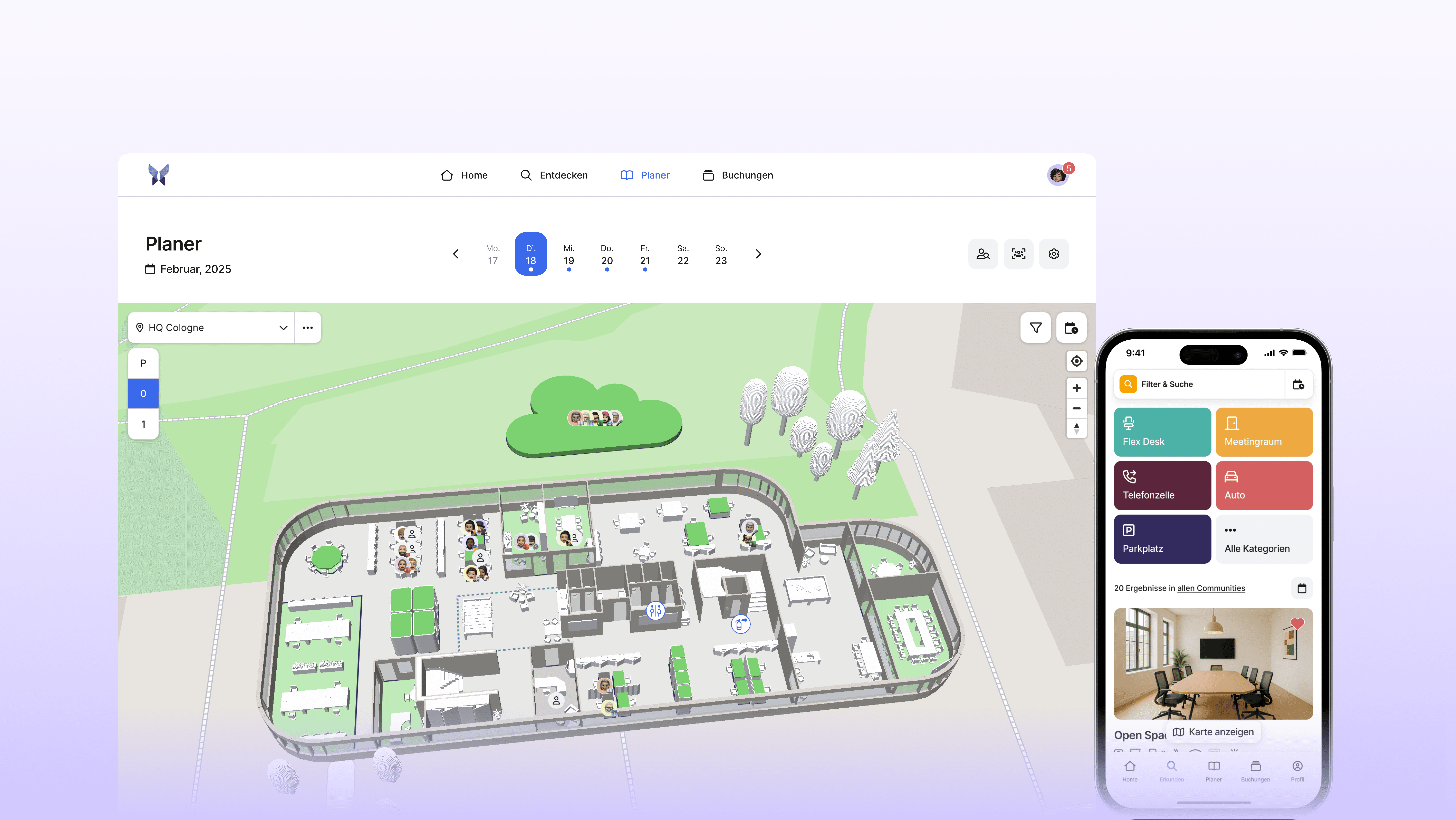
Book workspaces and rooms in advance
With anny, employees can easily reserve desks, team zones, meeting rooms, or parking spaces for specific days via the app, MS Teams, or their browser. A 3D floor plan visualizes the office, helping users find their desired workspace in no time.
Why you'll love it:
Teams can see in advance who will be in the office on any given day
Double bookings are completely avoided
Planning security is significantly increased
On-site check-in: Turning bookings into confirmed attendance
The key difference from basic booking tools: a reservation only becomes a confirmed attendance upon check-in. This is done in seconds via a QR code at the desk, a link in the email, or directly in the app.
Optionally, companies can enable an automatic no-show release: if a user hasn't checked in after 15 or 30 minutes, the booking is automatically canceled, freeing up the space for others.
Real-time transparency
Team leads and office managers can see at a glance in anny:
Who is currently working at which location?
What is the occupancy rate of each floor?
Which rooms are free and which are occupied?
This transparency makes spontaneous planning a breeze.
Occupancy data for smarter decisions
Over time, you'll build a reliable database of insights:
Most popular days: Wednesday 65% occupancy, Friday only 20%
Peak times: Busier mornings compared to afternoons
Top rooms: Which meeting rooms are always fully booked?
Unused spaces: Which areas could be repurposed?
These insights guide space planning, rental decisions, and the design of team days. This way, companies can optimize their space and save money.
Data protection and hosting in Germany
anny is fully GDPR-compliant and ISO 27001 certified. All data is hosted securely in Germany. Attendance data is subject to clear role-based access control: who is allowed to see what information is fully configurable. Deletion concepts and anonymization rules are technically supported.
For employees, this means full transparency regarding what data is collected, without any feeling of being monitored.
Easy onboarding without training
The interface of anny is intuitively designed. High adoption rates prove that there's no need for time-consuming training. The software integrates seamlessly with existing calendars like Outlook or Google Calendar, as well as collaboration tools like MS Teams.
Companies can start small—for example, with desk booking for just one team—and expand later to visitor management, events, equipment booking, or parking management.
Test it now or schedule a demo
Getting started is super easy:
Start for free: Run a quick test with your own team for 14 days
Book a demo: Get a personal consultation to clarify your custom requirements
If you want to compare different desk sharing providers, check out our best-of article.
Best Practices: Successfully Implementing Attendance Tracking in a Hybrid Setup
The best software fails if implementation and communication are not right. Therefore, here are some proven tips for the rollout.
Transparency about goals instead of control narrative
Clearly communicate why presence is being tracked:
Better team planning and collaboration days
More efficient use of office space
Safety in case of evacuation
And what the goal is not:
Minute control of working hours
Performance monitoring
Punishment for absences
When communication is open, acceptance is significantly higher.
Start with a pilot area
Do not start with the entire company. Select a team, a location, or a floor for a pilot test:
Test period: 6–8 weeks
Clear communication: Start date, goals, contact persons
Plan for feedback: What works, what doesn't?
After a successful pilot, follow with a gradual rollout.
Define team days, but keep them flexible
Define 1–2 preferred office days per team. But allow for exceptions:
Travel
Care work
Project peaks
Personal appointments
Rigid presence obligations lead to frustration. Flexible recommendations promote self-responsibility.
Regularly analyze data
Actively use the attendance data:
Evaluation | Possible decision |
|---|---|
Friday only 15% occupied | Establish Friday as a preferred remote day |
Floor 3 permanently empty | Reduce or repurpose space |
Meeting rooms overloaded | Create additional booking options |
Monthly or quarterly reviews lay the foundation for strategic decisions.
Establish feedback loops
After 4–6 weeks: Collect structured feedback.
Short survey (5 questions, 2 minutes)
Retro meeting in the team
Open office hours for questions
Adjust the settings in anny – such as check-in rules, booking windows, or notifications.
Simplify integration into everyday life
The less additional effort, the higher the usage:
Calendar linking: Bookings automatically appear in Outlook
Reminder emails: Check-in reminders in the morning
Internal how-to guides: Short guide with screenshots
Conclusion: Hybrid work requires a clear answer to "Who is here today?"
Hybrid work is here to stay. The way we work has fundamentally changed, bringing new challenges in effectively bringing teams together. Without reliable presence detection, team days and office space planning are left to chance.
The core message of this guide: The combination of booking (planning) and check-in (confirmation) provides the necessary data foundation for teams, HR, and office management. No gut feeling, no outdated Excel spreadsheets – but reliable information in real-time.
Where is the topic heading?
Some trends are emerging:
Further automation: Integration with access systems and smart locks
Finer control: Optimize collaboration days based on real usage data
AI predictions: Recognizing attendance patterns and providing recommendations
anny as a pragmatic solution
anny integrates into existing tool landscapes – calendars, HRIS, SSO. The platform scales from SMEs to large organizations. Whether it’s desks, rooms, parking spaces, or visitor management: A way to centrally manage all bookable resources.
Your next step
Do you want to end the chaos and finally know who is in the office and when? Then schedule an obligation-free demo with anny and get personal advice.
FAQ on Attendance Tracking in Hybrid Work
Does presence tracking with anny replace traditional time tracking?
No, anny records the workplace and office presence, not the precise working hours. Time tracking usually meets legal requirements under labor law and documents working hours. Presence tracking, on the other hand, supports planning, space utilization, and security. Both systems can run in parallel and complement each other.
How do we prevent presence tracking from being perceived as a control instrument?
Communication is crucial. Emphasize the benefits for employees before the rollout: better planning, increased team cohesion, less chaos in the office. Involve employees and the works council early and establish usage rules together, such as what evaluations are possible and who has access. Deliberately avoid performance metrics based on physical presence and communicate this in writing. This builds trust instead of a feeling of surveillance.
Can anny accommodate multiple locations and remote work simultaneously?
Yes, anny is designed for organizations with multiple locations, floors, and zones. Co-working spaces and satellite offices can also be mapped. Bookings can be filtered by location to allow teams to plan office days together at specific places. Remote days can also be displayed, such as by booking from home office. This provides an overview of the working methods of all team members.
How complex is the technical implementation of anny?
The implementation of anny is not complex and typically takes only a few days. You can find a detailed overview here.
Typical steps in implementation include setting up locations and resources, configuring SSO and calendar integrations. Most businesses get a pilot area live within a few days. For larger rollouts, anny supports with onboarding and best practices—without lengthy implementation projects.






