

February 6, 2026
Desk Booking Software for Hybrid Work Models: How to Organize Your Office Chaos
8 min.

Key Insights
The coordination problem in hybrid offices is real: Employees can't find a free workspace, desks are empty some days while other days see bottlenecks, and teams miss each other regularly. A good desk booking solution can help here, but only if it suits your work model and is consistently used.
Desk booking software is the control center for hybrid work models – it shows you at any time who is in the office and which workspace is available.
A good solution helps you avoid vacancies and bottlenecks and allows you to optimize your office spaces based on data (typical savings potentials are around 20–30% area reduction in hybrid models).
anny offers you a GDPR-compliant desk booking platform, hosted in Germany, specifically developed for hybrid teams – including desk, room, and parking booking.
Successful implementation depends less on technology than on change management – you need clear rules, good communication, and simple processes.
Desk booking software is the foundation for the next stage of evolution in hybrid working: AI-supported space recommendations, flexible area concepts, and more sustainable office planning.
Why Hybrid Work Models Quickly Descend into Chaos Without Desk Booking
Tuesday morning, 9 o'clock, official "Team Office Day." You set out extra early because you wanted to work on a project in person with your colleagues again. But when you arrive, all the spots near your team are taken—by employees from other departments who happened to choose the same day. A colleague stands confused with a laptop in hand, another has dejectedly retreated to the home office. Welcome to the hybrid office chaos.
The opposite scenario is equally problematic: on other days, 60% of the workspaces remain empty. Office spaces cost the same but go unused. And you? You drove to the office alone because you thought today was project day, but your team is working from home. You could have saved yourself the 45-minute commute.
Since 2020, work models have fundamentally changed. The return from purely home office environments led to 3-2 models, completely flexible presence regulations, and numerous hybrid forms. Many companies have realized that Excel sheets, Outlook calendars, and chat arrangements no longer suffice for this complexity. The constant inquiries to HR and Office Management ("Who will be in the office tomorrow?", "Where can I sit?", "Are there any free meeting rooms?") consume time and energy.
Especially HR, Facility Management, and leadership struggle with coordination efforts. There is a lack of clear utilization figures for space planning, the employee satisfaction suffers from the constant searching and improvising, and team collaboration becomes a matter of luck.
The good news: there is a solution. Desk Booking Software makes hybrid work models manageable, fair, and transparent—without sacrificing the flexibility everyone desires.
What is Desk Booking Software and why is it essential for hybrid work models?
Desk Booking Software is a digital platform that enables employees to reserve desks, rooms, parking spaces, and other resources for specific time periods. Instead of arriving at the office in the morning hoping that a spot is available, you book your workspace in advance - via a web interface or app.
This fundamentally differs from traditional office organization. Previously, each employee had a permanent desk with personal photos and their own coffee mug. Today, many companies practice desk sharing, activity-based working, or flexible attendance days. The old model approach simply hasn't worked in many organizations since around 2021 because not everyone is in the office at the same time, and permanent spaces would mean massive vacancies.
Core functions of desk booking software include:
Booking workspaces (daily and hourly)
Overview of who is in the office and when
Intuitive floor plans and layouts
Rules for specific areas (e.g., focus zones, team areas, quiet zones)
Booking meeting rooms and other resources
The connection to hybrid working models is obvious: Whether it's the 3-2 rule (three days in the office, two at home), "office-first" or "remote-first," team-based attendance days, or completely flexible models – desk booking software significantly simplifies planning and communication.
Why Desk Booking Software is Essential for Hybrid Teams
Organic growth of hybrid working models eventually reaches its limits. As long as only a few people occasionally come to the office, coordination via chat works. With 50 or 100 employees with changing office days, you need systems that enable transparency, fairness, and cost control.
Benefits of Desk Booking Software
Transparency and Planning: A central overview (e.g., a weekly calendar with attendances) allows teams to plan joint office days. You can see at a glance when your colleagues are in the office, and you can manage impromptu visits effectively. Knowing who is there and when makes the difference between productive collaboration and a wasted trip.
Space Optimization: Booking and occupancy data help you make informed decisions. Perhaps you can sublet a floor, repurpose areas, or create more collaboration spaces. Typical cost savings from intelligent space utilization are between 20-30% – significant savings on rent, energy, and cleaning expenses.
Improved Team Collaboration: Teams can see via the software when team members are present and can strategically block joint office days. A product team, for example, books the same zone every Wednesday for on-site workshops. The HR team reserves Friday afternoons for personal meetings. Team coordination transforms from chance encounters to well-planned events.
Employee Experience and Fairness: Clear booking rules (e.g., lead times, no-show rules, role-based priorities) ensure fairness. The constant feeling of "everything is always occupied" disappears because everyone plays by the same rules. This increases employee satisfaction and reduces everyday frustration at work.
Compliance & Safety: Regulated industries (e.g., public administration, education, healthcare) require proof of presence and area usage. Desk Booking significantly simplifies this documentation and ensures legal security.
Essential Features of a Desk Booking Software for Hybrid Work Models
Not every desk booking solution is created equal. As a decision-maker, you should focus on features that hybrid teams actually use, rather than just feature lists that look impressive but play no role in daily work life.
Intuitive booking interface (Web + mobile app)
Interactive 3D floor plans
Team and attendance overview
Meeting room and resource booking
Mobile use & self-service
Integrations (Microsoft 365, MS Teams, Google Workspace, HRIS systems)
Analytics & reports on utilization and no-show rates
Roles, rules & permissions
Data protection & security (GDPR compliance, hosting in Germany/EU)
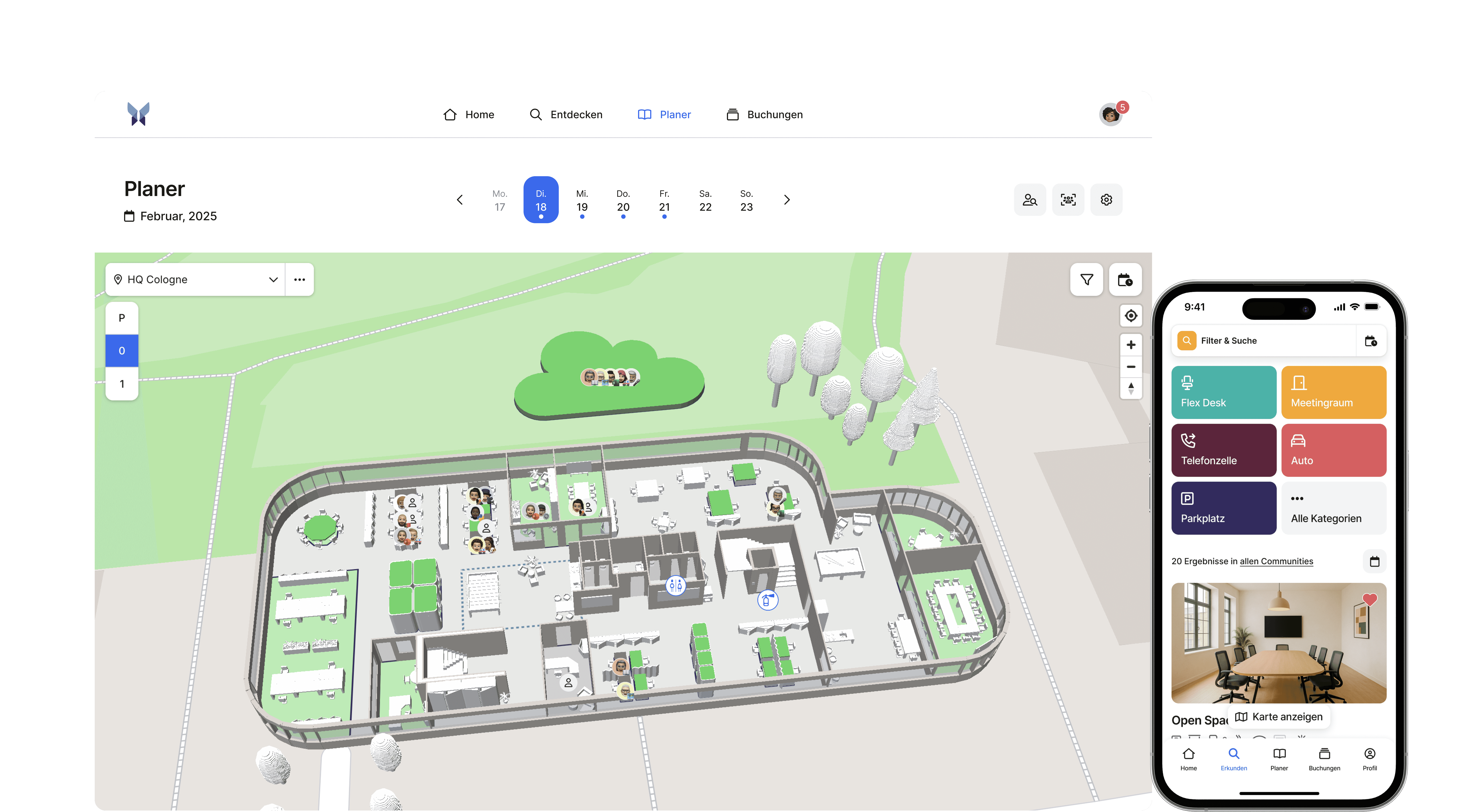
In practice, the best solutions combine these features to make a real difference in daily operations. At anny, we have taken exactly this approach – our platform combines desk booking, room booking, and parking space management into a single interface that your employees will actually love to use. For example, our Microsoft Teams integration means nobody has to open a separate app. Your team can see right within Teams who is in the office and when, and book their workspace in just two clicks. The interactive floor plans allow you to see at a glance where spots are still available. On top of that, anny is fully developed and hosted in Germany, meaning you meet all GDPR requirements without any extra compliance hassle.
For a comprehensive comparison of providers, take a look here.
Introducing Desk Booking Software: How to Successfully Transition
Technology is only half the battle. The success of your desk booking implementation depends on how well you engage employees and clarify processes.
Steps to a Successful Implementation:
Define Goals (e.g., office space reduction, better usage data, employee satisfaction)
Involve Stakeholders (HR, IT, Facility Management, Works Council, Data Protection)
Establish Guidelines for hybrid work (booking lead time, no-show policies, team days)
Conduct a Pilot Phase (gather feedback, optimize rules)
Communication & Training (kick-off, tutorials, FAQ, support channels)
Prepare Technical Integration (SSO, calendar, user management)
Continuous Improvement (data analysis, feedback, adjustments)
Measurable Benefits & ROI: How Desk Booking Software Pays Off
Investments in hybrid work software are often critically questioned—especially because, at first glance, they don't appear to be directly linked to revenue. However, in practice, the effects are quickly noticeable and measurable. The key benefits are less about individual features and more about the synergy of transparency, controllability, and user experience.
Space and cost savings (typically 20–30%)
Transparent booking and occupancy data allow for realistic office space planning. Companies can identify which areas are regularly used and where capacities remain unused. This enables them to reduce spaces, reallocate flexibly, or manage future rentals more strategically—resulting in direct effects on rental and operational costs.
Better utilization of existing spaces
Hybrid work software ensures that existing resources are effectively distributed. Workstations, meeting rooms, or special areas are visible, plannable, and can be booked as needed. Instead of vacancies or overbookings, there is a more balanced utilization reflecting the actual workday better.
Increase in productivity and satisfaction
When employees know they can book exactly the work environment they need for their tasks, friction in everyday life decreases. Less uncertainty, fewer coordination loops, and clearly defined processes positively affect focus, collaboration, and satisfaction—especially in hybrid teams.
Informed management decisions through data
Usage data replaces gut feeling. Leaders and workplace teams receive reliable information on occupancy, demand, and usage patterns. These data form the basis for strategic decisions—such as in space planning, location development, or the introduction of new workplace concepts.
Employer branding & recruiting through modern workplace concepts
Flexible, digitally organized work models have long been a competitive advantage in recruiting. A professional hybrid work infrastructure signals modernity, trust, and employee orientation. Especially for younger target groups and specialists with high expectations for flexibility, the workplace becomes an active part of the employer brand.
The Future of Hybrid Work: The Role of Desk Booking Software
Hybrid working is not a transitional model, but a permanent one. Desk booking software is becoming the foundation of the modern working world.
Future Trends
AI-driven workspace recommendations
Stronger integration into the digital ecosystem
Sustainability & ESG through optimized space utilization
Flexible office concepts with modular spaces
Employee-centric workspace design based on usage data
Conclusion & Next Steps
Hybrid work models can quickly lead to chaos without structure. Desk booking software provides transparency, fairness, and efficiency. The greatest leverage doesn't lie in the technology, but in clear rules and consistent use by all team members.
Our recommendation: Start with clearly defined goals and a pilot phase, gather experiences, optimize rules, and then scale.
A solution like anny is specifically developed for hybrid work models, uniting all essential features on one platform, completely GDPR-compliant and hosted in Germany.
Your next step: Test anny for free or schedule a demo to discuss use cases, integrations, and your rollout plan.
Well-organized hybrid work models are a competitive advantage – now is the best time to get started.
Frequently Asked Questions About Desk Booking Software for Hybrid Teams
What is the cost of desk booking software?
The cost of desk booking software varies depending on the provider and the range of features. Most solutions operate on a monthly or annual subscription model, where you pay per user or per workspace. The price range is typically between 2 and 8 euros per user per month. The more users, the cheaper it often becomes per person. Many providers offer tiered pricing, where larger companies benefit from volume discounts. It's important not just to look at the price but also at which features are included. Some providers charge extra for analytics, integrations, or premium support. Other solutions, like anny, offer transparent all-in prices, where all important features are already included. Calculate how much you can save through optimized office space – oftentimes, the software pays for itself within a few months.
How long does it take to implement desk booking software?
The good news: Implementing modern desk booking software is usually quick. Technically, you can set up most solutions within a few hours or days. You upload the floor plans of your office spaces, mark the bookable workplaces and rooms, possibly set booking rules, and integrate the software into your existing tools like Microsoft 365 or Google Workspace. That's it for the technical side. The real challenge lies in change management. You should plan for about two to four weeks to introduce, train, and familiarize your employees with the new solution. A pilot project with a department or team has proven helpful before rolling out the software throughout the company. This way, you can gather feedback, adjust processes, and convince skeptics through positive experiences. In total, you should plan for about four to eight weeks for a complete implementation, including rollout and acclimatization phase.
Do we need desk booking also for small teams?
This question strongly depends on your specific situation. Generally, once more employees can potentially come to the office than there are workstations available, desk booking makes sense. In very small teams of five to ten people, where everyone has a fixed seating arrangement and rarely works remotely, you probably don’t need software. However, once your team works hybrid and flexibility is important, you benefit even in smaller team sizes. Imagine there are ten of you, and everyone comes to the office on different days. Without desk booking, you probably coordinate this via WhatsApp groups or Excel sheets – which works but is inefficient. With desk booking software, you know at a glance who is there when and can plan your office days to collaborate with the right colleagues. Also, if your team grows, you have already established the structure. Many modern solutions also offer affordable starter packs for smaller teams, making the investment worthwhile.
How do I ensure all employees actually use the software?
Employee acceptance is indeed the critical success factor. From experience, we know: The software can be great – if your team doesn't use it, it's pointless. Therefore, you should focus on three things from the start. First: Communication. Explain not only HOW the software works, but especially WHY you are introducing it. What problem does it solve? What personal benefits do the employees gain? Second: Simplicity. Choose software that is truly intuitive. If booking a workplace is more complicated than sending a WhatsApp message, it will be difficult. The best solutions can be understood and operated in under a minute. Third: Role models. Leaders and managers should lead by example and consistently use the software. Additionally, it helps to integrate the software into existing workflows – for example, by integrating it into Microsoft Teams or Slack, so employees don’t have to open a new app. And very important: Regularly gather feedback and adjust processes. If employees see that their feedback is taken seriously, acceptance increases enormously.
Can we use desk booking software for meeting rooms?
Absolutely, and that is even one of the great advantages of modern desk booking solutions. Most systems allow you not only to book workstations but also meeting rooms, phone booths, project spaces, or even parking spaces. This makes sense because in a hybrid work model you need flexibility on all levels. Imagine booking your workstation for Tuesday and simultaneously seeing that your team is also in the office that day. Then you can book a suitable meeting room for your team meeting. Many solutions also offer advanced features for room bookings, like integration with Outlook or Google Calendar, so meeting room bookings automatically appear in the calendar. Some systems even show the equipment of the rooms – whether a projector is available, how many people can fit, or if the room is equipped for hybrid meetings with video conferencing equipment. This saves time and prevents double bookings or employees standing in front of closed doors.
What happens to our data? Is desk booking GDPR-compliant?
Data protection is a completely legitimate topic with desk booking software, and you should look closely here. The good news: Serious providers from the EU area are GDPR-compliant and take data protection very seriously. When choosing a solution, you should ensure that the provider is based in Europe or at least uses servers in the EU. The software usually only stores the necessary data: who booked which workplace when. Personal data like names are necessary to ensure functionality, but no sensitive information is collected. It's important that you, as a company, communicate transparently with your employees about what data is collected and for what purpose. Some employees may be concerned about being monitored through desk booking. You can counteract this by clearly stating: it’s not about control, but about organization and transparency. Most modern solutions also offer anonymization features for analytics – you can see how many workstations are used without tracking individual employees. Ask your provider for a Data Processing Agreement and have your legal department or data protection officer take a look at it.
What integrations with existing tools are possible?
Modern desk booking software should seamlessly integrate into your existing IT landscape. The most important integrations are Microsoft 365 and Google Workspace. With these, you can use Single Sign-On – your employees don’t have to log in separately but use their familiar credentials. Additionally, the desk booking software often synchronizes with Outlook or Google Calendar, so booked workstations automatically appear in the calendar. Integration into collaboration tools like Microsoft Teams or Slack is also extremely valuable. Employees can directly see from Teams who is in the office and book their workplace without switching apps. Some solutions offer APIs, allowing you to build your own integrations – for instance, with your HR system or building management. If you already use an access control system, access permissions can often be synchronized as well. When selecting your desk booking software, you should carefully check which integrations are natively supported and how easy the setup is. Good software comes with pre-built connectors and offers support during integration.
How do we measure the success of desk booking software?
To measure the success of your desk booking software, you should set clear KPIs in advance. The most obvious metrics are usage data: how many employees actively book workstations? What is the average office occupancy? Are all available spaces used, or are there areas that remain permanently empty? This data helps you optimize your office space and possibly save costs. If, for example, you find that only sixty percent of the workstations are used on average, you can consider reducing the office space. But success isn’t measured only in hard numbers. Conduct regular employee surveys: Has coordination with the team become easier? Does the software reduce frustration in everyday work? Do employees feel better informed about who is in the office when? The time-to-value is also an important factor: how long did it take before the software was used productively? The faster your team works with it, the better. Many desk booking solutions offer integrated analytics dashboards that automatically compile these metrics for you. Use this data not just once, but establish regular reporting – so you can see trends and constantly optimize.






