

Amira van Weegen
Junior Marketing Manager
September 15, 2025
Desk Sharing Software without lengthy onboarding
2 min

Why Easy and Quick-to-Implement Desk Sharing Software is Essential
The introduction of new desk-sharing software without lengthy training can significantly relieve companies. In the era of New Work and hybrid work models, it is important to choose a solution that is quickly operational and reduces administrative effort.
Modern desk sharing tools go far beyond merely providing workspaces. They enable flexible booking of desks, meeting rooms, and additional resources such as parking spaces or equipment. At the same time, they support employees' needs and improve team collaboration. An intuitive interface and seamless integration with familiar tools like Microsoft Teams, Outlook, Google Calendar, and other applications are crucial.
Why Lengthy Implementation Times for Desk Sharing Software Are Problematic
Traditional desk sharing software often hits its limits when it comes to quick implementation and easy use. The average implementation time for conventional desk sharing systems is often between 4 and 8 weeks, during which the availability of desks and meeting rooms is not optimally utilized.
Typical challenges during implementation:
Extensive training for users and support teams
Complex customization of the software to specific company departments
High IT effort for integration into existing systems like Google Calendar, Microsoft Teams, or email platforms
Involvement of external consultants and change management processes, which incur additional costs
Low user acceptance due to overloaded user interfaces and complicated booking functions
These delays directly affect office productivity. During the implementation phase, employees cannot reserve their spots, rooms go unused, and office space utilization stagnates. Additionally, costs arise from inefficient space utilization and the time spent on training and support.
Low user acceptance further exacerbates the problem. If a desk sharing booking system is too complex or requires too many clicks for a simple booking, users resort to informal solutions or abandon the use altogether. This leads to incomplete data on utilization, complicating data-driven optimization of office space.
How to Successfully Deliver a Quick Introduction
A swift introduction of desk sharing software requires a structured approach that reduces complexity and quickly onboards users. The following factors play an important role:
Realistic Timelines
The duration of the implementation largely depends on the company size, the number of locations, and the data quality. Realistic timelines are:
Up to 50 workstations: up to 1 week
50-500 workstations: 1-3 weeks
More than 500 workstations: 2-4 weeks
The success of a rapid introduction mainly depends on the data and planning quality on the client's side; the better they are prepared, the smoother and faster the implementation will proceed.
Best Practices for a Quick Rollout
Automated Basic Configuration: Systems that can adapt to the company structure reduce setup effort.
Simple Office Layouts: Drag-and-drop tools for uploading and assigning workstations, desks, and meeting rooms simplify the setup.
Seamless Integration: Automatic links with tools like Microsoft Teams, Google Calendar, and other applications without manual IT configuration.
Well-prepared Data: Complete layouts and resource details enable a smooth start and shorten implementation time.
Intuitive User Interface: A smartphone-like operation with few clicks promotes acceptance and makes workspace booking easier.
Clear Communication: Employees understand the benefits better when the introduction and advantages are explained transparently.
Gradual Rollout: Introducing in phases to minimize risks and showcase user achievements.
Benefits of a Quick Solution
A desk sharing software that is ready for use without lengthy onboarding offers numerous advantages for businesses:
Quick ROI: Cost savings from optimized office space and workspace utilization can be realized from the very first day of use.
High User Acceptance: Intuitive systems with clear booking functions and check-ins increase regular usage and provide reliable data on occupancy.
Reduced IT Effort: Less effort for installation, training, and support saves resources and enables quick availability.
Flexibility: Employees can easily and quickly book workspaces, meeting rooms, parking spaces, and other resources via desktop or mobile devices.
Transparency: Real-time dashboards and live overviews give a clear view of office occupancy and support data-driven decisions.
Example: anny as a fast desk sharing solution
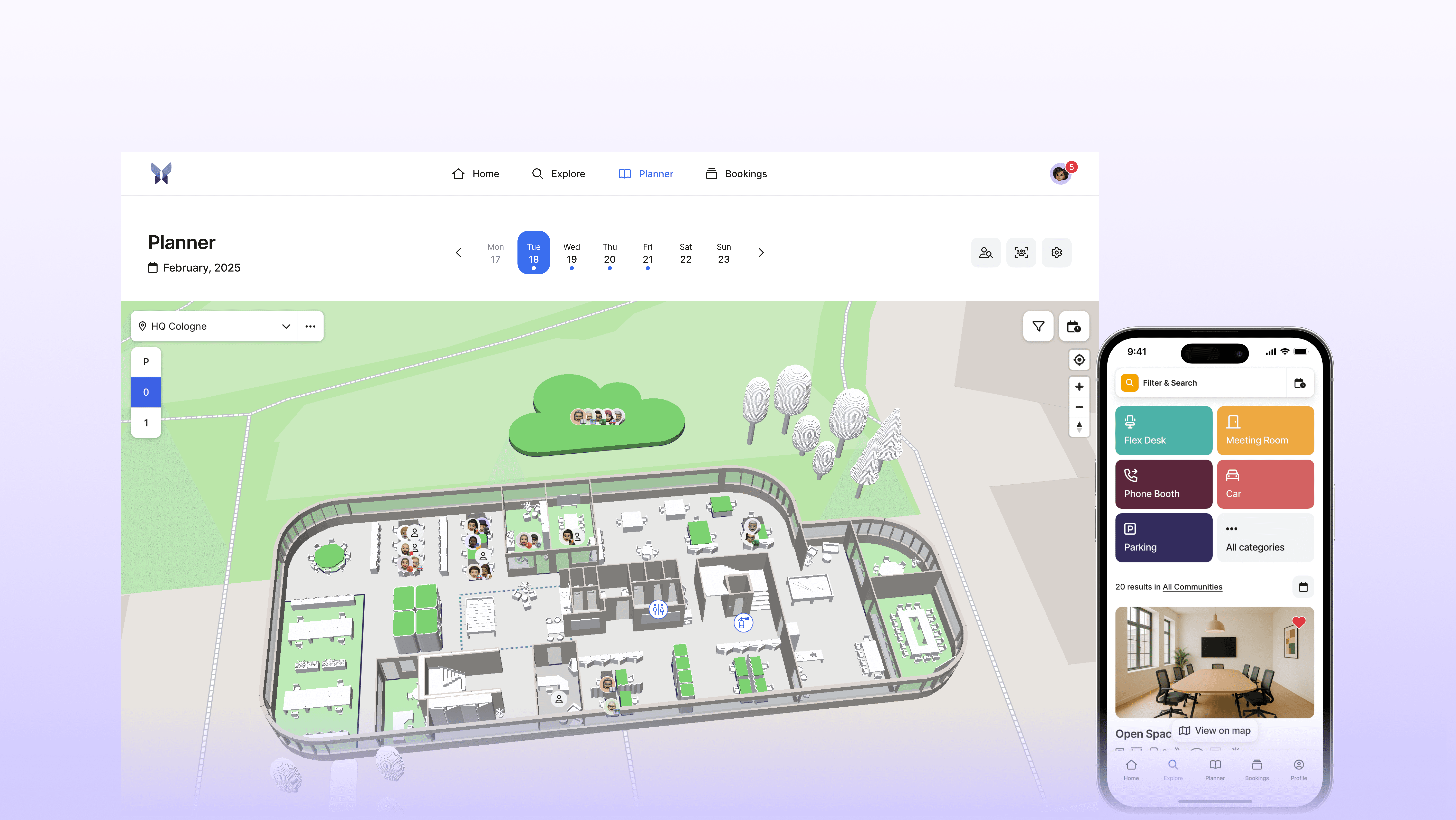
An example of a desk-sharing software that combines quick implementation and easy operation is anny. Many companies rely on anny because the platform is ready to use within a few days without complex IT integration and is instantly understood by the staff.
The implementation follows realistic timeframes and mainly depends on the size of the company. After uploading the floor plans, the team takes over the processing and creates the digital 3D plans. Workspaces, conference rooms, and parking spaces are optimally set up and are then available for booking. Employees can book directly in the browser or use the seamless integration with Microsoft Outlook, Teams, and other familiar tools.
anny is fully GDPR-compliant, developed in Germany, and specifically tailored to the requirements of the European market. This supports companies in optimally utilizing office space, simplifying processes, and significantly improving collaboration in a hybrid work environment.
If you're looking for a desk sharing tool that is ready to go without long introductions, try anny for free or schedule a non-binding demo.
In the following demo video, you'll get a direct insight into how easy anny works and how quickly you can start with the software.





" height="38px" id="bH388uk2E" transform="translate(1 1)" width="118.00000395534607px"/></svg>)