

Amira van Weegen
Junior Marketing Manager
September 8, 2025
Avoid double bookings in meeting rooms: A common issue in companies
3 min.

Introduction
Imagine standing in front of the meeting room only to find it already occupied, even though you booked it for this exact time. Many office employees are all too familiar with this frustration. Double bookings for meeting rooms are a common issue that not only costs time and patience but also significantly impacts productivity.
In large companies with many employees, room conflicts occur regularly: meetings overlap, rooms are double-booked, or remain empty despite being reserved. Digital booking systems provide a remedy here. They significantly reduce double bookings, offer better oversight, and simultaneously increase actual room utilization. Below, you'll discover the typical causes behind these conflicts and how modern solutions help to solve the problem sustainably.
Causes of Double Bookings in Meeting Rooms
The most common reasons for double bookings are outdated and uncoordinated processes. Here's an overview of the main causes:
Missing central management: Different teams use varying booking methods
Parallel booking systems: Email bookings, Excel lists, and wall calendars coexist
Manual processes: Phone calls to the reception lead to misunderstandings and overlaps
Outdated technologies: Analog calendars cannot be synchronized in real time
Unclear responsibilities: No one has an overview of all bookings
Problems from uncoordinated email bookings arise particularly often when employees reserve rooms directly via email without these bookings being recorded in a central system. Excel lists are often stored locally and not updated in time, leading to conflicts.
The costs and time loss due to double bookings are significant. In a company with 200 employees, room booking conflicts typically result in:
15 hours of time lost per week due to room searches and rebookings
Productivity loss about €3,500 monthly due to interrupted workflows
Increased frustration among 68% of employees according to internal surveys
Cause | Impact | Frequency |
|---|---|---|
Missing central management | 45% of all double bookings | Daily |
Email bookings | No real-time availability | Weekly |
Manual coordination | Communication errors | 2-3 times per week |
Outdated systems | Synchronization problems | Monthly |
Unclear processes | Chaos in room allocation | Continuously |
The impact on employee satisfaction and productivity is significant. This lost time is missing for actual work and leads to delayed projects and decisions.
Modern Solutions to Avoid Double Bookings: How Software Can Help
Digital booking systems offer an effective way to avoid double bookings of meeting rooms. They ensure transparency, centralized management, and real-time synchronization of all room reservations. Key features of modern systems include:
Real-time synchronization: Automatic matching with calendars like Microsoft 365 and Google Workspace prevents overlaps. Bookings are instantly updated in all connected systems.
Central booking platform: All meeting rooms at all locations are managed in a single overview. The online portal provides employees and admins with an easy way to check and book available rooms and resources, whether from the office desk or on the go via the browser.
Intelligent booking rules: The system automatically checks availability before each booking and suggests alternative times or rooms if necessary. It also takes into account room capacity, equipment, and individual requirements such as catering or technical services.
Visual overviews: Interactive maps and room displays show the real-time status of meeting rooms, allowing employees to quickly find available rooms and book them directly on-site. This optimizes office space usage and encourages collaboration.
Automatic release: Unused rooms are automatically released after a defined period to avoid phantom bookings and increase room utilization. This improves the flexibility of room planning and enhances efficiency.
Access control: Different permissions for teams and departments prevent unauthorized bookings and ensure a clear organizational structure.
Check-in systems: Confirmation of room use via mobile apps or on-site displays ensures that rooms are indeed used and releases them when not in use.
Integration: Modern room booking systems seamlessly integrate into existing Office 365 environments and other calendar and planning tools, increasing acceptance among employees and facilitating the organization of meetings.
How anny prevents double bookings as an intelligent solution
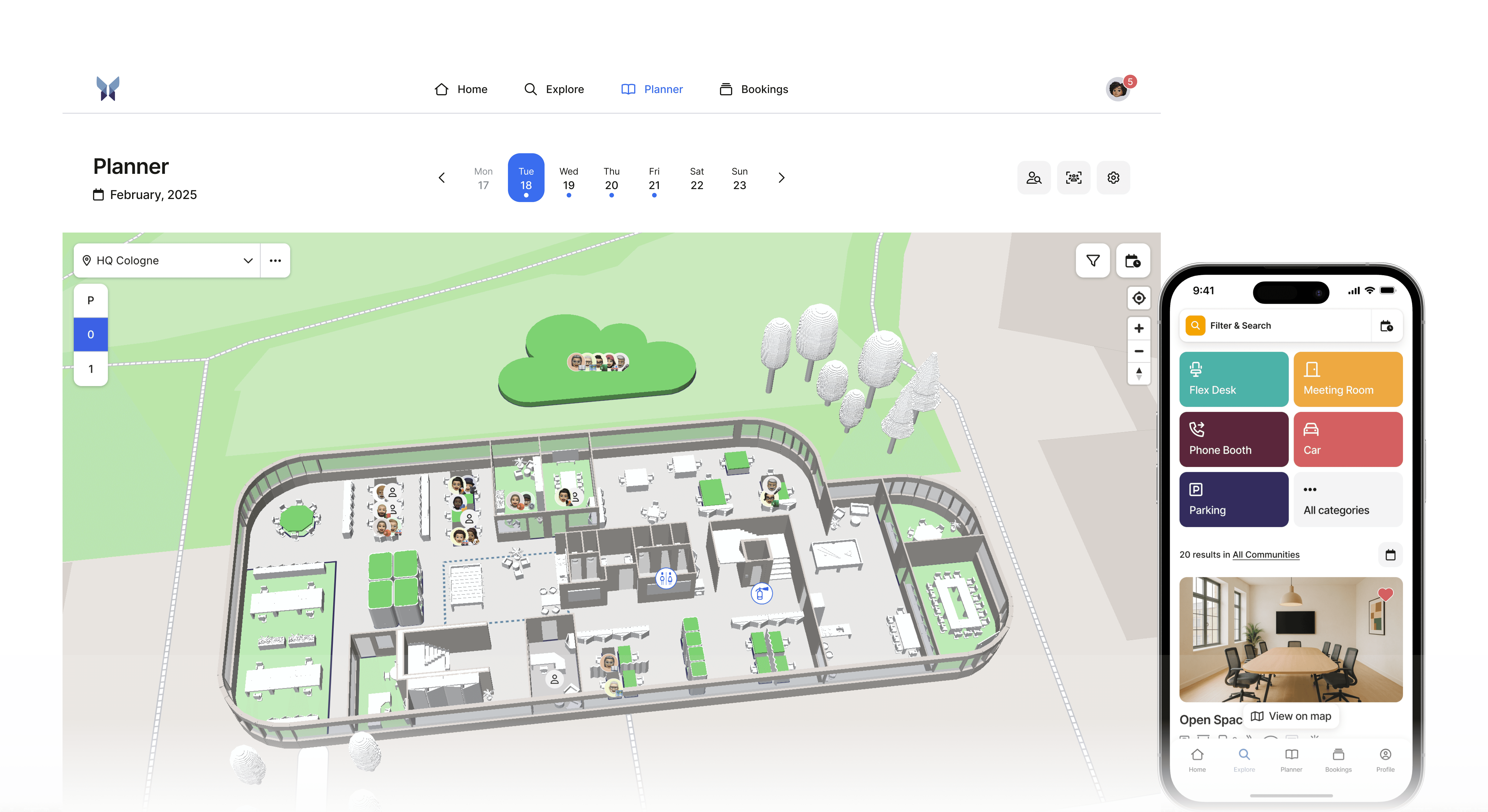
anny offers the features described above and effectively helps to avoid double bookings of meeting rooms. Over 1,000 companies, including DeepL, Metro, and Volksbank, already trust anny to solve this problem sustainably.
The software integrates seamlessly with Microsoft Teams and Outlook, ensuring automatic prevention of room conflicts. With real-time availability, intelligent booking rules, and an interactive 3D map, employees always have an overview of all meeting rooms - regardless of the location.
Additional features of anny include:
Digital signage with on-site room displays
Automatic release of unused rooms
Group-based access control
Mobile app for bookings on the go
GDPR-compliant operation with German support
By using anny, companies reduce double bookings to nearly zero, increase room utilization, and significantly boost employee satisfaction. The investment quickly pays off through time savings and productivity gains.
Would you like to see for yourself? Then book your demo today and experience how anny makes your office life instantly easier.





" height="38px" id="bH388uk2E" transform="translate(1 1)" width="118.00000395534607px"/></svg>)