

Amira van Weegen
Junior Marketing Manager
September 12, 2025
Simple Desk Sharing Tool: Discover the Perfect Solution for Your Office
6 min

What is a simple desk sharing tool and why do you need it?
A simple desk sharing tool is a user-friendly software that helps you to book and manage workspaces in the office flexibly. In this guide, you will learn what makes a simple desk sharing tool essential, why it is important, and how to use it successfully.
In this article, you will get a complete overview of: definitions and core concepts, a step-by-step guide to implementation, key features, which providers offer a suitable solution, and answers to the most frequently asked questions about desk sharing software.
Understanding Simple Desk Sharing Tool: Key Concepts and Definitions
Basic Definitions
A simple desk sharing tool is software that allows employees to book and use workspaces flexibly without being assigned permanent desks. Unlike complex enterprise solutions, simple tools focus on essential functions: booking, managing, and overviewing available workspaces.
Key terms at a glance:
Desk Sharing: Flexible use of workspaces without fixed allocation
Hot Desking: Spontaneous choice of workspace on a first-come, first-served basis
Workspace Booking: Reservation of desks via an app or platform
Desk Booking: English term for workspace booking
Booking System: The software solution for managing reservations
Pro Tip: First understand the “What” before you focus on the “How.” A simple desk sharing tool differs from complex systems by offering fewer features that excel in performance.
Concept Relationships
Simple desk sharing tools are closely linked to modern work models. Here are the key connections:
Desk Sharing → Cost Savings → Increased Office Efficiency
Remote Work → Hybrid Work Models → Flexible Space Requirements
New Work → Workplace Management → Digital Booking Systems
These tools play a central role in today's work environment, helping companies optimize office space usage and provide maximum flexibility to employees.
Why a Simple Desk Sharing Tool is Important in Modern Offices
A study by Jones Lang LaSalle shows that companies can reduce their office costs by up to 30% when they switch from fixed workspaces to a desk sharing model. This figure highlights why more and more organizations are adopting modern desk sharing software.
The main advantages at a glance:
Reduce empty desks: In traditional offices, 40-60% of workspaces often go unused because many employees work from home, are on the go, or attend external appointments.
Increase flexibility: Companies cite flexibility as the main reason for implementing desk sharing systems, as it allows for better organization of hybrid work and easier consideration of employee needs.
Increase office utilization: With professional booking software, utilization can significantly increase because workspaces are more transparently allocated and used more efficiently.
Special advantages of simple solutions:
Faster implementation: Tools like anny can be put into productive use within a few days.
High user acceptance: Employees book their workspaces with just a few clicks.
Clear management: Administrators manage everything conveniently via a dashboard.
Lower costs: Compared to complex systems, companies not only save time but also budget.
While complex systems often take weeks or months for implementation, companies can start with a simple desk sharing tool like anny in a short time and immediately benefit from greater efficiency and better space utilization.
Criteria for an Easy Desk Sharing Tool
When selecting a simple desk sharing tool, there are several key criteria you should consider to ensure that the solution is a perfect fit for your company and the needs of your employees. Here are the essential points:
1. User-Friendliness
The tool should offer an intuitive user interface that is easily understandable even for less tech-savvy users. Clear navigation and simple booking processes are crucial so that employees can reserve their workspaces quickly and without any training effort.
2. Mobile App and Multi-Device Support
Since employees often work flexibly and on the go, a desk sharing app for smartphones and tablets is essential. Likewise, the software should be accessible on desktop computers to allow easy search and booking of workspaces from any device.
3. Real-Time Availability and Interactive Floor Plans
A simple desk sharing tool should display the availability of workspaces in real-time. Interactive floor plans or maps help users find available spots that meet their preferences, such as by a window or close to colleagues.
4. Integration with Existing Systems
The capability to connect the desk sharing booking system with already used calendars (e.g., Outlook, Google Calendar) or collaboration tools (e.g., MS Teams) facilitates scheduling and ensures a seamless user experience.
5. Data Protection and GDPR Compliance
Data protection is essential, especially when managing employee data. The tool should be GDPR-compliant and process data securely, ideally on servers located in Germany or the EU.
6. Quick Implementation and Minimal Training Effort
A simple desk sharing tool is characterized by quick setup, allowing the system to be operational within a few days. Additionally, the training effort for employees should be minimal to ensure high acceptance.
7. Transparent Cost Structure
The pricing should be clear and understandable, without hidden costs for additional features or support. This way, you maintain full control over your budget.
8. Support and Customer Service
A reliable support team that provides quick assistance for questions and issues is crucial for smooth use of the tool.
9. Flexibility and Adaptability
The tool should be able to adapt to different locations, varying office layouts, and changing work models. This allows it to grow with your company and meet diverse requirements.
10. Reporting and Analytics
Even simple solutions should provide basic analyses of workspace utilization and usage, enabling data-driven decisions on space utilization, for example.
Simple vs. Complex Desk Sharing Tool
Anyone looking for a desk-sharing tool will quickly come across two fundamental approaches: simple, intuitive solutions versus complex enterprise systems. Here is an overview of the differences:
Criterion | Simple Solutions (e.g., anny) | Complex Solutions (Enterprise Software) |
|---|---|---|
Operation | Intuitive, few clicks, no training needed | Often overloaded, requires onboarding & training |
Implementation | Quick to set up, cloud-based, immediately usable | Long implementation, high IT resources needed |
Target Audience | Small & medium teams, non-tech-savvy employees | Large corporations with complex structures |
Integrations | Standard (e.g., Outlook, Google, MS Teams, Slack, Smartlocks) | Very many integrations, but often complicated to set up |
Flexibility | Simple to customize, self-service possible | Adjustments often only through IT or vendor support |
Data Protection / GDPR | Focus on GDPR compliance, servers in DE/EU possible | Internationally oriented, sometimes more complex compliance issues |
Cost Model | Transparent, user-based, low entry costs | Expensive, often individual licensing models |
Best Use Case | Companies that want to start uncomplicated & need "easy booking" | Companies with global locations & complex processes |
These criteria help you find a suitable simple desk-sharing tool that not only covers basic functions but also offers the flexibility and user-friendliness required in modern work environments.
Especially when it comes to providing non-tech-savvy employees a simple way to book workspaces, tools like anny are ideal. They combine intuitive operation with GDPR-compliant security, without lengthy implementation.
Step-by-Step Guide: Introducing an Easy-to-Use Desk Sharing Tool
Step 1: Identify Needs and Requirements
Before selecting a desk sharing tool, you should know your specific requirements. Here's a handy checklist:
Checklist for Preparation:
[ ] Capture the number of employees and workspaces
[ ] Measure current office occupancy (how many people are in the office daily?)
[ ] Define work models (full-time in the office, hybrid, remote work share)
[ ] Set budget for desk sharing software
[ ] Check technical infrastructure (Wi-Fi, employees' devices)
[ ] Clarify data protection requirements (GDPR compliance)
Example Scenario: A medium-sized company with 50 employees finds that due to hybrid working, only 60% of desks are used daily. The goal is to reduce office costs while increasing flexibility for the team.
Key Questions on Office Utilization:
How many employees work on-site daily?
Which types of workspaces do you need (individual workstations, team areas, quiet zones)?
Should meeting and conference rooms also be bookable?
How important is integration with existing systems (email, calendar)?
Step 2: Choose and Implement the Right Simple Tool
Selection Criteria for Simple Desk Sharing Tools:
Intuitive operation even for less tech-savvy users
Mobile app for spontaneous bookings
Quick implementation without lengthy training
Transparent pricing without hidden costs
Reliable support team for questions
Implementation in 3 Steps (may vary depending on the tool):
Setup: Upload office layout, define workstations
Team Onboarding (Day 2-3): Register employees, brief app introduction
Go-Live (Day 4): Activate system, support with initial bookings
Step 3: Measure Success and Optimize
Key Success Metrics:
Booking Rate: How many workspaces are booked daily?
Occupancy: Percentage utilization of available spaces
User Satisfaction: Employee feedback on the software
Cost Savings: Reduced office costs through optimized use
Benchmarks for Successful Use:
Booking rate over 70% of present employees
Office occupancy between 80-90% (avoid 100% for flexibility)
Positive user rating over 4/5 stars
Measurable cost savings within the first 6 months
Continuous Improvement: Use the analytics features of your desk sharing tool to optimize regularly. anny offers clear reports that show which workspaces are particularly popular and where adjustments might be beneficial.
Avoiding Common Mistakes with Basic Desk Sharing Tools
Error 1: Choosing a complex solution instead of a simple tool
Many companies overestimate their requirements and opt for enterprise solutions with features they will never use. This leads to longer implementation times, higher costs, and lower acceptance among employees.
Error 2: Not sufficiently involving employees in the implementation
Desk sharing involves a change in working methods. Without onboarding and explanation, resistance can arise. Communicate transparently why the new system is being introduced.
Error 3: Neglecting GDPR compliance
When managing employee data and booking information, data protection is essential. Ensure that your chosen tool is GDPR compliant and that data is securely stored in Germany or the EU.
Pro Tip: Start with a pilot team of 10-15 people before implementing the system across the entire company. This way, you can identify issues early and optimize the solution before all employees use it.
Common pitfalls with simple tools:
Insufficient training because the tool is supposed to be "self-explanatory"
Neglecting change management aspects
Lack of rules for bookings
What does a simple desk-sharing tool look like in practice?
After we've considered the most important criteria, it's worth taking a look at a concrete solution that implements these requirements. An example of this is anny, an all-in-one software for internal and external booking management.
With anny, employees can easily book workspaces, rooms, parking spaces, equipment, and other shared resources directly within tools like Microsoft Teams or Outlook. This way, the booking process is seamlessly integrated into the workday without additional effort.
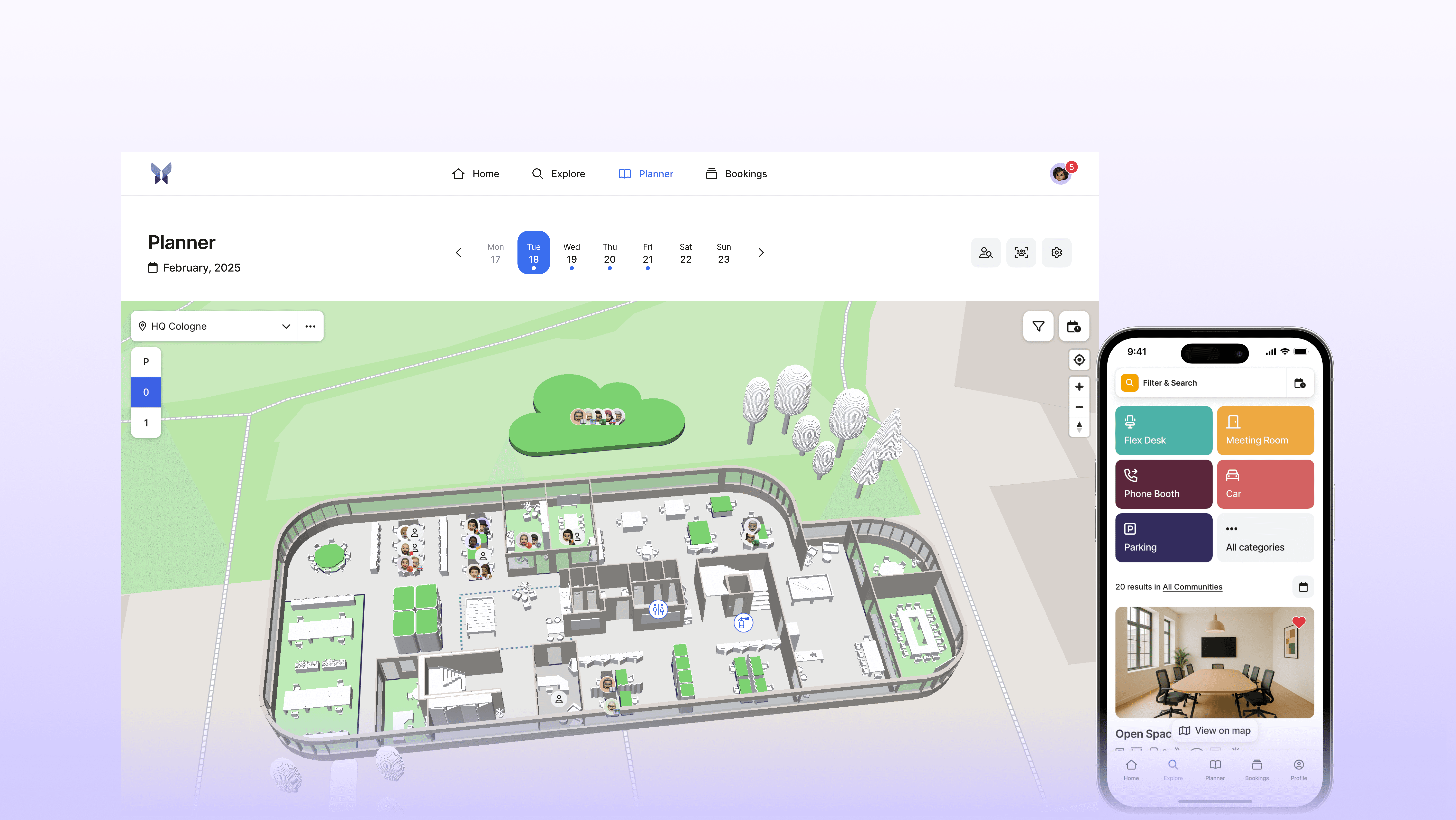
Features and Highlights at a Glance:
Interactive 3D Map for a visual selection of workspaces
Weekly Planner to coordinate office and home office days with colleagues
Room Booking with Digital Signage and real-time on-site display
Visitor Management with automated registration and notifications
Flexible Rules & Communities to control who can access which resources
Clear Dashboard for administrators with full control over occupancy and reporting
GDPR-compliant, developed and hosted in Germany
Personalized Support from Germany
More than 1000 companies, including DeepL, Metro, and Volksbank, already use anny to successfully implement hybrid work models and optimize their office spaces.
Frequently Asked Questions About Simple Desk Sharing Tools
Question 1: What does a simple desk sharing tool cost?
Simple solutions like anny typically cost €4-8 per resource per month. Enterprise solutions can cost 3-5 times more, but often offer features that small to medium-sized enterprises do not need.
Question 2: How long does the implementation take?
With tools like anny, you can go live within a week. The exact duration depends on factors such as the number of locations and the completeness of the information. Rapid implementation is a major advantage of simple systems over complex enterprise solutions.
Question 3: Is anny GDPR compliant?
Yes, anny meets all GDPR requirements. The software is Made and Hosted in Germany.
Question 4: What integrations does a simple desk sharing tool offer?
The key integrations include Microsoft 365, Google Calendar, Outlook, and MS Teams. For a complete overview of the integrations supported by anny, click here.
Question 5: Do I need technical knowledge for setup?
No, simple tools are specifically designed for users without an IT background. Start your free 14-day trial with anny now and see for yourself: register for free.
Key Insights into Simple Desk Sharing Tools
The Top 5 Points Summarized:
Simplicity is Key: Tools like anny prove that less is often more. Focusing on core functions leads to better user acceptance and faster deployment.
Cost Savings are Real: Up to 30% reduction in office costs is possible when workplaces are optimally utilized instead of standing empty.
Rapid Implementation: While complex systems require months, simple desk sharing tools can be put into productive use in just a few days.
Employee Satisfaction Increases: Flexibility and autonomy in choosing a workspace lead to higher team satisfaction.
Data Drives Optimization: Even simple tools provide valuable analytics to continuously improve office utilization.
anny as an Ideal Solution: If you are looking for a simple yet comprehensive desk sharing tool, anny is an excellent choice. The combination of user-friendliness, quick setup, and all essential features makes it the ideal solution for companies wanting to enter the world of desk sharing without complexity.
Your Next Step: Start today with a free trial of anny or book a demo to see how simple modern workplace management can be.





" height="38px" id="bH388uk2E" transform="translate(1 1)" width="118.00000395534607px"/></svg>)