

Amira van Weegen
Junior Marketing Manager
September 9, 2025
Room Booking Software with Outlook Integration: The Best Solutions
3 min.

Introduction: Room Booking via Outlook Add-In
The working world has fundamentally changed in recent years. Hybrid working models, flexible office concepts, and the increasing complexity of space management pose new challenges for companies. As your employees switch between home office and the office, efficiently managing meeting rooms, workstations, and other resources becomes a critical success factor.
This is where room booking software with Outlook integration comes into play. As the central tool for scheduling and calendaring, Microsoft Outlook is already deeply rooted in most companies. Seamless integration of your room booking system with Outlook can make the difference between chaotic space management and a smoothly functioning smart office.
In this comprehensive guide, you'll learn all about the various approaches to Outlook integration, which options are suitable for your company, and what to consider when making your selection.
Overview of the Outlook Integration Options
The technical approaches for integrating room booking software with Microsoft Outlook are diverse. Each variant has its specific advantages and suits different company sizes and IT infrastructures. Choosing the right integration method significantly influences the user-friendliness, scalability, and long-term maintainability of your solution.
Integration Variant | Description | Advantages | Disadvantages |
|---|---|---|---|
Outlook Add-In Solutions | Extension of the Outlook client with special room booking features | Direct integration, easy operation, advanced features | Dependent on Outlook version, potential performance drawbacks |
Bidirectional Calendar Synchronization | Automatic synchronization of bookings between room booking system and Outlook calendar | No additional software needed, flexible usage | Requires stable Exchange server connection |
Exchange Server Integration | Managing rooms as native Exchange resources | Central management, easy room discovery | Limited advanced features |
Microsoft 365 and Teams Integration | Linking with Microsoft 365 environment including Teams meetings | Seamless user experience, hybrid meeting support | Dependency on Microsoft 365 ecosystem |
Outlook Add-In Solutions
Outlook Add-Ins extend the native functionality of your Outlook client with specialized room booking features. These extensions integrate directly into the user interface, allowing you to book rooms, meeting spaces, and other resources without leaving your familiar work environment.
Functionality and Technical Implementation
An Outlook Add-In for room booking is typically installed as a plugin and appears as an additional tab or sidebar in your Outlook. From there, you can view available conference rooms, make bookings, and even utilize advanced features like room occupancy or ad-hoc bookings.
Advantages of the Add-In Solution
Maximum user-friendliness through integration into the Outlook interface
Advanced features like 3D room views and live availability displays
Automatic creation of meeting links for hybrid appointments
Ability to book additional services like catering and technology
Disadvantages and Limitations
Dependency on the Outlook version used
Bidirectional Calendar Synchronization
This method ensures automatic synchronization of all bookings, changes, and cancellations between the room booking system and the Outlook calendar.
Technical Requirements
Stable connection to Exchange Server or Office 365
Use of REST APIs or Exchange Web Services (EWS)
Advantages
No installation of additional software on client computers necessary
Bookings can be made via both the room booking system and directly through Outlook
Exchange Server Integration
Here, meeting rooms are managed as native Exchange resources and automatically displayed as available rooms in Outlook.
Central Management
Management via Exchange Management Console or Exchange Admin Center
Booking policies and permissions controllable centrally
Limitations
Limited advanced features such as catering or digital door signs
Microsoft 365 and Teams Integration
This integration connects room booking, Outlook, teams, and other Office applications into a comprehensive solution.
Hybrid Meeting Support
Automatic generation of Teams links when booking physical rooms
Enables participation of remote employees
Seamless User Experience
Unified solution without switching between applications
Future-proof through close collaboration with Microsoft
Why Room Booking Software with Outlook Integration is Essential
Integrating a professional room booking solution with Microsoft Outlook offers many benefits for your workday:
Microsoft Outlook as a Central Hub for Scheduling
In most companies, Outlook is the focal point for all scheduling. Your employees use the Outlook calendar daily for meetings, appointments, and coordinating their work. A room booking software that doesn’t integrate seamlessly with this familiar system inevitably leads to media breaks and inefficient processes.
Avoidance of Double Bookings and Conflicts
Without bidirectional synchronization between your room booking system and Exchange Server, situations quickly arise where multiple teams book the same room simultaneously. The integration ensures that bookings are synchronized in real-time across all systems and conflicts are automatically avoided.
User-Friendliness and Adoption
When your employees can book rooms directly from their familiar Outlook interface, the need to learn new software is eliminated. This familiar operation leads to higher user acceptance and significantly reduces the need for training.
Automated Processes and Workflows
Modern room booking solutions with Outlook integration offer far more than just simple room booking. They also enable:
Automatic booking of catering and other services
Reservation of workspaces within desk-sharing concepts
Management of resources and equipment like projectors, flip charts, or other add-on products
Real-time display of room occupancy on digital door signs and welcome screens
Want to learn more? Then book a non-binding demo with the sales team from anny.
Criteria for Choosing the Right Outlook Integration
Choosing the optimal room booking solution with Outlook integration depends on various factors:
Company Size and Scalability: Small businesses often benefit from Exchange resource management, while larger organizations require specialized solutions with advanced features.
IT Infrastructure: Cloud environments (Office 365) vs. local Exchange Servers demand different integration approaches.
Functional Requirements: Simple room booking or comprehensive workplace management with desk sharing, catering, visitor management, and digital door signs.
Budget and Total Cost of Ownership: Consideration should be given to licensing costs, implementation, training, and maintenance.
Compliance and Data Protection: Particularly in Germany, GDPR compliance and German hosting are crucial criteria.
Integration into Workflows: The solution should seamlessly integrate into existing processes and enhance usability.
Implementation and Best Practices
The successful implementation of room booking software with Outlook integration requires careful planning:
Phased Introduction: Pilot groups and gradual expansion allow for adjustments and greater acceptance.
Employee Training: Communicating the benefits and operation to enhance user acceptance.
Optimal Synchronization Configuration: Define clear rules for bookings, cancellations, and changes.
Governance and Permissions: Make booking rights and approval processes transparent.
Monitoring and Optimization: Analyze usage patterns and continuously improve.
Conclusion: Finding the Right Solution
A professional room booking software with Outlook integration is the foundation for efficient room management and a modern smart office. It increases room utilization, reduces conflicts, and improves the daily work of your employees through intuitive operation and automated processes.
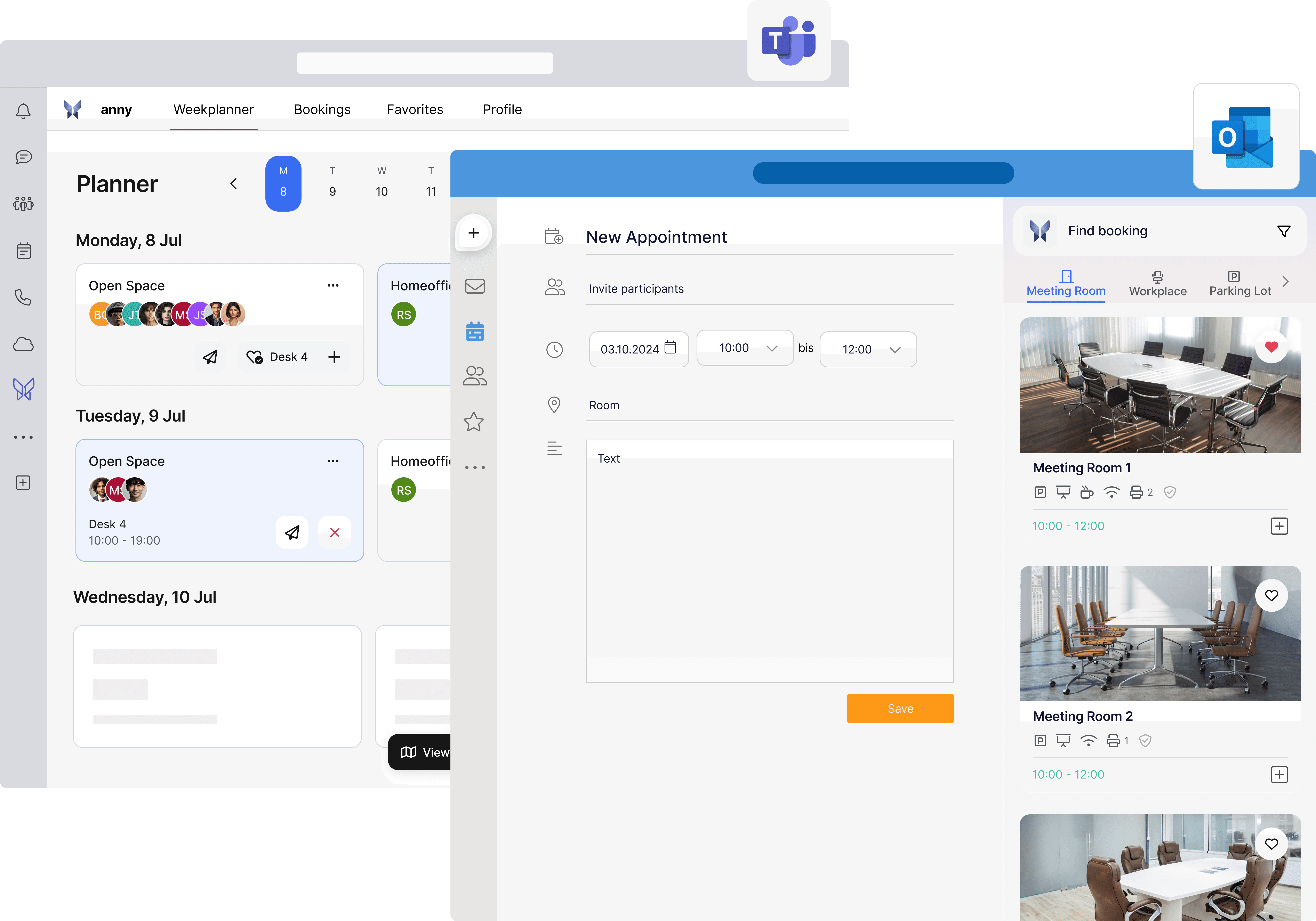
A leading all-in-one solution that meets all the described requirements and additionally offers innovative features such as immersive 3D maps, digital visitor management, and comprehensive analytics is, for example, anny. This future-proof solution supports companies in managing their room booking systems efficiently and significantly easing the daily work of employees.
Sounds interesting? Then you can easily book a non-binding demo with the sales team of anny here.





" height="38px" id="bH388uk2E" transform="translate(1 1)" width="118.00000395534607px"/></svg>)