

Amira van Weegen
Junior Marketing Manager
September 8, 2025
Room booking system for small teams: Efficient space management for increased productivity
8 min

Introduction
You know the scenario: It's 2:00 PM, your team urgently needs a meeting room for an important meeting, but all available rooms seem to be occupied. Or you stand in front of the conference room and find out that nobody is there, even though the room was officially 'booked.' These everyday frustrations show why even small teams can benefit from a professional room booking system.
While many large companies have long relied on digital solutions for room management, many small teams still believe that their few rooms can be managed with Excel lists or whiteboards. But reality shows: Even with only three to five meeting rooms, conflicts, double bookings, and inefficient room usage arise quickly.
In this article, you'll learn why a room booking system makes sense for your small team, which features are really important, and how to find the right solution.
Why Small Teams Need a Room Booking System
The challenges of space management in small teams differ fundamentally from those faced by large enterprises. While corporations often have dedicated facility or office managers, small teams need to organize themselves, often alongside their actual tasks.
The hidden pitfalls of manual booking systems
Manual systems like Excel spreadsheets or whiteboards are prone to numerous issues, which can be particularly painful for small teams:
Double bookings: Conflicts arise when multiple team members attempt to reserve a room simultaneously
Lack of real-time overview: No one can easily see which rooms are available at a glance
Lost bookings: Email coordination is easily lost or overlooked
No flexibility: Last-minute changes are difficult to communicate
Time savings for teams with 5-50 members
In small teams, time is especially valuable. Every minute spent searching for an available space or resolving booking conflicts is time lost for productive work. An efficient room booking system significantly reduces administrative burden and ensures smooth workflows.
Core Features of a Room Booking System for Small Teams
Simple Online Booking of Meeting Rooms and Workspaces
The heart of every room booking system is an intuitive booking interface. In just a few clicks, you should be able to see which rooms are available and make a reservation. Modern systems not only show availability but also details about the equipment - from projectors to flipcharts.
Calendar Integration with Outlook and Google Calendar
For small teams, integration into existing tools is crucial. The best room booking systems synchronize seamlessly with Microsoft Outlook or Google Calendar. This way, every room booking is automatically entered into your calendar, and all participants receive the corresponding meeting invitations.
Mobile App for Spontaneous Bookings on the Go
Especially in agile teams, meeting needs often arise spontaneously. A mobile app allows you to quickly book a room even when you are on the road or working from home. The app should offer all the essential functions of the desktop version and ensure intuitive usability.
Clear Booking Calendar for All Team Members
Transparency is particularly important in small teams. A shared booking calendar gives all team members an overview of which rooms are occupied and when. This facilitates planning and prevents conflicts in advance.
Automatic Release for No-Shows
A common problem in room management is rooms booked but not used. Modern systems can automatically detect when a room is not utilized and release it after a defined period. This is particularly valuable in small teams where every room counts.
Exclusive Benefits for Small Teams and Startups
Cost Optimization: Reducing Unused Office Space and Optimizing Room Utilization
Small businesses need to make every euro count. A room booking system helps analyze actual room usage and identify optimization potentials. You might discover that the large conference room is only 40% utilized, indicating a need for more flexible workspaces instead.
Flexibility: Adapting to Changing Team Sizes and Hybrid Work Models
Startups and small teams often grow quickly and unpredictably. A good booking system grows with you and can be flexibly adapted to new requirements. This is especially important for hybrid work models where room needs can fluctuate daily.
User-Friendliness: Intuitive Interface without Extensive Training
In small teams, no one has time for complex training sessions. The best room booking systems are designed to be so intuitive that every employee can use them immediately. A self-explanatory interface and familiar operating concepts are crucial here.
Quick Implementation: Setup in Hours Instead of Weeks
While large companies often require months-long implementation projects, a system for small teams should be ready within a few hours. Cloud-based solutions with preconfigured settings make this possible.
Scalability: Growing from a 5-Person Team to a Medium-Sized Company
A future-proof room booking system should be able to grow with your business. What suffices for five employees and three rooms today should also work with 50 employees and ten offices—without needing to switch systems.
Transparency: Everyone Sees Available Times and Can Plan Better
In small teams, communication is everything. A transparent booking system where everyone can see the current bookings promotes collaboration and prevents misunderstandings. This leads to less stress and more productivity.
Tips for Choosing the Right System
Checklist: What Features Does Your Team Really Need?
Before deciding on a system, you should conduct an honest assessment:
Feature | Essential | Nice-to-have |
|---|---|---|
Room Booking | ✓ | |
Calendar Integration | ✓ | |
Mobile App | ✓ | |
Desk Booking | ✓ | |
Catering Management | ✓ | |
Vehicle Booking | ✓ | |
Analytics/Reporting | ✓ |
Pricing Models: Per User vs. Per Room – What Is Worthwhile for Small Teams?
Most providers use two basic pricing models:
Per User: Usually 5-15 Euros per month per user
Per Room: Typically 30-50 Euros per month per room
For teams with few rooms but many users, the room-based model is often cheaper. With few users but many rooms, the user-based model is worthwhile.
Integration with Existing Tools (Microsoft 365, Google Workspace)
Seamless integration into your existing IT landscape is critical. If your team already uses Microsoft Teams or Google Workspace, the room booking system should be able to integrate directly into these tools. This reduces onboarding time and increases acceptance.
Utilize Free Trial Periods and Compare Different Providers
Most reputable providers offer free trial periods of 14-30 days. Use this time to test the system with your team in practice. Pay particular attention to:
Daily User-Friendliness
Stability and Speed
Quality of Support
Actual Usage by the Team
GDPR Compliance and Data Protection with German Providers
For German companies, GDPR compliance is non-negotiable. Ensure the provider operates its servers in Germany or the EU and can present the relevant certifications. German providers often have advantages here due to local expertise and legal security.
Practical Implementation and First Steps
Step-by-Step Guide to Implementing a Room Booking System
Step 1: Inventory Assessment Document all available rooms with their amenities and typical usage. Create a list of key requirements.
Step 2: Evaluate Vendors Test 2-3 different systems simultaneously and gather feedback from various team members.
Step 3: Initiate Pilot Phase Start with a single room or a small user group to gather experience.
Step 4: Gradual Expansion Gradually extend the system to all rooms and users.
Step 5: Optimization Analyze the first few weeks and adjust settings based on the insights.
How to Convince Your Team of the Benefits
The success of a room booking system depends on team acceptance. Here are proven strategies:
Highlight Issues: Document current booking conflicts and their impacts
Demonstrate Quick Wins: Show concrete time savings and efficiency gains
Emphasize Simplicity: Demonstrate how simple booking can be
Take Feedback Seriously: Listen to concerns and adjust the system accordingly
Set Booking Rules: Lead Time, Maximum Booking Duration
Sensible booking rules for small teams:
Minimum Lead Time: 15-30 minutes for spontaneous meetings
Maximum Booking Duration: 4-6 hours to avoid prolonged blockage
Automatic Release: After 15 minutes no-show
Booking Horizon: Maximum 3-6 months in advance
Best Practices for the First Weeks after Implementation
Regular Check-ins: Short rounds to quickly identify issues
Documentation: Collect common questions for an internal FAQ
Adjustments: Be ready to adapt rules based on practice
Communicate Success: Share positive experiences with the entire team
Avoid Common Pitfalls
Too Complex Rules: Keep booking rules as simple as possible Missing Alternatives: Always plan backup options in case of system failures Lack of Communication: Inform the team promptly about changes Overdoing It: Don't introduce all features at once
How anny supports small teams in space management
anny positions itself as a particularly user-friendly solution, specifically designed for the needs of smaller teams. The system understands the unique challenges of businesses with 5-50 employees and offers tailored features.
Special Features of anny for Teams with 5-50 Employees
anny offers a perfectly balanced range of functions that is neither overloaded nor too simple:
Quick Bookings: Rooms can be booked with just one click
Flexible User Roles: From simple booking rights to full administration - everything is individually configurable
Clear Occupancy Display: It shows which room is available at what time
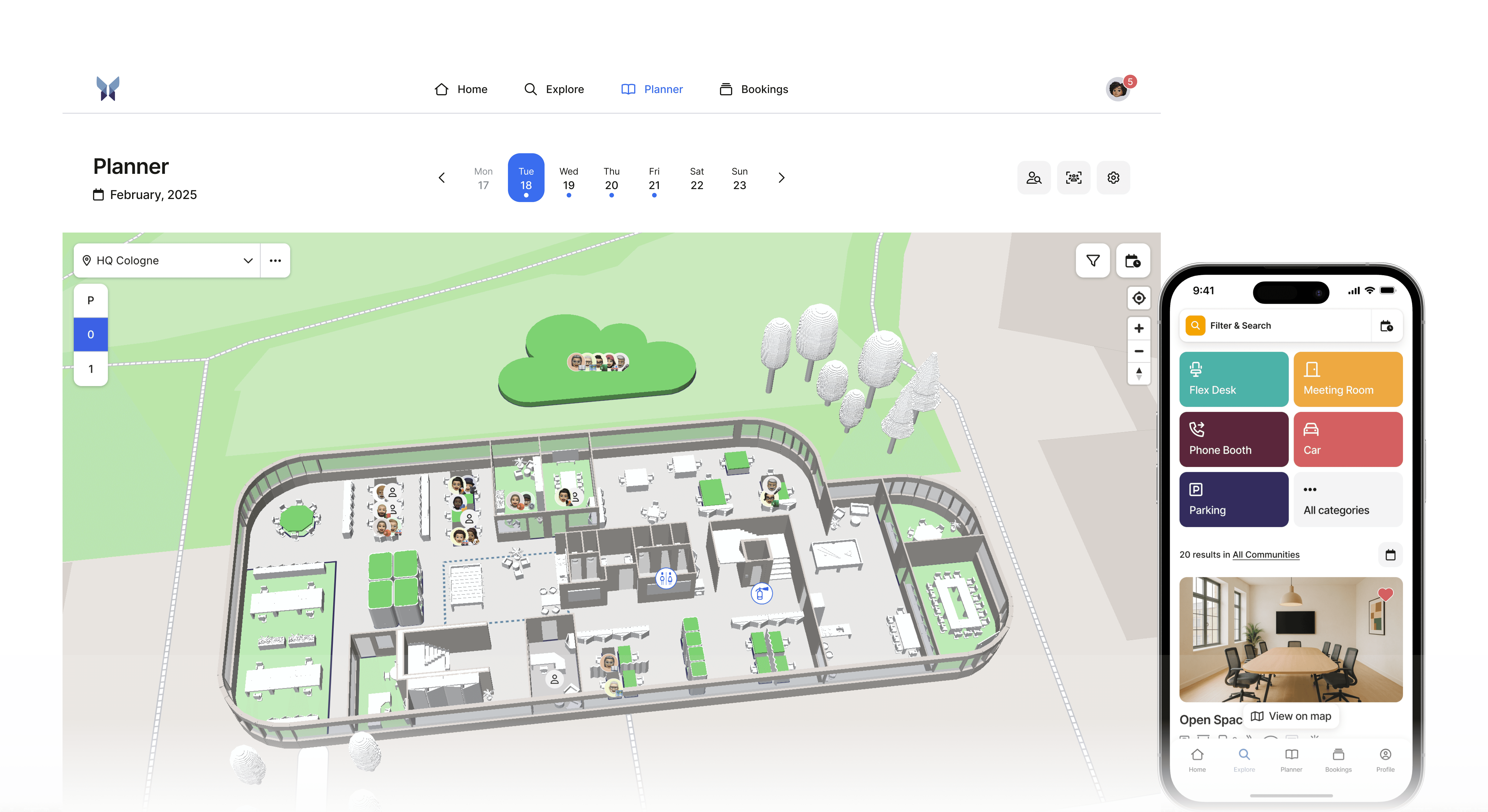
3D Maps for Small Offices
anny's interactive floor plans make it particularly easy to find the right room. With just one click, it can be reserved. Additionally, you can see when and by whom it is occupied, allowing you to plan meetings according to availability.
German Support and GDPR-Compliant Solution
As a German solution, anny not only offers support in German but also ensures complete GDPR compliance. The servers are located in Germany, and all processes are aligned with German data protection standards. This is especially important for small businesses that cannot afford legal risks.
Integration with Microsoft Teams and Outlook for Seamless Workflow
The seamless integration with Microsoft Teams and Outlook makes anny particularly valuable for teams already utilizing Microsoft 365. Rooms can be booked directly from Teams, and all booking information automatically appears in the Outlook calendar. This minimizes the learning curve significantly.
Community Features for Organizing Different Departments
Even small businesses often have different departments or project groups. anny enables them to organize these in their own communities. Each department can have its own booking rules, while the overarching management retains an overview.
Avoid Hidden Costs: What to Consider When Choosing a Provider?
When selecting a suitable provider, beyond the features, the price is a decisive factor. Therefore, several points need to be considered when comparing prices.
Watch out for these potential cost traps:
Setup Fees: Some providers charge a one-time setup cost
Support Costs: Premium support often costs extra
Data Export: Switching to another system can become expensive
Minimum Terms: Longer commitments reduce flexibility
User Limits: Additional users can become disproportionately expensive
anny stands out with a cost structure from which especially small businesses can benefit. In the Starter Package, up to 5 meeting rooms can be created and managed for free, regardless of the number of users. For more information, click here.
Conclusion
A room booking system is no longer just a luxury for large corporations. Small teams also benefit from the increased efficiency and cost optimization that modern booking systems enable. The investment usually pays off after just a few months through saved time and optimized room usage.
It's important to choose a system that fits your team - neither oversized nor too simple. Solutions like anny demonstrate that there are indeed providers who have focused specifically on the needs of smaller teams.
Start with a thorough analysis of your current situation and test various systems in practice. The time you spend in careful selection will pay off in the long run. Because a well-implemented room booking system will not only make your team more productive but also make daily work noticeably more relaxed.
Do you want to get started right away? Then click here and create a free account with anny.





" height="38px" id="bH388uk2E" transform="translate(1 1)" width="118.00000395534607px"/></svg>)