



Amira van Weegen
Junior Marketing Manager
September 12, 2025
Workspace Management Software with MS Teams Integration: Seamless Desk Sharing for Hybrid Work
5 mins
What is workspace management software for Microsoft Teams and why is it important?
Hybrid work succeeds when bookings occur where teams are already working. With workspace management software that is directly integrated into Microsoft Teams, employees can book desks and rooms in their familiar environment without switching apps, without additional logins, with notifications and calendar integration in one place. This lowers barriers, increases adoption, and makes desk sharing really easy.
In this guide, we show how the Teams integration works, which features matter in practice, and which best practices have proven effective. We also introduce a tool that allows you to implement desk sharing and space planning seamlessly in Microsoft Teams.
Why Integration with Microsoft Teams is So Important
Many companies today already rely on Microsoft Teams as a central platform for collaboration. Chats, meetings, files, and calendars come together in one place – and this is exactly where the key to successful desk sharing lies. Employees are not keen on opening a new app for every task or having to familiarize themselves with additional tools.
A workspace management software with Teams integration fills this gap. It brings desk booking directly into the daily routine of the employees:
Booking without detours: Desks, rooms, or parking spaces can be reserved directly in Teams, without the need for employees to launch a separate app.
Higher acceptance: Since Teams is already used daily, the barrier for desk sharing is minimal. Employees are more likely to book when it's just a click in their familiar environment.
Transparency in the team: Through Teams, it is immediately visible who is in the office and when. This facilitates coordination and promotes collaboration – especially in hybrid teams.
Reduced training effort: While a brief introduction to the new software is needed, the integration with Microsoft Teams minimizes additional learning effort. Employees operate in their familiar environment, which significantly eases the start and increases acceptance.
For companies, this close integration also offers clear advantages. The use of the software increases when it is part of a familiar work environment. At the same time, the effort for support and onboarding decreases, as no parallel systems need to be maintained or managed.
In short: A tool for desk sharing is only truly "simple" when it is embedded in the work routine. And since Microsoft Teams has long been the digital hub for many companies, integration there is a crucial success factor for hybrid working.
What features should workspace management software with Teams integration offer?
For workspace management to truly be simple in everyday work, more is needed than just the ability to reserve a space. Crucial are features that ease the booking process for employees while providing companies with transparency and control. Therefore, a good workspace management software with Teams integration should include the following features:
Desk booking directly in Teams: Employees can reserve workspaces with just a few clicks within the familiar Teams environment, without switching apps or additional logins.
Room reservations: Meeting rooms can be booked directly via Teams, allowing teams to seamlessly plan their meetings.
Real-time overview: Who is in the office and when? A clear representation supports team coordination and prevents overbookings.
Calendar integration: The connection to Outlook and Teams calendars ensures that bookings are automatically synchronized with existing appointments.
Resource management: In addition to desks and rooms, parking spots, equipment, or other resources can also be centrally managed.
Analytics & Reporting: Evaluations of space utilization help companies optimally plan their office spaces and save costs.
GDPR & Security: Especially in Europe, data security is crucial. Reliable software should be GDPR-compliant and meet high-security standards.
With these features, workspace management software ensures that hybrid working is not only technically possible but also simple and efficient in the daily routine of employees.
Step-by-Step Guide: Implementing Workspace Management Software in Microsoft Teams
Step 1: Needs Assessment and Tool Selection
Checklist for your requirements analysis:
Number of workstations and mobile employees
Office locations and available meeting rooms
Existing Microsoft 365 licenses and IT infrastructure
Budget for software and implementation (typical: €4-12 per resource monthly)
Special needs: parking spaces, visitor management, compliance requirements
Evaluation matrix for tool comparison: Create a matrix with your key criteria (integration, features, price, support) and rate each provider from 1-10. Allocate 2-4 weeks for demo appointments and proof-of-concept tests.
Step 2: Integration and Configuration
Technical prerequisites:
Microsoft 365 Business Premium or higher
Teams admin permissions for app installation
Azure Active Directory for user authentication
Optional: Teams-certified hardware for meeting rooms
Step 3: Rollout and Success Measurement
Change management and employee onboarding:
Inform all employees 2 weeks before launch
Create video tutorials for key features
Plan training sessions for managers and "super users"
Start with a pilot group of 10-20 people
Key KPIs for success:
Booking rate: Target 70%+ of available workstations
Workspace utilization: Optimum at 60-80% average usage
User satisfaction: Monthly surveys with target score >4.5/5
Avoid Common Mistakes When Implementing Workspace Management in Microsoft Teams
Issue 1: Inadequate Change Management Strategy
Many companies underestimate the effort required to acclimate employees to new booking processes. This can lead to low acceptance and high no-show rates.
Issue 2: Lack of Integration with Existing Microsoft 365 Workflows
Without seamless connectivity with Outlook calendars and Teams meetings, disruptions occur that reduce rather than enhance productivity.
Issue 3: Booking Processes Too Complex for End Users
If desk booking requires more than 3 clicks, user willingness decreases drastically. The user experience must be intuitive and swift.
MS Teams Integration in Practice
Integration of anny with Microsoft Teams: Features and Benefits
anny is a modern workspace management software that seamlessly integrates with Microsoft Teams, enabling desk booking and room management directly within the familiar Teams interface.
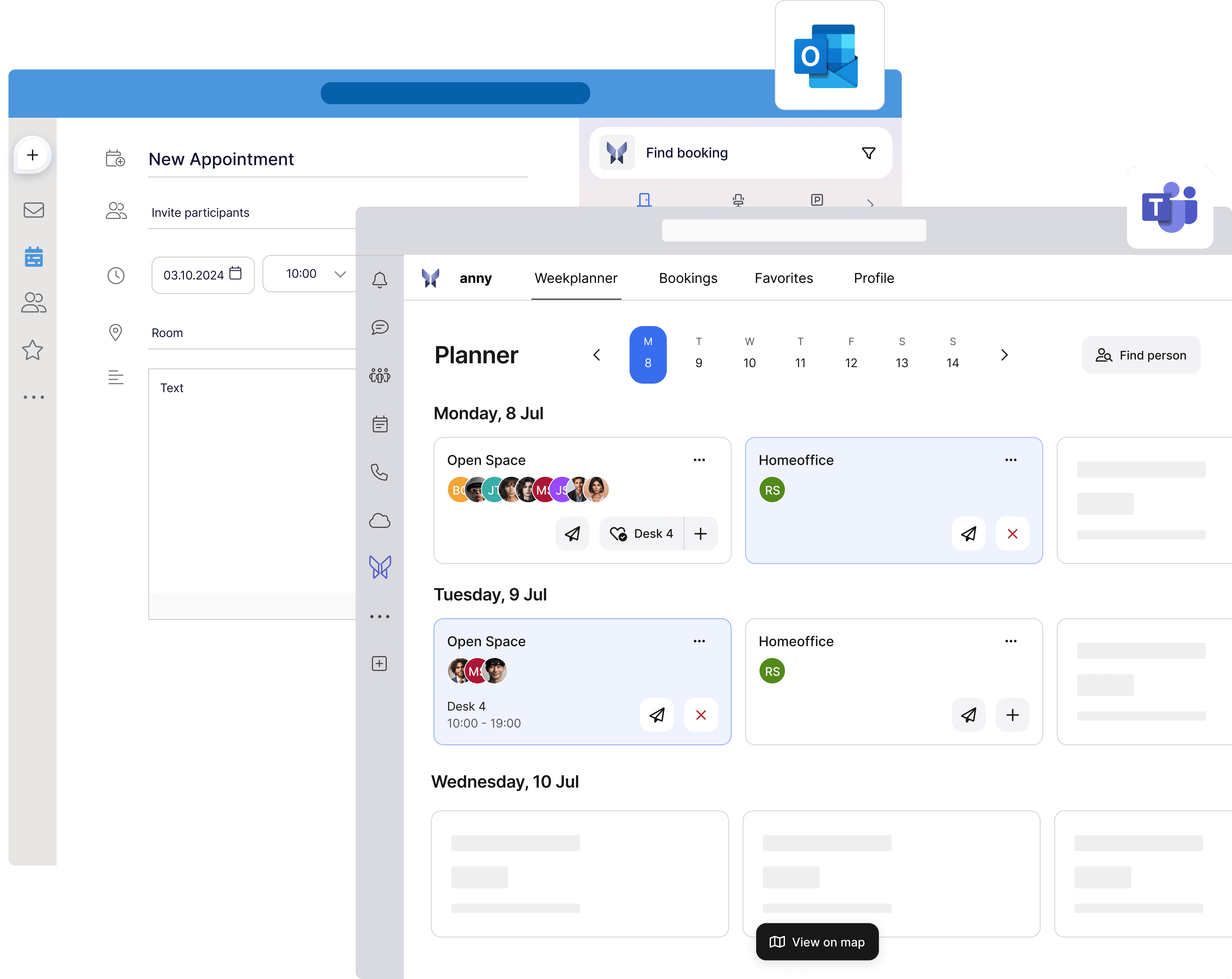
Key Features of anny in Teams Integration:
Easy Desk Booking: Employees can search, book, and manage workspaces directly within Microsoft Teams without opening additional apps.
Room and Resource Management: Book meeting rooms, parking spaces, and other resources with real-time availability.
Automatic Notifications: Reminders and updates for bookings are delivered directly via push notification.
Mobile Availability: The integration also supports the Teams mobile app, allowing employees to book flexibly and make changes on the go.
Intuitive User Interface: The interface is designed for quick navigation and easy use.
Team Coordination: Visibility of colleagues in the office and joint planning of workspaces and meetings to foster collaboration.
Multilingual Support: Supports multiple languages to facilitate use in international teams.
Benefits of the anny Teams Integration:
Increased Productivity through quick and straightforward booking directly within the central communication tool.
Reduction of Double Bookings and vacancies thanks to real-time data and automatic updates.
Improved Collaboration through a transparent overview of team members and their workspace status.
Increased Flexibility for employees working both remotely and in the office, with easy access to relevant information and resources.
Optimized Office Utilization and associated cost savings for the company.
Seamless Integration without additional logins or complex interfaces, enhancing employee acceptance.
The integration of anny with Microsoft Teams supports companies in efficiently implementing hybrid work models, thereby sustainably increasing employee satisfaction and motivation. Check out how this can look in practice:
Frequently Asked Questions About Workspace Management Software for Microsoft Teams
How much does a professional workspace management solution for teams cost? The costs range from €4-12 per resource per month, depending on the range of features. To see the pricing of anny, click: here.
Does desk booking also work on mobile devices within the Teams app? Yes, most modern workspace management tools offer mobile apps or are directly integrated into the Teams mobile application.
Can I manage multiple locations through a Teams-integrated solution? Absolutely. Most providers support multi-site management with location-specific booking rules, different workspace types, and centralized administration through Teams.
Which data protection aspects should I consider during integration? Ensure GDPR compliance, local data storage in the EU, and transparent data usage.
Key Insights for Your Workspace Management Strategy
The key factors for success at a glance:
Leverage native integration: Choose a tool with direct Microsoft Teams integration to enhance the user experience and minimize training efforts.
Take change management seriously: Allocate sufficient time for communication and training to ensure that employees actively use the solution.
Implement gradually: Start with a pilot project, gather insights, and then scale gradually across the whole company.
Set KPIs: Measure success with clear metrics such as booking rates, space utilization, or user satisfaction.
Continuously optimize: Use analytics and feedback to continually improve your workspace strategy.
Your next step: Test a solution that already incorporates all these points. With anny, you can book workspaces, rooms, and resources directly in Microsoft Teams—intuitively, GDPR-compliantly, and without complex onboarding. Many companies like DeepL, Metro, or Volksbank already use anny to successfully manage their hybrid collaboration.
Are you ready to start? Then book a non-binding demo with the anny sales team: Schedule a demo.





" height="38px" id="bH388uk2E" transform="translate(1 1)" width="118.00000395534607px"/></svg>)