

Amira van Weegen
Junior Marketing Manager
October 31, 2025
Efficient Solutions with Desk Sharing Software for Modern Offices
7 mins.

The Key Features of a Desk Sharing Software
Hybrid work has permanently changed the everyday office life. Many companies today face the challenge of designing their office spaces flexibly and efficiently, while also creating an environment where employees enjoy coming together. A central role here is played by desk sharing software: It enables the booking of workspaces according to needs, better coordination of teams, and optimal use of existing resources.
However, not every solution meets the same requirements. For desk sharing to truly work, software is needed that is intuitive, motivates employees, and integrates seamlessly into existing processes. In this article, you will learn which features a good desk sharing software should offer, what to consider when making your choice, and how companies can successfully implement desk sharing with anny.
What is Desk Sharing Software?
Desk Sharing is a modern working model where employees do not have a permanent desk but share available workspaces according to a fixed plan. This concept is especially suitable for teams that regularly alternate between the office and home office, as it allows for a planned and efficient use of workspaces.
In contrast to Hot Desking, where employees have to choose a spot spontaneously every day, Desk Sharing offers more structure and clarity. This creates a stress-free yet flexible working environment, fully in line with modern New-Work concepts that promote self-responsibility and adaptability.
Desk Sharing Software forms the core of this model. It supports companies in managing their office spaces optimally and enables employees to easily book workstations. By implementing such a solution, you can:
Utilize office spaces efficiently and avoid unused desks,
Book workplaces in advance and manage them flexibly,
Promote teamwork and collaboration through transparent and playful workplace planning.
Furthermore, Desk Sharing Software simplifies the management of resources, integrates seamlessly into existing systems, and contributes to better space planning and transparency in everyday office life.
It is thus an indispensable tool for modern companies that focus on flexibility and a sustainable office concept.
What should I consider when choosing a desk sharing software?
Choosing a desk sharing software is not just about managing office space – it's about making sure employees enjoy using it. A good solution makes the office day intuitive, transparent, and inviting. It encourages actively booking workspaces and experiencing the office as a place for collaboration again.
The most important criteria include:
Ease of use: An intuitive user interface is crucial so that employees can book workspaces with just a few clicks.
Visualization of office space: A digital map of the office with a clear representation of all workspaces and rooms helps employees in choosing and orienting themselves.
Seamless integration: The software should easily integrate with existing systems like Microsoft 365 or Google Suite. This ensures high acceptance and smooth use in everyday life.
Modern desk sharing software should therefore not only enable bookings but also function as a comprehensive workplace management tool that supports both employees and the organization equally.
How to implement Desk Sharing with anny
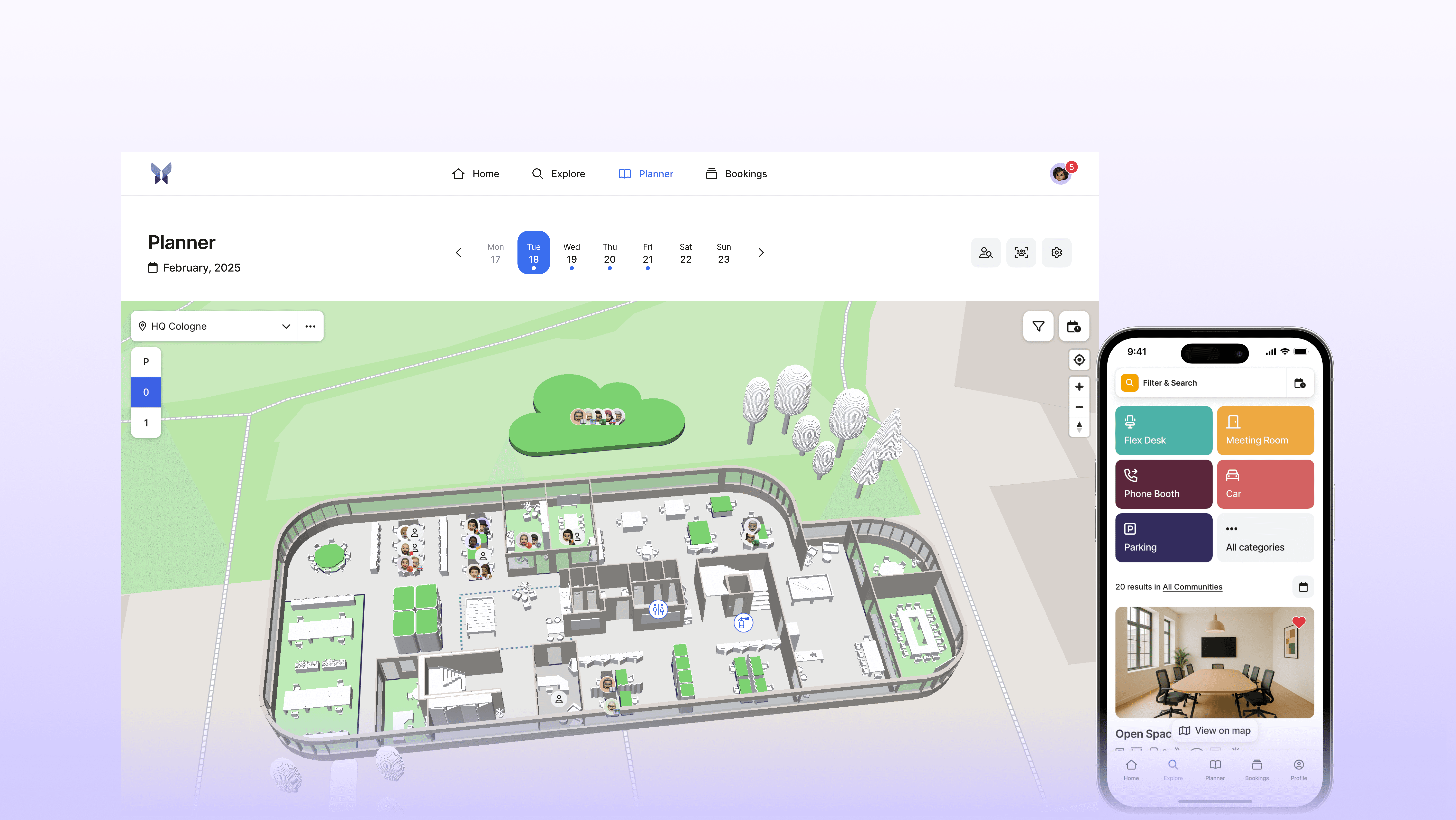
For desk sharing to work and be embraced by employees, it requires software that excites, is fun, and motivates people to take action. This is exactly where anny comes into play.
anny is an all-in-one platform for modern workspace management that combines desk sharing, room booking, and visitor management. anny is perfectly suited for hybrid work environments where flexibility and collaboration are key focuses. Employees can book workstations, meeting rooms, parking spaces, equipment, or other shared resources with just one click.
Here's what it looks like in detail:
Interactive 3D Map: The visual representation of the office invites employees to explore and book. Who's coming to the office, who sits where, with whom can I collaborate? This strengthens team spirit and makes coming to the office a conscious decision.
Weekly Planner: Allows easy booking of workstations in the office or home office with just one click. It also shows who's in the office when, to facilitate team coordination.
anny App: With the mobile app, bookings can be easily planned on the go. Available workstations and colleagues are found in seconds. Push notifications keep everyone up to date.
Seamless Integration: anny can be easily synchronized with Microsoft Teams, Outlook, Google Workspace, SSO systems, and calendars. Bookings thus become part of the usual workflow.
Benefits of anny for businesses
The introduction of anny offers companies far more than just a digital booking solution; it changes how people use and experience their offices.
A clear advantage lies in the optimal utilization of office spaces. By conducting precise occupancy analyses, companies can avoid vacancies and strategically plan workspaces. This provides valuable insights into the actual use of their spaces, allowing them to design areas more strategically for the long term. This saves costs while creating an environment that adapts to actual needs.
Moreover, anny significantly reduces administrative workload. Recurring tasks such as booking approvals, reminders, or check-ins run automatically. Teams no longer need to concern themselves with organizational details and can focus on their core work.
Another key benefit: increased motivation and engagement within the team. The intuitive interface, visual office map, and mobile access make desk sharing an experience that employees actively want to use.
Communication and collaboration also benefit: employees can see in the weekly planner when colleagues are in the office and coordinate their presence accordingly. This fosters better team coordination and a strengthened team spirit in everyday office life.
Success Story: MaibornWolff – 90% Utilization Rate in Desk Sharing with anny
An example of how successful desk sharing can be implemented with anny is demonstrated by the IT company MaibornWolff. With over 1,000 employees across multiple locations, the company faced the challenge of organizing its hybrid work environments in a way that ensures transparency, simplicity, and flexibility.
Why anny:
The interactive map view displayed workspaces and rooms clearly.
With anny, virtually all resources, from desks to meeting rooms, to events and parking spaces, could be booked centrally.
Data protection, user and rights management, as well as future viability, were crucial.
Implementation:
The introduction was rapid and structured. Along with the anny team, office plans were digitized, special cases were discussed, and solutions were individually adapted.
Results:
A utilization rate of up to 90%: Most employees actively book their workspaces, rooms, and events through anny.
The mobile app is extensively used and is an integral part of the daily work routine.
Transparent evaluations provide insights into preferred days, rooms, and locations – a basis for strategic space management.
Thus, anny became a central tool for modern collaboration and future-proof office organization at MaibornWolff.
Conclusion: Key Features for Successful Desk Sharing
Desk sharing is more than just a trend; it's a fundamental pillar of modern work culture. The right software is crucial for success or disappointment.
However, not every desk sharing software automatically ensures acceptance and smooth operations. Key features that motivate people to consciously use the office are critical. These include a user-friendly interface, an interactive office map, flexible booking options, mobile accessibility, and suitable integrations.
Whether you're a startup or a large enterprise, if you want to successfully implement desk sharing, anny provides the right solution to make hybrid work experiential, manageable, and sustainable.
Frequently Asked Questions
What is the difference between Desk Sharing and Hot Desking?
The difference between Desk Sharing and Hot Desking lies in the fact that with Desk Sharing, employees share desks according to a fixed schedule, whereas with Hot Desking, a new workstation is chosen daily without fixed assignment. Read more about the differences and respective advantages in our blog article.
What features should a good Desk Sharing software have?
A good Desk Sharing software should make booking workspaces as easy and transparent as possible for employees. Important features include an intuitive user interface, a visual office map for orientation, mobile booking options, flexible booking rules, as well as analytics on space utilization. Additionally, integrations with tools such as Microsoft Teams or Outlook and privacy by GDPR standards are crucial to ensure seamless and secure usage in daily work life.
How does anny support companies in implementing Desk Sharing?
anny guides companies step-by-step in introducing Desk Sharing. The Customer Success Team provides advisory support throughout the entire setup, from initial orientation through the digital mapping of the office to training staff. Depending on the scope and requirements, the implementation can be completed within a few days. Learn here more about the implementation duration. Even after the start, anny continues to support companies in optimizing their workspaces and further developing the solution individually.
How does anny ensure data protection and security?
anny ensures data protection and security by complying with GDPR, storing data on German servers, having an ISO 27001 certification, as well as conducting regular external audits.





" height="38px" id="bH388uk2E" transform="translate(1 1)" width="118.00000395534607px"/></svg>)