

January 22, 2026
Hot Desk Booking Software: The Complete Guide for 2026
8 min

Introduction
Hot Desk Booking Software enables the digital reservation of flexible workspaces and optimizes the use of office spaces in hybrid work environments. Modern Hot Desk Booking Software offers everything from one source – from managing bookings to integrations and comprehensive analytics. Companies with hybrid work models use these systems to manage desks in real-time, avoid double bookings, and make data-driven decisions for space planning.
This guide covers the selection, requirements, and typical challenges related to hot desk booking systems. The software significantly contributes to using office spaces efficiently, reducing vacancies, and aligning space planning with actual demand.
Well-implemented Hot Desk Booking Software reduces space costs by 30-50%, increases employee satisfaction through more flexibility, and provides precise occupancy data for strategic decisions. Through centralized booking management, the software helps avoid overbookings and minimizes vacancies in offices. An intuitive user interface is essential to ensure user-friendliness and acceptance within the company. Desk Booking Software is particularly used in hybrid work models where employees are not in the office every day.
Key takeaways from this article:
Desk Booking Software fundamentally differs from makeshift solutions and creates real value in everyday work life
Without professional systems, systematic problems such as double bookings and inefficient space utilization arise
Modern solutions integrate seamlessly with existing tools like Outlook, Microsoft Teams, and Google Calendar
The right software selection depends on company size, work model, and IT landscape
Hot Desking is not an isolated function, but part of a holistic workplace strategy
Understanding Hot Desk Booking Software
A desk booking software is a digital system that allows employees to reserve a flexible workspace for a specific period instead of having a fixed workstation. With a desk booking app or directly through the system, employees can book a desk only when they actually need it, which is particularly advantageous in hybrid work models.
Desk hoteling and desk sharing are related concepts: While desk hoteling involves reserving workspaces as needed, desk sharing describes the shared use of workspaces by multiple people, with hot desking emphasizing flexible, unassigned use. Choosing an appropriate time slot when booking is a central factor in ensuring flexibility and efficiency.
Hot desk booking software is a specialized workplace management platform that enables employees to digitally reserve unassigned workstations. A user-friendly, intuitive user interface ensures that employees can book workspaces with minimal training effort. Unlike makeshift solutions like Excel lists or simple calendar blocks, professional desk booking systems offer real-time synchronization, automatic conflict resolution, rules such as time limits and priorities to manage usage, and a visual display of available desks to avoid overbooking and optimize space utilization.
The added value in the modern workday is tangible: An employee books a desk in the morning via a mobile app, receives automatic reminders, checks in on-site, and automatically releases the spot upon leaving. This automation saves time, reduces frustration, and creates transparency for all parties involved. Training for employees is important to ensure smooth implementation and efficient use of the system. Especially in hybrid work models, desk booking software offers maximum flexibility and supports optimal utilization of office space.
Without such professional features, systemic problems arise in hybrid office environments that significantly affect the workday.
Basic Functionality
A desk booking system is based on a real-time database that continuously updates the status of each workstation – available, booked, or occupied. Through interactive floor plans, employees can filter free desks by criteria such as equipment or location and reserve them with just a few clicks.
Integration into existing workflow tools and calendar systems is central. Bidirectional synchronization with Outlook or Google Calendar ensures that reservations automatically appear in the calendar and vice versa. Single Sign-On via, for instance, Azure AD simplifies access, while integrations with Microsoft Teams or Slack enable booking directly from familiar tools.
Check-in mechanisms via QR code, NFC, or Wi-Fi detection verify actual usage and automatically release unclaimed bookings after 10-15 minutes – a key difference from static systems.
Differences to Conventional Solutions
Manual systems like shared spreadsheets or pure calendar bookings fail to meet the fundamental requirements of hybrid work models. They lack real-time availability, leading to double booking rates of up to 25-30%. They do not offer visual guidance through office plans, automatic release for no-shows, or analytics functions for usage.
Informal workspace allocations – such as the rule "first come, first served" – increase uncertainty and lead to frustration, especially in popular areas like quiet focus workspaces or regions with good equipment. For workplace admins and facility managers, blind spots arise: They can neither identify peak times nor make informed decisions about space optimization.
These structural deficits manifest in practice as concrete, recurring challenges.
Common Challenges Without Professional Hot Desk Booking Software
In hybrid work environments where employees come to the office only on certain days, systematic friction arises without a professional desk booking solution. The following problems are widespread in companies with flexible work models, costing time, money, and employee satisfaction.
Double Bookings and Space Conflicts
The most common issue: Two employees arrive at the same desk on the same morning. Without real-time synchronization and automatic conflict resolution, this happens in up to 40% of all informal booking attempts, according to industry data. The result is not only lost work time while searching for alternatives but also frustration and a rocky start to the day.
This becomes particularly critical in high-traffic areas such as quiet zones or workstations with special equipment. Conflicts frequently arise here that are difficult to resolve without clear booking logic and can strain the team atmosphere.
Inefficient Space Utilization
In parallel to space conflicts, a paradoxical phenomenon exists: Unused workstations alongside a perceived lack of space. No-show rates of 20-30% mean that booked desks remain unoccupied, while other employees cannot find a spot. Without automatic release mechanisms, these "ghost bookings" accumulate and distort the actual occupancy.
For companies aiming to optimize office costs, the lack of a professional system means a lack of data foundation: Which areas are actually utilized? On which days is occupancy particularly high or low? Without these insights, decisions regarding office space usage are based on assumptions rather than facts.
Lack of Transparency and Predictability
Teams working on joint projects have no way to coordinate their presence without a central booking overview. The question "Who is in the office tomorrow?" cannot be easily answered, complicating spontaneous collaboration and planned team days.
On a strategic level, facility managers and IT admins lack the basis for long-term planning: Lease agreements, renovations, or space reductions cannot be evaluated accurately without reliable usage patterns. This lack of transparency poses a risk in decisions involving millions of dollars.
These challenges demonstrate that hot desk booking cannot be solved with improvisation—it requires software with specific features.
Advantages of Hot Desking
Hot desking brings numerous advantages for companies and employees that go far beyond mere flexibility. Through the dynamic use of workspaces, companies can utilize their office space far more efficiently and thereby sustainably reduce space costs. Instead of maintaining fixed desks, which often remain unused, hot desking allows for demand-driven occupancy—optimally utilizing every workstation. This increases efficiency and ensures that the available space is used to its fullest potential.
Another plus: hot desking enhances collaboration and exchange within the company. Employees no longer sit in the same place all the time but can integrate flexibly into various teams and areas. This strengthens communication, fosters innovation, and creates a vibrant office environment. Especially in hybrid work models, where not all employees are in the office every day, hot desking provides the necessary flexibility to respond to changing needs and work models.
Companies also benefit from higher employee satisfaction, since the freedom to choose a workplace takes individual needs into account—whether it’s a quiet focus workspace, a spot near the team, or a desk with specific equipment. Thus, hot desking becomes a central component of modern workplace models that focus on efficiency, flexibility, and collaboration.
Requirements for Hot Desk Booking Software 2026
The requirements for desk booking software are evolving alongside working models. What was considered nice-to-have in 2020 will be standard in 2026. The following functional areas should be the focus when evaluating hot desking software—regardless of the specific provider.
Technical Core Functions
Every professional solution is built on functions that make the booking process quick, intuitive, and reliable.
A real-time availability display is indispensable: employees need to see in fractions of a second which desks are available. Automatic synchronization ensures that bookings are immediately visible to everyone, preventing conflicts.
Mobile usage via a dedicated app allows bookings on the go. For situations with limited connectivity, offline functionality should be available to cache reservations and sync them when a connection is reestablished.
Visual office plans with interactive layouts provide orientation: Where is the chosen workstation? Which meeting rooms are nearby? Where are team members seated? This spatial representation significantly reduces cognitive load during booking.
Check-in and check-out functions via QR Code, NFC, or WiFi recognition verify actual usage. Automatic no-show release after defined time frames ensures that unused spaces become available again.
Equipment Filters and User Groups
A key advantage of modern hot desking systems is the ability to filter workplaces based on equipment features. Employees can, for instance, search for a workstation with a monitor, an ergonomic chair, or one near a meeting room, finding the ideal spot for their current task with just a few clicks. This function not only increases satisfaction but also productivity, as each employee can book exactly the workspace that meets their needs.
Additionally, desk booking systems enable the setup of user groups. This allows companies to control which employees have access to certain workplaces or zones—for specific teams, departments, or executives, for instance. This ensures efficient and secure use of workspaces and prevents unauthorized use of sensitive areas. The combination of equipment filters and user groups makes hot desking a flexible yet controllable model that can be individually tailored to the needs of the company.
Integration and Workflow
Hot desk booking realizes its full benefits only when seamlessly embedded into existing workflows.
Calendar integration with Outlook and Google Calendar ensures bidirectional synchronization: Bookings automatically appear in calendars, and appointments influence booking suggestions. This linkage makes the software a natural part of the workday instead of an additional tool.
Single sign-on via existing identity providers like Azure AD or Okta eliminates separate logins and enhances security. HR system integrations allow for automatic assignment of employees to teams, locations, or authorization groups.
Open API interfaces are crucial for companies with established IT landscapes. They enable integration with existing tools—from facility management systems to visitor management—and prevent vendor lock-in.
Analytics and Reporting
Data-driven decisions require meaningful analytics capabilities.
Usage statistics show occupancy rates by area, day, and time. Workplace admins can quickly see which zones are overworked and where capacities aren’t being used. Heatmaps visualize desk booking data in an intuitive way.
Data export in common formats enables further processing in business intelligence tools or integration into management reports. This is essential for strategic space decisions.
These requirements form the foundation—but the right solution depends on individual factors.
Best Practices for Hot Desking
To ensure Hot Desking operates smoothly within a company, clear processes and the right Desk Booking Software are essential. Best practices are designed to implement and use Hot Desking in a way that maximizes both efficiency and user satisfaction. A key factor in this is selecting a powerful Booking Software like anny, which digitizes the entire booking process and makes workspace usage transparent.
It is important that the booking and use of workspaces are designed to be simple and intuitive for all employees. Clear rules and transparent communication ensure that everyone understands how the system works and what benefits it offers. The Desk Booking Software should not only support booking but also the check-in and check-out process to ensure seamless tracking and efficient usage of workspaces.
Efficient Booking and Usage

Efficient booking and usage of workspaces are the core of successful Hot Desking. With a modern Desk Booking Software like anny, employees can book an available workspace in seconds and view availability in real time. The software not only provides a clear overview of all available desks but also enables targeted searches for specific features or locations.
By integrating equipment filters and user groups, workspace usage can be optimally controlled. Teams can work together favorably, while certain areas can be reserved for special user groups. The Desk Booking Software ensures a fair and needs-based distribution of workspaces and prevents shortages or overbookings. The easy operation and high transparency promote acceptance among employees and make Hot Desking a true success model.
Smooth Check-In and Check-Out
A smooth check-in and check-out process is crucial for efficient and trackable workspace usage. Modern Desk Booking Software integrates technologies such as QR codes, NFC, or WiFi recognition, allowing employees to occupy or release their workspace with a click or scan. This ensures transparency and prevents booked but unused spaces from remaining blocked.
The integration of the check-in and check-out process into the Booking Software provides seamless documentation of workspace usage. This way, workplace admins can keep track of current utilization at all times and respond quickly if necessary. For employees, this means: less effort, more flexibility, and easy, digital management of their workspace – all in the spirit of a modern, efficient Hot Desking concept.
Selection Criteria and Integration for Your Company
There is no universal "best" Hot Desk Booking Software. The optimal choice depends on specific factors that each company must evaluate individually.
Company Size and Scalability
Small businesses with fewer than 200 employees benefit from streamlined, quickly implementable solutions. The focus here is on an intuitive user interface and quick setup – complex enterprise features would only create overhead.
Medium-sized businesses (200-2,000 employees) require more robust reporting features, differentiated permission concepts, and the ability to set up team-specific zones. The software must be able to scale with planned growth.
Large enterprises with multiple locations need centralized dashboards with location-specific policies, delegated administration capabilities, and often compliance features like regional data storage. The ability to manage 10,000+ users distinguishes enterprise solutions like Deskbird, Ronspot, or Envoy from simpler tools.
Work Model and Usage Intensity
The specific workplace model significantly influences the requirements. In a fully hybrid work model with regular office presence, features like recurring bookings, team coordination, and preference-based recommendations are important.
Occasional office use – such as by primarily remote-working teams – requires a particularly low entry barrier: The software must remain intuitively usable even without daily use.
Seasonal fluctuations, such as higher presence during project phases or lower in the summer, should be considered in capacity planning.
IT Landscape and Security Requirements
The existing toolkit landscape is a critical factor. Companies with extensive Microsoft 365 usage should pay attention to native Teams and Outlook integration. Google Workspace environments benefit from corresponding native connections to Google Calendar.
GDPR compliance is indispensable for European companies. Questions about server location, data processing, and data processing agreements should be part of every evaluation. Industries with heightened security requirements should use certifications like ISO 27001 as a criterion.
Budget and Total Cost of Ownership vary significantly: Entry prices typically range from 2-10 euros per user or resource per month, with enterprise packages featuring expanded functions accordingly higher. The ROI consideration should include saved space costs and productivity gains.
Companies that understand Hot Desk Booking as part of a broader workplace concept often encounter solutions that go beyond mere desk booking.
anny as a comprehensive workplace management solution
If you don't look at Hot Desking in isolation but rather view it as an element of an integrated workplace organization, anny is the platform that embodies this approach. With anny, you get everything in one place: desk booking, meeting rooms, parking spaces, equipment, and visitor management are centrally organized. Desk booking software is suitable for businesses of all sizes—from small startups to multinational corporations. HR departments, facility managers, and IT departments especially benefit from the easy management and integration of various work areas.
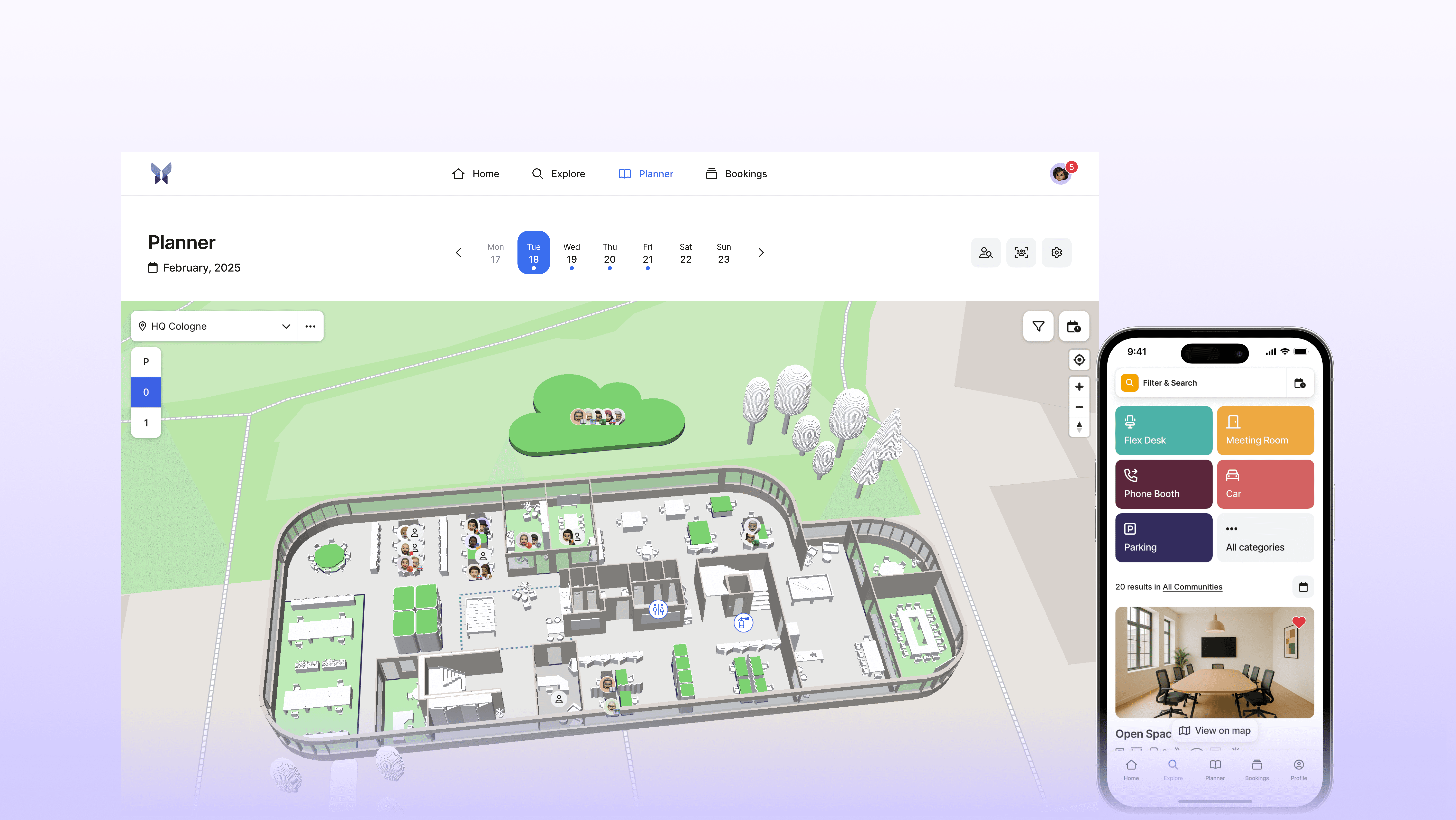
Hot Desk Booking in anny
Desk reservations in anny are made through intuitive 3D floor plans that offer a clear overview of availability and amenities. A few clicks are all it takes to book a desk—whether via the web interface, the mobile app, or directly from Microsoft Teams.
Flexible booking rules—such as lead times, buffer times between bookings, or team-specific zones—can be configured granularly and adapted to different needs.
Advanced Workplace Features
Beyond hot desk booking, anny integrates other features that support the hybrid workday: meeting rooms can be booked with the same logic, parking spaces are managed digitally, equipment can be reserved. Visitor management and event organization complement the portfolio.
Attendance summaries show which colleagues are in the office on a specific day—a feature that significantly eases coordination in hybrid teams and contributes to a measurable reduction in no-shows.
Data Protection and Integration
As a German solution with server infrastructure in Germany, anny meets GDPR requirements. The ISO 27001 certification confirms the security level for companies with increased demands.
Integration into Microsoft 365, Google Workspace, and common HR systems is done via documented interfaces. Single Sign-On is standard, and the setup is possible without extensive IT projects.
Conclusion and Next Steps
In 2026, Hot Desk Booking Software is not an optional addition but a necessary response to the reality of hybrid work models. Companies managing their office spaces without professional systems struggle with efficiency losses, employee frustration, and a lack of data foundation for strategic decisions.
The right solution provides transparency over availability, integrates seamlessly into existing workflows, and delivers the insights that facility managers and workplace admins need for informed space decisions. The impact goes beyond mere cost savings: Employees experience more flexibility and less frustration, and teams can better coordinate their collaboration.
Concrete Recommendations
Analyze the Current Situation: What is the actual office utilization rate? What problems occur regularly? This assessment forms the basis for all subsequent steps.
Define Specific Requirements: Which integrations are essential? Which features must be present, and which are nice-to-have? A prioritized list facilitates the evaluation.
Involve All Stakeholders: IT, HR, and Facility Management should evaluate together. Different perspectives reveal requirements overlooked by individual departments.
Pilot Phase before Rollout: Test the preferred solution with one department or location before company-wide rollout. Experiences from the pilot contribute to configuration and change communication.
For those seeking a holistic approach to workplace management, a demo can be arranged with anny to see how Hot Desk Booking can be embedded into an integrated system for modern workplace organization.






