

March 6, 2026
Optimize office space efficiently: Reduce fixed costs with data, analytics & anny
6 mins

Key Insights
After personnel costs, office space is the second-largest cost item for companies, and hybrid work often leaves it dramatically underutilized. Here are the key takeaways at a glance:
Office space is an underestimated cost factor: After personnel expenses, it accounts for 20-30% of total operating costs, especially for mid-sized companies in the DACH region.
20-40% of space remains permanently unused: Many companies still plan based on pre-COVID standards and have no reliable utilization data.
Data-driven workplace analytics create transparency: Tools like anny objectively show which spaces are used when, where vacancies exist, and which days see peak utilization.
Tangible cost savings are measurable: With data-driven space reduction, rent, energy, and operating costs can be significantly reduced.
Optimized spaces improve the work environment: Fewer empty rooms and more vibrant zones for collaboration and focused work increase employee satisfaction.
Data also enables smarter building operations: When usage patterns become visible, energy, lighting, and cleaning can be targeted to occupied areas.
Why Office Spaces Need to Be Rethought
The world of work in the DACH region has changed fundamentally in recent years. The pandemic accelerated the adoption of hybrid work models, in which employees split their time between working from home and the office. The result: offices that were designed for 100% occupancy are half empty on many days.
A concrete example illustrates the issue: A company with 500 employees in Berlin-Mitte rents 5,000m² of office space. In reality, only 250-300 people show up on average per day – that corresponds to 50-60% occupancy. The result: annual extra costs of €210,000 to €300,000 for space that no one uses.
Traditional space planning with fixed square meters per person and long-term lease agreements no longer fits fluctuating attendance levels. High fixed costs for rent, utilities, and cleaning meet high vacancy.
Typical utilization in a hybrid work office: Monday: ~30 % | Tuesday: ~90 % | Wednesday: ~70 % | Thursday: ~90 % | Friday: ~25 %
This article is aimed at Workplace Managers, Office Managers, HR leaders, Facility Managers, and CFOs who want to optimize their office costs through data-driven decisions.
For an initial space calculation, the office space calculator from anny can help. Enter your data in less than 2 minutes and find out how much office space your work model requires.
Common Pitfalls: How Office Spaces Are Still Being Wasted Today
Many companies still base their office planning on the pre-Corona standards of 2019. Back then, GEFMA standards were followed with fixed ratios: one desk per person, 10-15% of the space for meeting rooms, 8-12 square meters per full-time equivalent. These norms are based on an assumption that no longer holds true today: nearly 100% daily presence.
The reality is different:
Weekday | Typical Utilization | Challenge |
|---|---|---|
Monday | 30% | Almost empty site, full operating costs |
Tuesday | 80-90% | Desks scarce, meeting rooms overloaded |
Wednesday | 60-70% | Unequal distribution across floors |
Thursday | 80-90% | Peak load, parking spaces fully booked |
Friday | 25-30% | Home office dominates, office largely empty |
Private offices and fixed areas often operate at less than 50% capacity.
Hidden cost drivers emerge everywhere:
Permanently heated corridors and project areas without occupancy
Too many large conference rooms with only 20-25% usage
Empty zones that are still cleaned, heated, or air-conditioned
Energy costs of 2-4€ per m² monthly for unused areas
A typical real-world example: A tech company with 200 employees decides to expand meeting room capacity – a classic gut-feel decision. However, later data analysis shows: Small rooms for 2–4 people achieve an 85% utilization rate, while large conference rooms are only used 25% of the time. The company would have invested in the wrong resource.
Data Over Gut Feelings: Measure Office Utilization Objectively
Data-driven space optimization is based on three fundamental questions:
Who shows up when? – Daily and weekly attendance patterns
Which spaces are being used? – Desks, meeting rooms, project zones
What remains permanently empty? – Chronically unused areas and resources
The key metrics for a robust analysis are:
Metric | Target Value | Significance |
|---|---|---|
Desk Utilization | > 70% | Foundation for Desk-Sharing Ratio |
Meeting Room Utilization | 60-80% | Indicates demand for room sizes |
Peak Hours | 10 AM - 4 PM | Capacity Planning |
No-Show Rate | < 15% | Booking Discipline |
An important point for HR and works councils: It's about anonymous, aggregated data — not employee surveillance. Pseudonymization and opt-in check-ins ensure that there is no individual performance monitoring.
Traditional Methods vs. Digital Workplace Analytics:
Method | Accuracy | Effort | Cost |
|---|---|---|---|
Manual Counting | < 50 % | High | €500-2,000 per Audit |
Excel Sheets | 40-60 % | Medium | Personnel Costs |
Sporadic Inspections | 30-50 % | Medium | Personnel Costs |
Booking Software (e.g., anny) | 80-90 % | Low | SaaS License |
Workspace Management Tools like anny automatically generate this data from bookings, check-ins, and cancellations and display it on clear dashboards.
Efficiently Utilize Office Spaces with Workplace Analytics
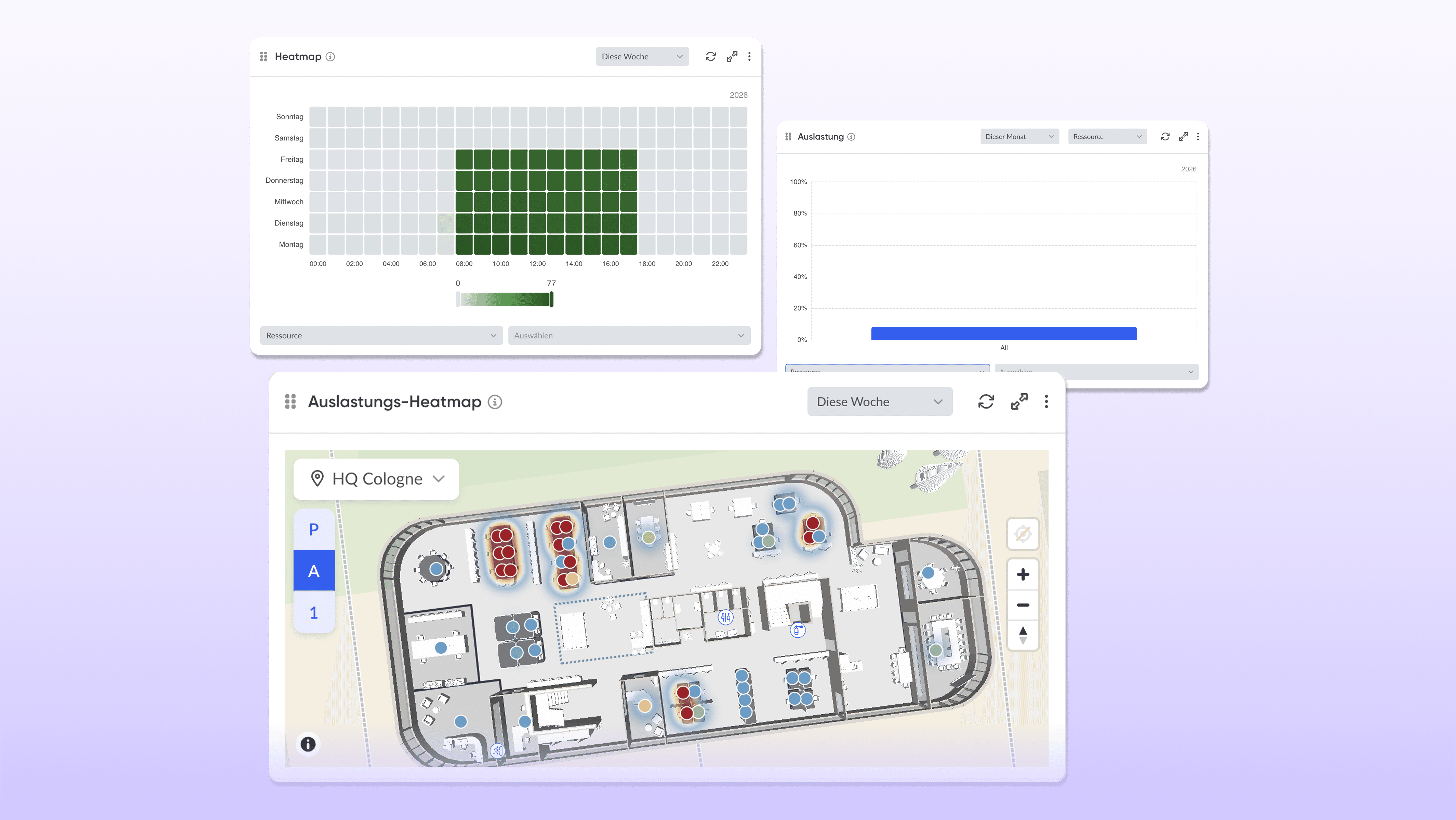
Workplace Analytics provides the foundation for well-informed decisions about space strategy. The necessary data is usually generated through digital workplace management platforms, where employees book desks, meeting rooms, or parking spaces. These bookings can be used to derive utilization patterns and analyze office space based on data.
From the data, admins can quickly identify key questions: Which locations have remained below their peak utilization for months? Which floors could be consolidated? Where does repurposing underused spaces hardly pay off?
These patterns can be turned into concrete actions:
Rightsizing: Adjusting space to actual usage
Consolidation: Combining floors or locations
Repurposing: Transforming unused areas into focus zones or collaboration spaces
Analytics should be used continuously — for example, with monthly reports and quarterly reviews. This makes it possible to review the impact of measures and adjust strategies if needed.
Example KPIs for CFO reports:
Average workstation utilization: 62%
Savings potential with 25% space reduction: €105,000 per year
Underutilized zones: 3 of 8
Utilization analyses of workstations and resources
A platform like anny collects booking data from desks, meeting rooms, parking spaces, and special rooms such as project rooms or creative zones. Utilization is displayed per resource and resource type — for example, the average use of a desk cluster in Q3 2026.
This helps companies quickly see whether they have too many or too few workstations for a team or a location.
For example: A location in Munich with 120 desks shows an average of only 65 occupied workstations per day — that corresponds to 54% utilization. Based on this data, the company introduced a desk-sharing ratio of 0.7 desks per FTE and reduced the number of workstations to 85. Annual savings: around €75,000.
Building heatmaps and space visualization
With anny, office space can also be analyzed spatially. 3D floor plans visualize the use of individual areas. Heatmaps show at a glance which zones are permanently underused (“cold”) or heavily utilized (“hot”).
For example: On one floor, the north side with former individual offices is barely booked, while open team areas in the south are regularly full. The analysis led to the removal of the individual offices and the creation of additional focus pods — space efficiency increased by 18%.
At the same time, such usage patterns are also relevant for building operations. If heatmaps show that employees spend most of their time in a specific zone on Wednesdays, other areas can be temporarily scaled down — for example, heating, ventilation, or lighting. Instead of operating the entire office permanently, energy consumption and operating costs are concentrated on the spaces that are actually used.
Analysis by days, times, teams, and locations
Workplace Analytics also enables evaluations by weekdays, times of day, teams, or locations. Platforms like anny make it visible when offices are actually used.
For example, the data shows:
Hamburg: High utilization on Tuesday and Thursday
Cologne: Peak on Wednesday
Across locations: Very low usage on Mondays and Fridays
These insights help teams coordinate shared in-office days and use space more efficiently. In addition, CFOs and facility managers can make informed decisions about location strategies — for example, consolidating multiple sites.
At the same time, this data also enables smarter control of building operations. If, for example, only about 30% of workstations are used on Wednesdays and most bookings are concentrated in a specific zone, other areas can automatically switch to energy-saving mode.
Identifying the most and least used resources
Another advantage of data-driven Workplace Analytics: companies can quickly see which resources are in particularly high demand and which are hardly used at all.
anny, for example, shows the most frequently booked meeting rooms, desk zones, or parking spaces and at the same time makes rarely used resources visible. This transparency helps plan investments more strategically and continuously optimize office space. Typical pattern:
Resource type | Utilization | Recommendation |
|---|---|---|
Small meeting rooms (2-4 people) | 90 % | Increase capacity |
Large conference rooms (12+ people) | 20 % | Repurpose or subdivide |
Focus pods | 85 % | Install more |
Project rooms | 35 % | Make more flexible to use |
These analyses help plan new purchases such as additional phone booths or meeting pods in a targeted way. The evaluations should be integrated into monthly reports for management and the facility team.
Plan office spaces efficiently: From analysis to space strategy
The path from analysis to a concrete space strategy follows a structured process:
Step 1: Current State Analysis (3-6 Months)
Capture utilization data with anny and define a baseline. Take seasonal effects such as vacation periods or project peaks into account.
Step 2: Define Goals
Set concrete goals – for example, 20% space reduction by the end of 2026, higher room utilization, or an improved employee experience.
Step 3: Develop Scenarios
Run the numbers for different options: combine floors, sublet partial spaces, consolidate locations. The data provides the basis for well-founded decisions.
Step 4: Implement Adjustments D
Adjust desk-sharing ratios, optimize the mix of room types, and create new zones for collaboration vs. focus.
Step 5: Continuous Monitoring
Use anny’s analytics dashboards to compare target vs. actual, track KPIs, and report regularly to stakeholders.
Reducing Fixed Costs: How Efficient Space Utilization Directly Impacts Expenses
Even a moderate space reduction of 15-25% delivers significant savings on rent and operating costs.
Example calculation:
Item | Before optimization | After 25% reduction |
|---|---|---|
Area | 1,000 m² | 750 m² |
Net rent (30 €/m²) | 30,000 €/month | 22,500 €/month |
Additional costs (5 €/m²) | 5,000 €/month | 3,750 €/month |
Annual costs | 420,000 € | 315,000 € |
Annual savings | – | 105,000 € |
In addition to rent, space optimization also impacts other costs:
Electricity and heating: Less space means lower energy consumption
Cleaning: Adjusted intervals in less-used areas save 1-2 €/m²
Security and reception: Consolidated spaces reduce staffing requirements
anny data on daily utilization enables dynamic control: heating only in occupied zones, cleaning based on actual usage. In combination with IoT automations, this control can even be automated. Through integrations such as Shelly, lights, for example, can be switched on only when a booking starts. If a room remains unbooked, lights, ventilation, or other devices also stay automatically off. This creates a direct link between actual usage and building operations – and prevents unnecessary energy and operating costs.
The savings can be reinvested – in more modern work environments with acoustic elements, phone booths, and collaboration spaces that improve the working environment for everyone.
anny as an enabler for efficient office space utilization
anny is a German SaaS platform that makes all resources—desks, meeting rooms, parking spaces, equipment, events, visitors—centrally bookable. All bookings and check-ins automatically provide the data basis for reliable workplace analytics.
The key advantages:
No additional sensors needed
Hosted in Germany, GDPR-compliant
ISO 27001 certified
Seamless integration into existing systems (calendars, HRIS, smart locks, SSO)
anny is suitable for companies of all sizes as well as public institutions and many more who want to make data-driven decisions about their office spaces.
Desk and room booking as a data source
Employees book workspaces, meeting rooms, and parking spaces via the web, app, MS Teams, or directly in the calendar through anny. Bookings, cancellations, and check-ins are automatically included in occupancy statistics—without extra effort for the office team.
Rules and workflows can be individually controlled:
Maximum occupancy per zone
Booking windows and lead times
Team quotas and permissions
A company with multiple locations can set different booking rules for each site and still see all occupancy data centrally. This central data basis is crucial for reliable spatial decisions.
Workplace analytics & 3D maps with anny
anny provides 3D maps that mirror the real office environment with workspaces, rooms, and zones. In the analytics dashboards, managers get an overview of:
Occupancy per location and floor
No-shows and cancellation rates
Resource usage by type
Trends over time
Specific example: A monthly report for Q3 2025 shows occupancy per location (Berlin: 72%, Munich: 68%, Cologne: 45%). The data led to the decision to give up a floor in Cologne.
Reports can be exported—for management presentations, lease negotiations, or discussions with landlords.
Implementation: Achieve efficient office space utilization in 4 easy steps with anny
Step 1 – Record Status
Introduce anny, map initial desks and rooms, define booking rules, onboard staff. The rollout is smooth thanks to web, app, and calendar integration. During implementation, a personal CSM is at hand to guide through the process.
Step 2 – Collect Data
8-12 weeks of data collection without major structural decisions to establish a robust foundation. Initial trends are noticeable after just 4 weeks.
Step 3 – Analyze & Develop Scenarios
Evaluate heatmaps, peak days, and resource usage. Collaborate with HR, Facility, and Finance to interpret and identify opportunities.
Step 4 – Implement Measures Consolidate spaces, adjust lease agreements, repurpose areas, refine desk-sharing models, and adjust energy and cleaning schedules.
This cycle should be repeated regularly — at least annually — to adapt to changing work practices and team structures.
Conclusion: Utilize office spaces efficiently – make decisions based on data, not guesswork
Hybrid work models without data-driven management almost inevitably lead to surplus areas and unnecessary fixed costs. The answer to this challenge doesn't lie in gut feeling but in transparency about actual office usage.
With Workplace Analytics, companies can identify which areas are truly needed and which are not. The result: targeted space reduction, optimized resources, and a better working environment for everyone.
anny provides exactly this transparency as a central booking and analytics platform. GDPR-compliant, hosted in Germany, and suitable for companies, public institutions, and universities.
Next Steps:
Start for free for smaller teams
Schedule a demo for cross-location solutions
Evaluate your own space situation based on actual data and make decisions that pay off.
FAQ on Efficient Use of Office Space
How long should we collect data before making decisions on space reduction?
For reliable decisions, we recommend at least 12-20 weeks of data collection with anny. This allows for consideration of seasonal effects such as holiday periods or project peaks. In industries with significant fluctuations – like consulting with pronounced project phases – observing for half a year can be beneficial. Initial trends can be identified after the first 4 weeks, but major rental decisions should be based on longer data periods.
How can works councils and employees be involved in the introduction of Workplace Analytics?
Transparency and communication are crucial. Clearly explain early on what data is being collected and that there is no individual performance monitoring. A company agreement for anonymized, aggregated evaluations builds trust. Workshops or Q&A sessions for employees help convey benefits like better workspace availability and modern areas.
How does efficient use of space impact employee satisfaction?
It's not about merely cutting space, but about creating areas that match actual usage and working styles. Modern, well-utilized spaces with focus and collaboration zones are generally perceived as more attractive than half-empty open-plan offices. Surveys show: Employee satisfaction increases by 15-25% in optimized spaces. Involve employees in the space strategy through feedback sessions.
For what company sizes is data-driven space optimization with anny worthwhile?
A data-driven solution typically pays off from around 50-100 office workstations, as space and operating costs weigh heavily here. anny is scalable – from smaller teams with one location to organizations with multiple locations and campus structures. Evaluate the potential benefit through a simple comparison: annual rental and operating costs vs. potential savings from just 10-20% space reduction.






