

Amira van Weegen
Marketing Manager
January 8, 2026
Office Space Layout: The Complete Guide to Optimal Office Planning 2026
7 min

Essential Principles for Optimal Office Space Planning
Modern office planning today is guided by clear legal minimum requirements as well as proven benchmarks for ergonomic and efficient work environments. The ASR A1.2 defines the lower limit: 8 m² for the first workstation and 6 m² for each additional one.
For a balanced room layout, typical space allocations have been established that serve as a guide: around 60% workstations, 20% meeting areas, 15% communal spaces, and 5% retreat zones. At the same time, hybrid work models and desk sharing are fundamentally changing space requirements and can reduce the required space by 20–30%.
With data-driven space planning and booking systems, companies also gain a reliable basis for using office spaces more efficiently and sustainably reducing costs, a crucial success factor for office planning in 2025.
How can I optimally plan the room layout for my team?
The world of work is undergoing a profound transformation. Where decisions once revolved around choosing between private or open-plan offices, New Work, hybrid working models, and flexible team structures now demand entirely new concepts for office planning. This brings a central question into focus: How much office space do I need for a certain number of people, and how do I allocate this space effectively?
This challenge can no longer be solved solely by the number of square meters per workspace. Modern space allocation must meet the legal requirements of workplace regulations, be economical, and simultaneously promote well-being, productivity, and collaboration. At the same time, home office, desk sharing, and activity-based working are changing how spaces are utilized, rendering traditional planning methods increasingly inefficient.
This guide offers a practical introduction to optimal space allocation in the office. We demonstrate which minimum requirements apply, how space can be realistically planned for different team sizes, and the role data-driven tools play in optimization. In doing so, we combine proven principles of workplace design with the current trends of the digital and hybrid working world.
Legal Foundations and Minimum Requirements
The foundation of every office planning is based on the statutory provisions of the Workplace Ordinance (ArbStättV) and the Technical Rule ASR A1.2. These not only define minimum areas but also important aspects such as room height and traffic routes that must be considered when designing workspaces.
Minimum Areas According to ASR A1.2
The ASR A1.2 establishes clear guidelines for the floor space of workplaces:
First Workplace: at least 8 sqm of floor area
Each Additional Workplace: at least 6 sqm of additional floor area
Movement Area at Computer Workstations: at least 1.50 sqm per person
This minimum size refers to the pure workspace area without traffic routes or communal areas. In practice, this means that a 3-person office must have at least 20 sqm (8+6+6) of floor area.
Ceiling Height and Other Structural Requirements
The Workplace Ordinance also defines minimum requirements for ceiling height:
Up to 50 sqm of Floor Area: at least 2.50 m ceiling height
50-100 sqm of Floor Area: at least 2.75 m ceiling height
Over 100 sqm of Floor Area: at least 3.00 m ceiling height
Traffic Routes and Escape Routes
The following guidelines apply to the planning of traffic areas:
Main Traffic Routes: at least 0.9 m wide for up to 5 people
Access to Workplaces: at least 0.6 m wide
Escape Routes: depends on the number of people and type of building
These statutory minimum requirements are the starting point for any office planning but should often be exceeded in practice to ensure an appropriate work atmosphere and sufficient comfort.
Space Requirements per Person by Office Type
The actual space requirement per person varies significantly depending on the office concept, work models, and equipment standards. While the legal minimum requirements define the legal framework, successful companies follow proven guidelines that promote the well-being and efficiency of their teams.
Office Type | Minimum Space | Comfort Zone | Premium Standard |
|---|---|---|---|
Private Office | 8-10 sqm | 12-15 sqm | 16-20 sqm |
Team Office (2-4 People) | 6-8 sqm/Person | 10-12 sqm/Person | 14-16 sqm/Person |
Group Office (5-25 People) | 8-10 sqm/Person | 12-14 sqm/Person | 15-18 sqm/Person |
Open Space Offices | 10-12 sqm/Person | 14-16 sqm/Person | 18-22 sqm/Person |
Private and Small Offices (1-4 People)
Private offices offer maximum concentration and privacy but also require the highest square footage per person. The guideline of 8-10 sqm per person allows for an ergonomic workspace design with a standard desk (160 x 80 cm), office chair, and sufficient room to move.
When setting up, consider the following aspects:
Height-adjustable desks as standard for ergonomic working
Adequate storage through wall shelves and mobile pedestals
Personalization options to increase employee satisfaction
Optimal positioning for natural lighting
Group Offices (5-25 People)
Group offices offer a good balance between communication and concentration. With 10-12 sqm per person, they provide workspaces that enable both individual work and spontaneous collaboration.
Successful design principles include:
Zoning with half-height partitions or mobile dividers
Shared areas for printers, archiving, and short meetings
Acoustic measures to reduce noise
Flexible furniture for changing team configurations
Open Plan Offices (from 400 sqm / 25+ People)
Open Space offices require 12-15 sqm per person, which is the highest space requirement due to additional traffic areas, retreat areas, and acoustic zones needing to be planned. The higher space demand is justified by the more complex requirements for noise protection and the necessity of various work zones.
Central planning aspects:
Activity-Based Working with various work zones
Retreat areas and phone booths for undisturbed communication
Flexible furniture for changing team setups
Professional acoustic planning to reduce noise
Optimal shares of space zones
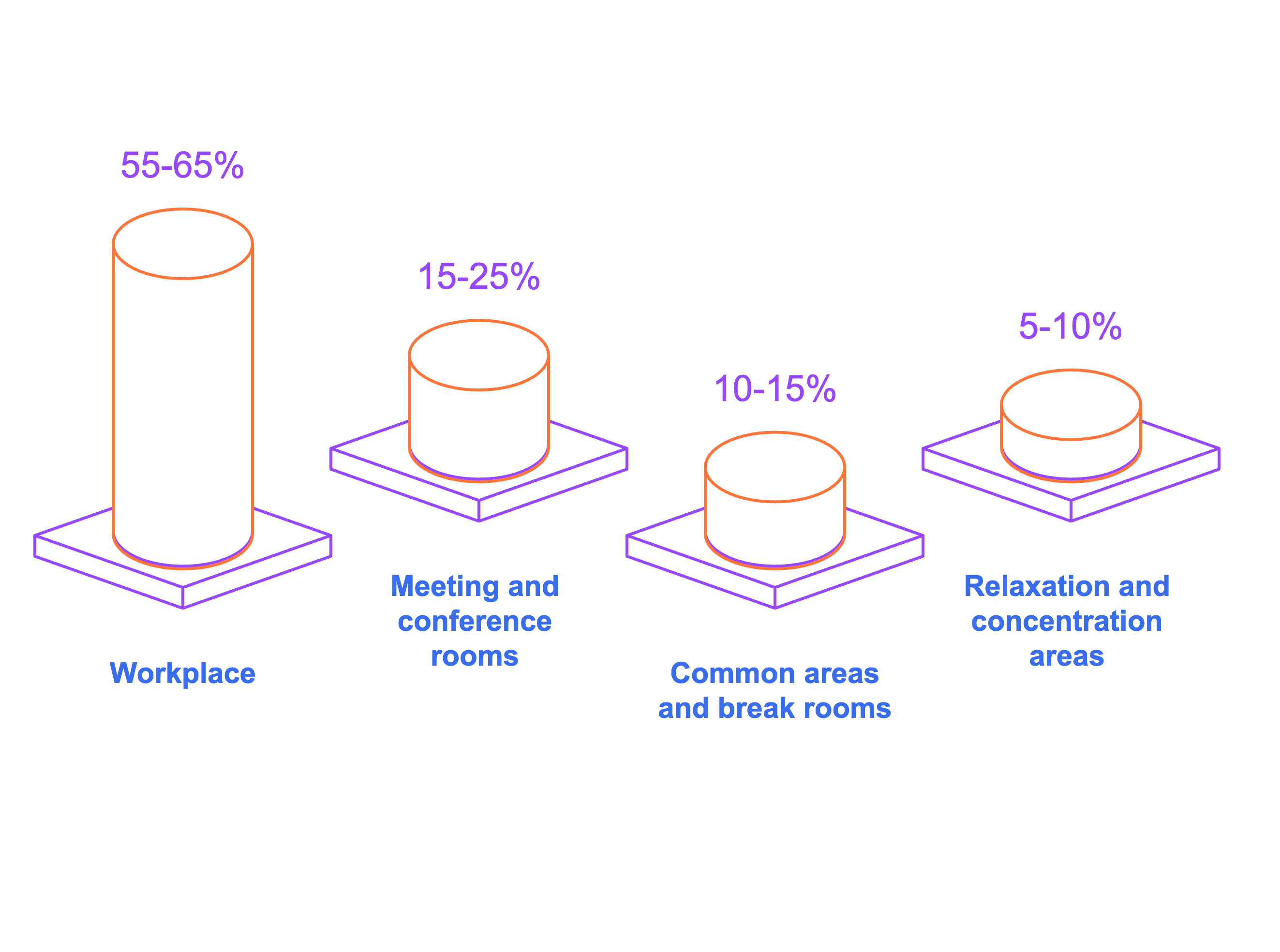
A well-thought-out zoning is the key to creating functional office spaces that optimally support different work types. The division of available space should be tailored to the actual workflows and needs of the team, with the following benchmarks proving effective in practice:
Workspaces (55-65% of total area)
The main portion of office space is dedicated to actual workstations. This zone includes both fixed desks and flexible workspaces in hybrid work models. For a team of 50 people in an 800 sqm office, for example, 480-520 sqm would be reserved for workspaces.
Important design principles:
Mix of fixed and flexible workstations according to the desk-sharing ratio
Ergonomic equipment with height-adjustable desks
Optimal arrangement for natural lighting and outdoor views
Sufficient distance between workstations for privacy
Meeting and Conference Rooms (15-25% of total area)
Meeting rooms are essential for teamwork and customer interaction. As a guideline: one meeting spot per eight workstations. The size distribution should cover various meeting formats:
Small Meeting Rooms (4-6 people): 12-18 sqm for team sessions
Medium Conference Rooms (8-12 people): 20-30 sqm for project discussions
Large Presentation Rooms (15+ people): 40+ sqm for all-hands meetings
Modern equipment includes:
Technical equipment for hybrid meetings and video conferences
Flexible booking systems for optimal utilization
Professional soundproofing and blackout options
Variable table configurations for different meeting formats
Community and Break Areas (10-15% of total area)
These areas promote informal exchange and support corporate culture. According to the workplace ordinance, a break room with at least 6 sqm is required for 10 or more employees.
Typical areas include:
Kitchen Area: Basic equipment with refrigerator, microwave, and dishwasher
Lounge Areas: Relaxed seating groups for informal conversations
Bistro Zone: Standing tables for quick meetings over coffee
Event Space: Flexible area for company events and larger gatherings
Retreat and Focus Areas (5-10% of total area)
In modern office environments, retreat options are essential for focused work and confidential conversations. This category includes:
Phone Booths: Soundproof cabins for private calls
Think Tanks: Individual workplaces for concentrated project work
Quiet Rooms: Relaxation areas for short breaks
Creative Rooms: Inspiration spaces for brainstorming and innovation
Optimal zoning also considers traffic routes and ensures that different work modes do not disturb each other. For example, quiet zones should not be located near major traffic paths.
Practical examples for various team sizes
The theoretical benchmark values only gain practical relevance through concrete application examples. The following examples show realistic space allocations for typical team sizes, taking into account both legal requirements and modern work demands.
Startup Office for 5-10 People (80-120 sqm)
For a growing startup with 8 people, the following layout on 120 sqm is recommended:
Work Area (80 sqm - 60%)
Open space design with flexible workstations
10 sqm per person for ample movement
Height-adjustable desks for various work types
Shared printer and archive zone
Meeting Room (15 sqm - 15%)
Flexible space for 4-8 people
Interactive presentation technology for client meetings
Mobile furniture for different meeting formats
Kitchen-Lounge Combination (20 sqm - 20%)
Central hub for breaks and informal meetings
Fully equipped kitchen with dining area
Lounge corner for relaxed conversations
Phone Booth and Tech (5 sqm - 5%)
Soundproof booth for private conversations
Tech room for server and network equipment
Medium-sized Business Office for 25 People (350-420 sqm)
An established company with 25 employees requires a more differentiated layout on 415 sqm:
Workplace Areas (250 sqm - 64%)
Mix of team zones and individual workstations
10 sqm per person including circulation areas
Various work environments for different tasks
Meeting Rooms (60 sqm - 16%)
A 4-person meeting room (12 sqm) for team discussions
An 8-person conference room (20 sqm) for project meetings
A 15-person presentation room (28 sqm) for client appointments
Professional video conferencing equipment
Break Area with Kitchen (45 sqm - 12%)
Spacious break room with adjacent outdoor area
Fully equipped kitchen for office lunches
Various seating groups for different needs
Retreat Areas (30 sqm - 8%)
4 phone booths for uninterrupted communication
2 think tanks for focused individual work
Bookable time slots via digital booking system
Large Enterprise Location for 100+ People (1,200+ sqm)
A corporate office for 120 people requires complex zoning on 1,500 sqm:
Activity-Based Working Zones (900 sqm - 60%)
6-8 different work environments depending on the activity
Collaboration hubs for intensive teamwork
Focus areas for concentrated individual work
Hot desks for flexible working
Meeting Landscape (300 sqm - 20%)
15 meeting rooms of various sizes
Ratio 1:8 (one meeting place per eight workstations)
Specialized rooms like creative workshop and boardroom
Hybrid meeting facilities for remote participants
Community Areas (225 sqm - 15%)
Generous bistro with various seating options
Event space for corporate events and all-hands meetings
Various break zones for different needs
Special Rooms (75 sqm - 5%)
Reception area with waiting zone
Showroom for product presentations
Separate retreat floors for focused project work
The examples show: As team size increases, not only does the absolute space requirement grow, but also the complexity of the layout. Larger offices require more differentiated zoning and professional planning support.
Impact of Hybrid Work Models on Space Planning
The widespread adoption of remote work and flexible working models has fundamentally transformed office planning. Recent studies show that German offices are only 65-75% occupied on average, as many employees switch between the office and home office. This development opens new opportunities for more efficient space utilization.
Space reduction through intelligent desk sharing
Desk sharing enables significant savings in office space. The sharing ratio indicates how many employees share one workstation:
Sharing ratio examples:
1:1.3 - 10 employees share 8 workstations (with 20% home office share)
1:1.5 - 10 employees share 7 workstations (with 30% remote work)
1:2.0 - 10 employees share 5 workstations (with 50% hybrid work)
With a 40-60% remote share, it's realistic to save 20-40% of workspace. A company that previously needed 1,000 sqm for 100 workstations can reduce to 700 sqm with a sharing ratio of 1:1.4, significantly saving on rental costs.
To find out how much office space you really need for your hybrid work model, use the office space calculator from anny. With just a few clicks, you can discover your real needs.
Investment in better equipment
The saved rental costs can be invested in higher-quality equipment:
Premium workstations: High-quality, ergonomic furniture for all workstations
Better technology: Modern IT equipment and professional video conferencing systems
Additional functional areas: More meeting and collaboration rooms
Wellness areas: Relaxation rooms and zones for better work-life balance
New room types for hybrid work
Hybrid work models require new room concepts that meet changed requirements:
Collaboration Hubs
Interactive technology for spontaneous and planned collaboration
Flexible furniture for different team sizes
High-quality audio-video equipment for remote participants
Video call rooms
Professional equipment for external meetings
Optimal acoustics and lighting for online presentations
Easy booking via mobile apps
Hot desk areas
Fast IT connectivity for spontaneous office use
Clean desk policy with personal lockers
Different types of workstations for various preferences
Social magnets
Attractive communal areas as an incentive for office days
Event spaces for team building and informal exchange
Premium equipment in kitchen and break areas
Change management for flexible workplace concepts
The successful implementation of desk sharing requires accompanying measures:
Clear rules: Define booking policies and clean desk policy
Digital tools: Implement user-friendly booking systems
Employee training: Provide training for new working methods and tools
Continuous feedback: Regular evaluation and adaptation
The data shows: companies that thoughtfully implement hybrid working models can reduce space costs by 20% while simultaneously increasing employee satisfaction and productivity.
Data-Driven Optimization
Modern office planning increasingly relies on objective data rather than subjective assessments. Workplace and room booking systems combined with utilization analytics provide valuable insights for evidence-based decisions and continuous optimization of space allocation.
Booking systems as a planning foundation
Digital booking systems for workspaces and meeting rooms automatically collect extensive data on actual room usage. This information forms the basis for well-informed planning decisions:
Collect and evaluate real-time data
Workspace occupancy by weekdays and times of day
Identify popular vs. less-used workspaces
Meeting room booking behavior and actual usage duration
No-show rates for reserved rooms
Analyze user behavior
Preferred workspace types of different teams
Average duration of stay in the office
Seasonal fluctuations in office usage
Correlation between workspace quality and booking frequency
Identify peak times
Peak times for workplace and room bookings
Capacity constraints in various office areas
Optimal times for maintenance and cleaning
Demand forecasts for different scenarios
Utilization optimization through analytics
The systematic evaluation of usage data uncovers optimization potentials that remain hidden without data-driven analysis:
Identify underutilized areas
Workspaces with less than 30% occupancy
Meeting rooms with high cancellation rates
Functional areas without regular usage
Opportunities for repurposing or reducing space
Recognize overloaded zones
Areas with booking occupancy over 80%
Queues at popular workspaces
Frequent conflicts over limited resources
Need for additional capacities
Align employee feedback with objective data
Subjective perception vs. actual usage data
Discrepancies between desired and available workspaces
Validation of complaints about noise or lack of space
Make the success of improvement measures measurable
Cost optimization through intelligent space planning
Data-driven space planning leads to measurable cost savings in various areas:
Reduce rental costs
Accurate space planning based on real usage patterns
Avoidance of overcapacity and undercapacity
Informed decisions in contract negotiations
ROI calculations for different office concepts
Lower energy costs
Demand-driven air conditioning in used areas
Smart lighting control based on presence data
Optimized cleaning cycles for different room types
Energy efficiency through data-driven building technology
Optimize operating costs
Demand-driven maintenance and repair
Optimal catering planning for break areas
Reduction of vacancy costs
Secure investment decisions
Reliable data for office expansions or downsizing
Evidence-based furniture and equipment decisions
Measurable success metrics for renovation measures
Implement continuous success monitoring of implemented concepts
In short: Those who not only manage but truly understand spaces create an office that is more efficient, flexible, and significantly more attractive to employees.
Recommendations for Optimal Room Allocation
Successful office planning is a structured process that combines systematic procedures with flexible adaptation. The following recommendations are based on proven practices and help to avoid common planning mistakes.
Phased Implementation for Sustainable Results
Phase 1: Inventory Analysis and Needs Assessment (2-4 weeks)
The starting point of any planning is an honest analysis of the status quo. Conduct a comprehensive employee survey to capture real needs:
Document workplace preferences and frequent workflows
Identify current pain points like noise, lack of space, or unsuitable meeting rooms
Capture home office habits and presence times
Consider growth plans and future requirements
Simultaneously, collect objective data: How are existing spaces actually used? Which areas are over- or underutilized? This combination of subjective perception and objective facts forms the foundation for all further decisions.
Phase 2: Concept Development with All Stakeholders (3-6 weeks)
Develop various planning options and discuss them in a workshop with representatives from all departments. Consider:
Different work models and their space requirements
Budget and time frame for implementation
Future flexibility and scalability
Compliance with legal requirements
A structured dialogue between management, HR, IT, and employee representatives prevents costly planning mistakes and ensures broad acceptance.
Phase 3: Test a Pilot Area and Utilize Learnings (8-12 weeks)
Before redesigning the entire office, implement the concept in a representative pilot area first. This allows for:
Practical testing of planned spatial layout and zoning
Feedback on acoustics, lighting, and workplace quality
Optimization of booking systems and digital tools
Adjusting the desk-sharing ratio based on real data
The pilot phase should last at least 6-8 weeks to collect meaningful data and test all work scenarios.
Phase 4: Gradual Implementation with Accompanying Change Management (3-6 months)
Roll out the optimized concept gradually, ideally area by area or floor by floor. Accompanying measures include:
Training for new work practices and digital tools
Clear communication of rules and expectations
Feedback channels for continuous improvement
Phase 5: Monitoring and Continuous Optimization (ongoing)
Establish a system for continuous monitoring and regular adjustments:
Monthly occupancy reports and trend analyses
Quarterly employee surveys on satisfaction
Biannual review of spatial layout and zoning
Annual strategic planning for future developments
Checklist for Successful Office Planning
Before Planning:
[ ] Check legal requirements according to ASR A1.2
[ ] Define budget and time frame
[ ] Identify and involve stakeholders
[ ] Inventory of the current situation
During Planning:
[ ] Play through different scenarios
[ ] Plan flexibility for future changes
[ ] Consider technical infrastructure
[ ] Professional planning of acoustics and lighting
After Implementation:
[ ] Regularly measure occupancy and satisfaction
[ ] Systematically collect and evaluate feedback
[ ] Make adjustments based on objective data
[ ] Document and communicate successes
FAQ - Frequently Asked Questions about Office Space Allocation
How do I calculate the space requirements for my team?
To calculate this, you need a few factors: the current team size, number of office days, and the number of areas in your office (e.g., number of meeting rooms). The easiest way to determine the space requirements is by using the office space calculator from anny, which you can find here. The office space calculator considers that there may be different occupancy levels in your office depending on the day, providing you with a realistic idea of your needs.
How do I successfully implement a desk-sharing concept?
A successful introduction of desk sharing is achieved when employees can always see which workspaces are available and how or when they can use them. A workspace booking system like anny offers the necessary transparency and simplifies the entire process, as bookings, occupancy, and room availability become clear to everyone. This creates security in daily routines, and teams can quickly embrace the new work style. With a digital solution like anny, the transition to desk sharing generally runs much smoother and becomes routine faster. If you'd like to see for yourself, you can book a demo here quickly and without obligation.
How many meeting rooms do I need per employee?
As a rule of thumb, one meeting place is needed for every eight workspaces. For 40 employees, you should plan meeting capacity for 5 people. More important than the absolute number is the size distribution: 50% small rooms (4-6 people), 30% medium-sized rooms (8-10 people), and 20% large conference rooms (12+ people). Booking systems help measure actual usage and adjust as needed.
What is the optimal room height for different office sizes?
The legal minimum requirements are 2.50 m for areas up to 50 sqm and 2.75 m up to 100 sqm. For optimal well-being and better acoustics, higher values are recommended: 2.70-3.00 m for smaller offices and at least 3.00-3.20 m for open plan offices. Higher rooms not only improve air quality but also feel less confining and offer more flexibility for acoustic measures.






" height="38px" id="bH388uk2E" transform="translate(1 1)" width="118.00000395534607px"/></svg>)