

Amira van Weegen
Junior Marketing Manager
September 5, 2025
Room Booking System: Efficient Space Management for Modern Businesses
7 mins.

Introduction
Digitalization is transforming the way we work, including the management of office spaces. While Excel spreadsheets or simple Outlook calendars used to suffice for coordinating meeting rooms, these methods quickly reach their limits in modern, flexible work environments. Double bookings, inefficient use of space, and frustrated employees are often the result.
A professional resource booking system offers a solution: It digitalizes and automates the entire space management process, creates transparency, and optimizes the use of available rooms. In this article, you'll learn everything about the features, benefits, and challenges of modern resource booking systems and how anny can assist in this.
What is a room booking system?
A room booking system is a specialized software solution that helps organizations efficiently manage, reserve, and optimize their spaces. These digital systems have evolved from simple calendar-based solutions to comprehensive workplace management platforms that go far beyond mere room reservations.
Core Features of Modern Room Booking Systems
Real-time room availability
Automated bookings and resource management
Booking of meeting rooms, workstations, and conference rooms through various channels (Mobile App, Intranet, Outlook)
Integration of adjacent services such as catering, technical equipment, and parking
Differentiation from Traditional Solutions
Before the introduction of specialized room booking systems, rooms were often booked via Excel lists or directly in Outlook or Google Calendar. Employees had to manually check if a room was available at a particular time, which often led to confusion and double bookings. These methods do not offer real-time visibility into the exact occupancy of rooms, making planning difficult as there is no automatic availability check or room suggestion. In contrast, professional room booking systems enable centralized, transparent, and automated management of room reservations with advanced features.
Target Audiences for Room Booking Systems
Companies of all sizes: From startups to large corporations
Coworking Spaces: Coordination of flexible workspaces
Educational Institutions: Management of seminar rooms, labs, and exam rooms
Public Administration: Citizen appointments and internal meetings
Difference Between Internal, External, and Complete Room Booking Systems
Internal systems focus on managing rooms for their own employees
External systems enable rental to third parties with payment processing
Complete solutions combine both approaches and offer maximum flexibility
Benefits of Room Booking Systems
The implementation of a professional room booking system brings numerous measurable benefits for organizations of all sizes.
Real-time Transparent View of Available Rooms
A central dashboard provides an at-a-glance overview of which rooms are available, what equipment they offer, and when they will be free again. This transparency eliminates time-consuming phone calls and emails between departments.
Avoidance of Double Bookings and Conflicts
Automatic availability checks make double bookings impossible. The system automatically blocks overlapping bookings and suggests alternative rooms or times.
Reduction of Organizational Effort
Studies show that companies can reduce their administrative effort by up to 70% through digital room booking. Automated processes replace manual coordination and significantly shorten booking times.
Optimized Room Utilization Through Data-driven Insights
Detailed usage statistics reveal patterns: Which rooms are overbooked? Which ones are rarely used? These insights enable informed decisions about space requirements and redesign.
Cost Savings in Meetings and Resource Management
By better utilizing existing rooms, companies can avoid additional rentals.
Improved Employee Satisfaction Through Simple Booking Processes
Intuitive operation and mobile availability increase acceptance among employees. Quick bookings without detours boost productivity and reduce frustration.
Drawbacks and Challenges
Despite the many advantages, room booking systems also present challenges that companies should consider when making a decision.
Initial Implementation Costs and Time Investment
The introduction of a room booking system requires investments in software, hardware, and possibly adjustments to the IT infrastructure. Depending on the complexity, implementation projects can extend over several months.
Need for Employee Training and Change Management
The shift from traditional booking methods to a new system may initially encounter resistance. Training and well-thought-out change management are therefore essential for success.
Data Protection and GDPR Compliance Requirements
Personal booking data must be stored and processed in compliance with GDPR. Providers with hosting locations in Germany offer additional security in this regard.
Key Features of Modern Room Booking Systems
When selecting a room booking system, certain core features should definitely be available to ensure maximum benefit.
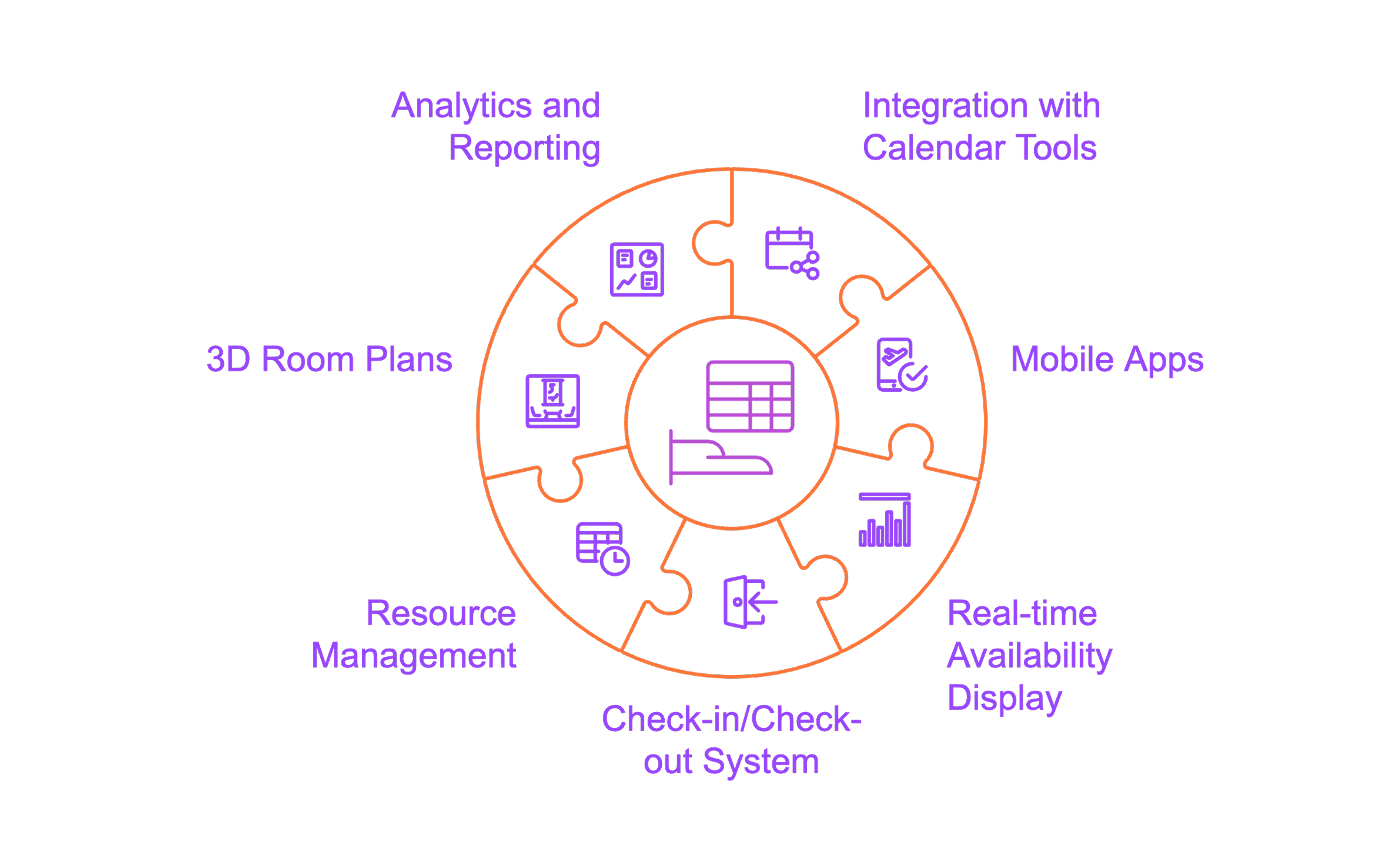
Integration with Outlook, Google Calendar & Microsoft Teams
Real-time synchronization with Microsoft 365, Outlook Exchange, and Google Workspace
Bi-directional updating of bookings and availabilities
Automatic inclusion of all room information in email invitations
Simplified appointment changes and cancellations without any communication gaps
Mobile apps for flexible room booking on the go
Book and manage rooms via smartphone or tablet
Location-based display of the nearest available rooms
Push notifications remind you of appointments and notify you of newly available rooms
Allows spontaneous last-minute bookings
Real-time availability display and digital door signage
Live overview of free rooms with capacity and equipment details
Prevention of double bookings through constant updates
Digital door signs show current occupancy status and allow ad-hoc bookings on-site
Display of user information and estimated occupancy duration
Check-in/Check-out system to optimize room utilization
Automatic release of rooms when check-in fails to occur (e.g., after 10-15 minutes)
Reduction of "ghost bookings"
Manual or automatic check-out function for early release
Resource management and additional services
Booking of projectors, flip charts, video conferencing equipment, catering, and other services
Availability check and technical details of resources
Integration into facility management systems for cleaning and setups
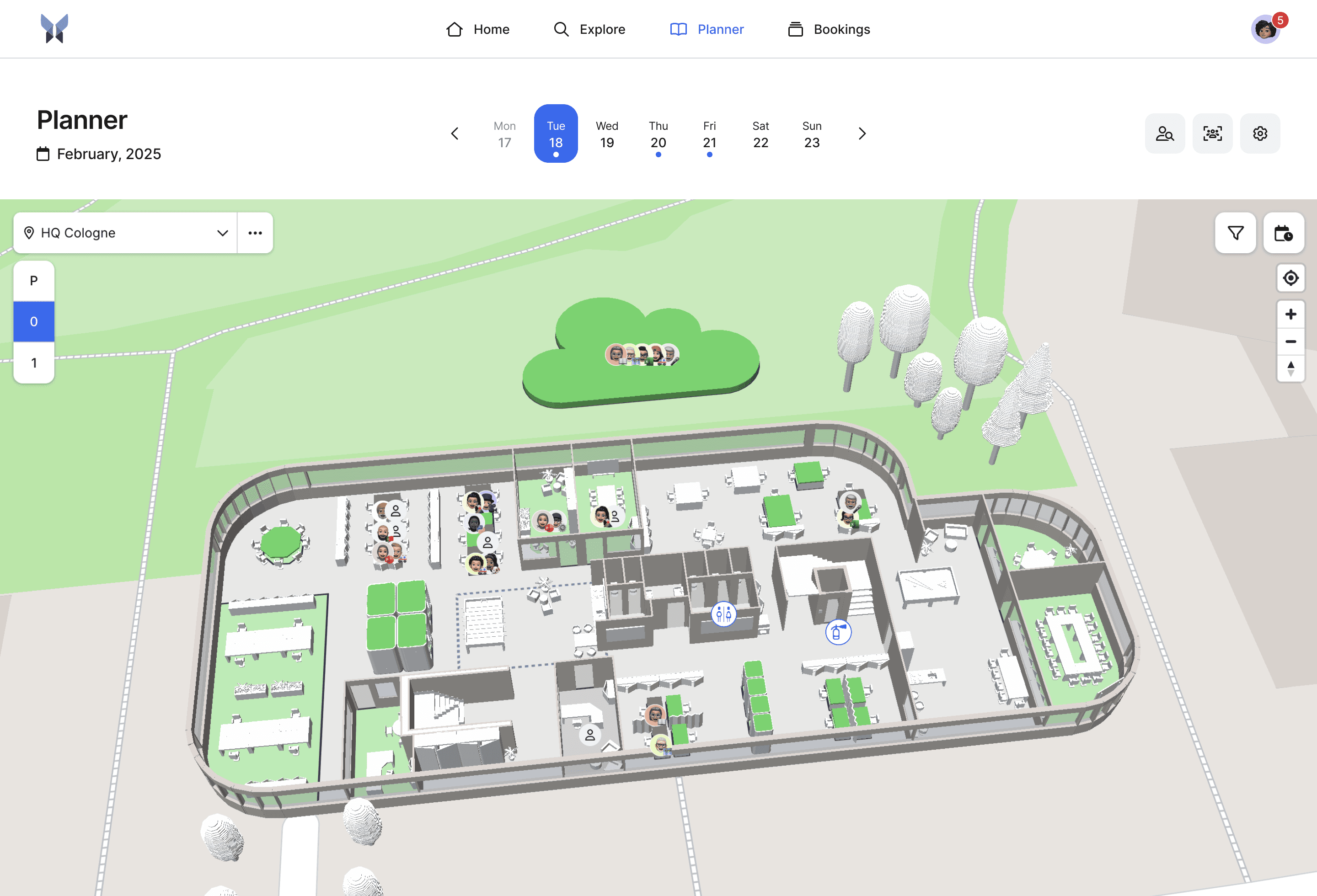
3D room plans and interactive building maps
Virtual navigation through floor plans and color-coded marking of available rooms
Display of interior furnishings, window seats, and key building areas
Automatic directions for users
Analytics, reporting & utilization data
Detailed reports on room utilization, peak times, and usage trends
Exportable dashboards
Cost-benefit analyses for investment optimization
Tips for Choosing the Right Room Booking System
Selecting the right room booking system requires careful planning and a systematic evaluation of various providers.
Needs Analysis: Define the number of rooms, users, and specific requirements
Start with a thorough assessment:
How many rooms need to be managed?
How many users will use the system?
What are the special requirements (external bookings, payments)?
What integration options are necessary?
Consider scalability for future company growth
Choose a system that can grow with your company. Modular solutions allow you to add features like workspace booking or visitor management later.
Review integration possibilities with existing IT infrastructure
Ensure the room booking system is compatible with your existing systems:
Active Directory for user authentication
Calendar systems (Outlook, Google, MS Teams)
Access control systems (Smartlock integrations)
Conduct test phases with different providers
Utilize free trials and demos to compare different systems. Test:
User-friendliness
Speed and reliability
Mobile usage
Administrative effort
Configuration options
Consider data protection and hosting location
For GDPR compliance, it's advantageous if the provider operates their servers in Germany. Also, review the provider's privacy policy and security measures.
Evaluate support quality and service level agreements
Good support is crucial for long-term success. Pay attention to:
Response times for issues
Training and onboarding offerings
Regular updates and developments
Best Practices for Successful Implementation
A well-thought-out implementation strategy is crucial for ensuring your room booking system is successfully adopted.
Start with a phased rollout using a pilot project
Begin with a pilot project in one department or part of a building. This allows you to gather experiences and optimize processes before rolling out the system company-wide.
Plan employee training and onboarding
Invest sufficient time in training for all user groups:
End Users: Basic booking functions, mobile app
Administrators: System configuration, user management, reporting
Office Management: Catering & add-on requests
Define clear booking rules and policies
Set rules for room usage:
Maximum booking duration
Lead times for bookings
Cancellation deadlines
Authorization for different room types
Regular evaluation of usage data for improvements
Use system analytics to identify trends and make optimizations:
Which rooms are over or under-utilized?
At what times is demand highest?
Which amenities are needed most frequently?
Develop a change management strategy for high acceptance
Communicate the benefits of the new system clearly and proactively address concerns. Change Champions across various departments can act as multipliers.
Why is anny the best choice for a room booking system?
anny has established itself as a leading solution for room booking systems and already convinces over 1000 companies worldwide with unique features and thoughtful user guidance.
3D Map: Immersive depiction of your office for intuitive navigation and better orientation
The 3D visualization from anny makes room search easier than ever. Users can navigate through the office using a realistic depiction and quickly identify available rooms at a glance. This intuitive orientation reduces search times and significantly improves the user experience.
Maximum Flexibility: Individually configurable booking rules and processes tailored to your requirements
anny adapts to your processes. The system offers granular configuration options for booking rules and permissions. Additionally, anny can be customized to match your corporate identity.
German Support: First-class customer service from Germany with personal assistance
The German-speaking support from anny is characterized by quick response times and deep product knowledge. Personal contacts accompany you from implementation to roll-out, ensuring the maximum success of the project.
GDPR Compliance: Developed and hosted in Germany for maximum data security
As a solution developed and hosted in Germany, anny meets the highest data protection standards. All data remains in Germany and is subject to stringent German data protection regulations.
Seamless Integrations: Full integration with Microsoft 365, Google Workspace, and other systems
anny seamlessly integrates into your existing IT landscape. Full synchronization with Outlook, Microsoft Teams, Google Calendar, and many other systems ensures smooth workflows without switching systems.
Smart Weekly Planner: One-click bookings for workspaces with colleague overview for better coordination
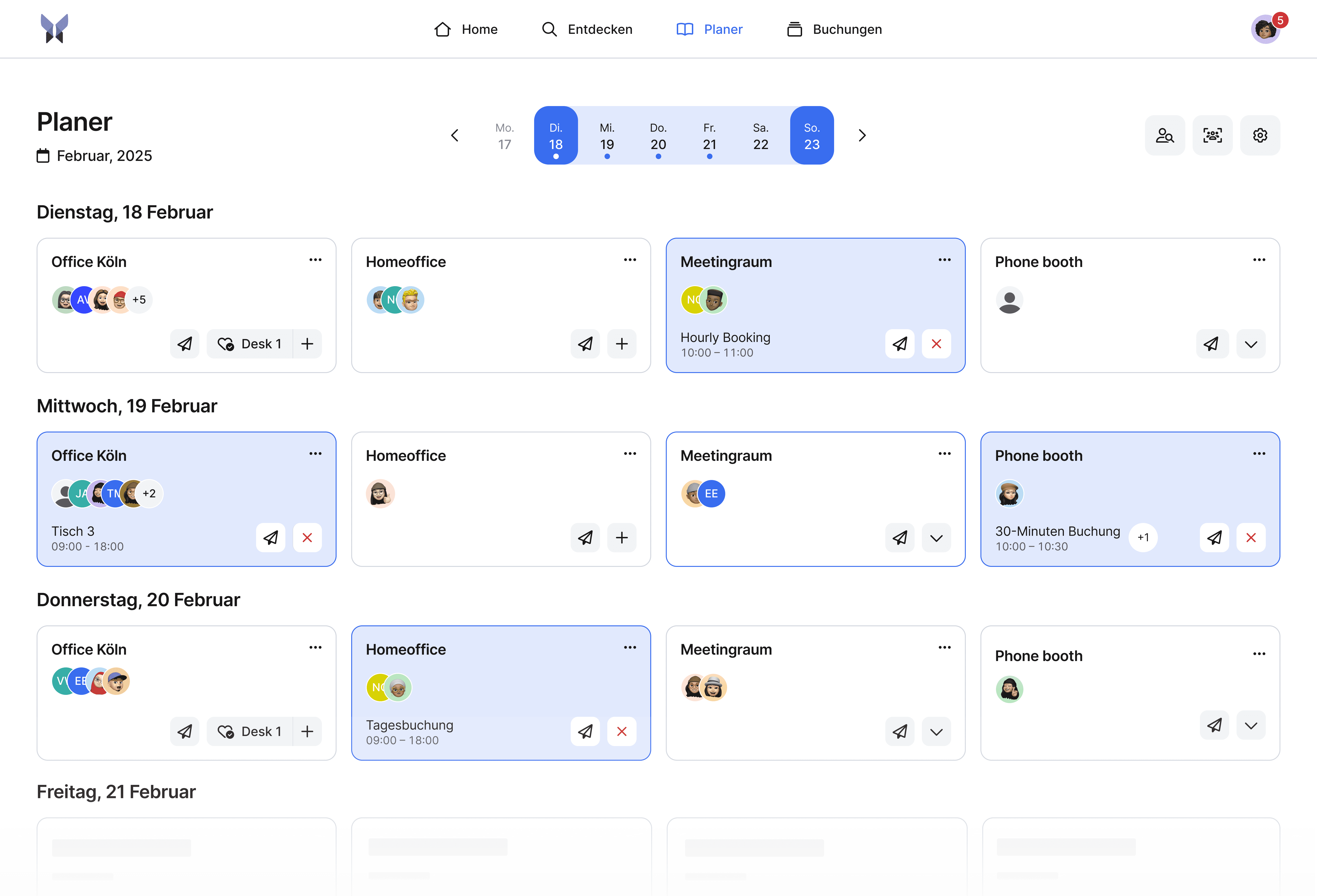
The intelligent weekly planner enables employees to plan not only rooms but also workspaces for the whole week. The overview shows which colleagues are in the office and when, making it easier to coordinate team meetings and collaboration.
Digital Signage: Room display app for real-time availability and spontaneous on-site ad-hoc bookings
Interactive room displays not only show the current status but also allow spontaneous bookings directly on-site. This flexibility is especially valuable for agile teams and impromptu meetings.
Professional Visitor Management: Automated visitor registration with digital signatures and badge printing
The integrated visitor management from anny automates the entire reception process when guests are invited to a meeting. From pre-registration to registration to badge printing, everything is digital and straightforward.
Conclusion: Why a Room Booking System is Essential Today
A modern room booking system is indispensable today for companies that want to use their spaces efficiently, reduce administrative efforts, and increase employee satisfaction. The benefits clearly outweigh the initial challenges of implementation.
With anny, you not only receive a room booking system, but a comprehensive platform for modern workspace management. The combination of user-friendly features, top-notch support, and proven reliability makes anny the ideal choice for companies of any size.
If you're ready to digitalize room management and boost your company's efficiency, schedule a non-binding and free demo.





" height="38px" id="bH388uk2E" transform="translate(1 1)" width="118.00000395534607px"/></svg>)