

(January 2026)
Desk Booking Software 2026: Overview of the Best Providers

Desk booking systems are a central component of modern, hybrid work environments in 2026. They enable companies to book workspaces flexibly, manage office spaces efficiently, and enhance team collaboration.
In this guide, you'll learn which desk booking providers lead the way in 2026, how they differ, and which features are particularly impressive. We also show how desk booking software can be integrated into comprehensive workplace management for maximum efficiency and transparency in daily office operations.
Key points at a glance:
Desk booking software supports the flexible use of workspaces, reduces space costs, and improves team organization.
Modern desk booking tools offer real-time information on space availability, intuitive booking processes, and detailed analyses for optimal space utilization.
The individual solutions differ significantly in functionality, user-friendliness, and integration capabilities; this comparison addresses these aspects directly.
What is Desk Booking?
With Desk Booking, workspaces in the office are booked digitally. Employees choose in advance which desk they would like to work at and reserve it through software or an app. This allows precise control over who uses which space and when. These systems not only provide clarity and planning security but also help companies organize their office spaces efficiently and flexibly manage hybrid work routines.
How do I choose the right provider?
Choosing the Right Desk Booking System is highly dependent on your company's requirements and priorities. To help you find the right solution, we have compiled the most important criteria for selection:
Check the functionality: Does the Desk Booking Software only cover basic features like booking workspaces and meeting rooms, or does it also support advanced use cases like events, visitor bookings, or payments?
Flexibility of workflows: Does the Desk Booking System offer options to define custom forms, approval processes, and individual booking rules, or are the processes rigidly set?
Integrations & IT Compatibility: Can the software be seamlessly integrated into your existing IT environment (e.g., calendars, SSO, HR systems, smart locks, or APIs)? Good integration ensures smooth processes and high acceptance among the team.
Support & Assistance: Do you receive quick, personalized support in your language and time zone? A competent service team can be crucial for successfully implementing and operating your Desk Booking System.
Data Protection & Compliance: Is the solution GDPR-compliant, and does it meet your internal security and compliance requirements? High data protection is indispensable, especially for sensitive employee data.
The Top Desk Booking Providers 2026 Compared
This page was created by anny to provide an overview of various booking solutions (including anny). Brand and product names belong to their respective companies.
The evaluation is based on publicly available information (e.g., the provider’s website, user reviews on Capterra and G2, pricing pages, and feature overviews). When selecting the providers, functionality, pricing, ease of use, integrations, support, and mobile usage were taken into account. The providers are listed alphabetically.
Date
(January 2026)
1.
anny
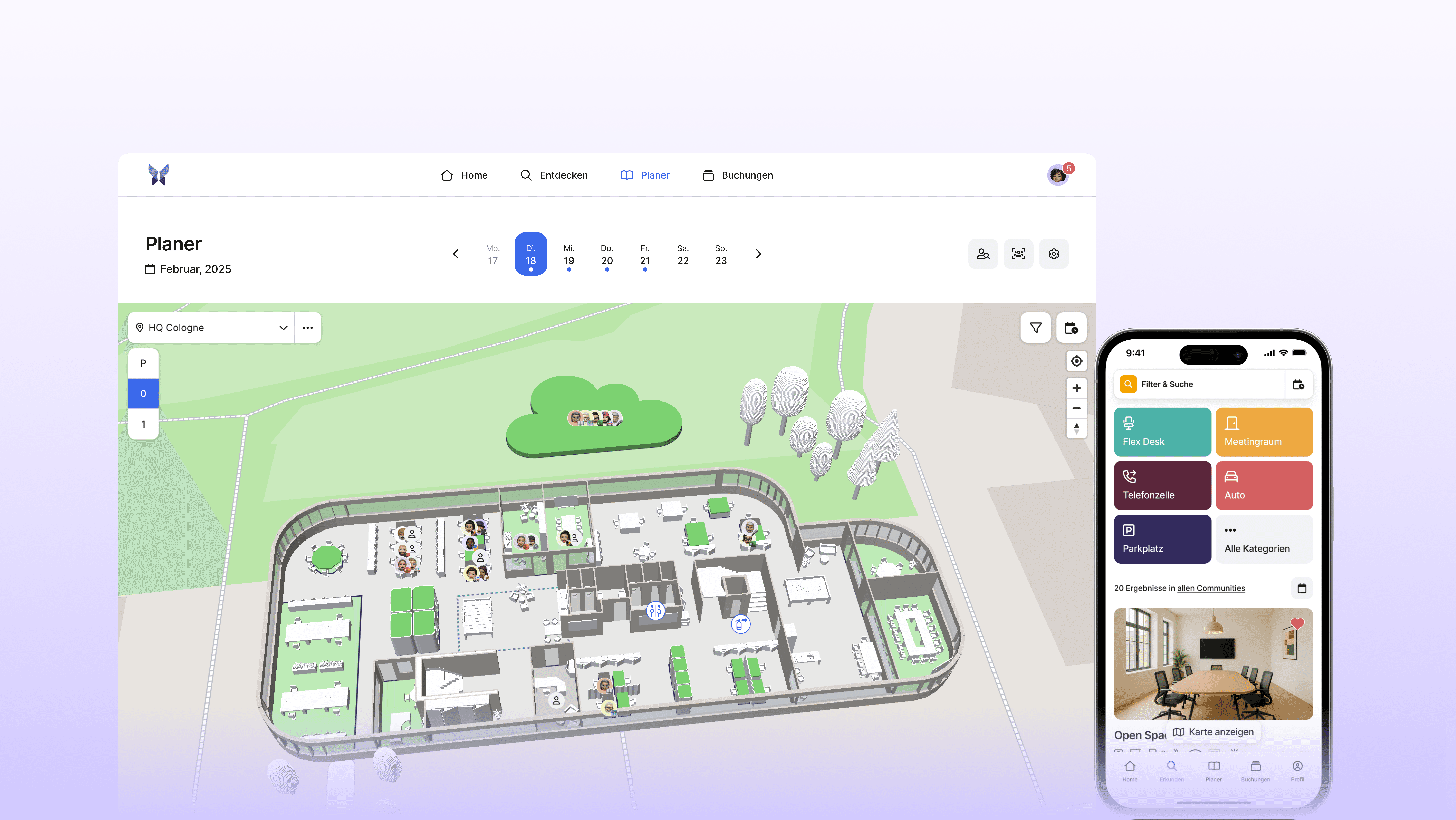
anny is one of the most popular solutions for flexible booking and workplace management (G2). The platform helps companies use desks, rooms, parking spaces, equipment, and other shared resources efficiently. With an intuitive booking function, employees can reserve exactly what they need for productive work, whether in the office or remote. With anny, access rights can be managed precisely through groups (communities), while individually configurable booking rules provide maximum flexibility.
Key features
Interactive 3D map
Desk, room, parking, equipment, and event bookings
Mobile app for desk bookings from anywhere
MS Teams app and Outlook add-in
Occupancy analytics and insights
Role-based permissions & community system for granular access rights
Visitor management including badge printing
Extensive integrations from calendars and SSO to HRIS, smart locks, webhooks, and an open API
Advantages
Very user-friendly and intuitive — complete bookings & check-ins with just one click
Model a wide range of resources — also for external booking pages
Integrated 3D map designer to easily customize maps
Holistic ecosystem with visitor terminals and room displays
Personal support from Germany
Developed and hosted in Germany
Fully ISO 27001 certified
Pricing
anny’s pricing is based on the number of bookable resources, regardless of the number of users. The Starter plan is free and includes up to five resources. For more extensive requirements, paid plans start at €2 per resource. This resource-based model is especially beneficial for companies with fewer resources than employees and a need for high flexibility.
2.
Archie
Archie is a software platform for managing modern hybrid offices and coworking spaces. It consolidates functions for desk, room, and office bookings, interactive floor plans, visitor check-ins, and door access through integrations. For operators, Archie offers billing with automated invoices and payments, contract management with electronic signatures, community and member management, as well as reports and analytics. Calendar integration, single sign-on, mobile apps, and multi-location administration support daily operations. Open interfaces and numerous integrations with access systems, WiFi, printers, and accounting tools enhance workflows.
Key features
Desk and Meeting Room Booking
Visitor Management with Automated Host Notifications
Automated Billing, Invoices, and Payments
Interactive Floor Plans and Workplace Search
Deep Integrations (Calendar, Access Control, SSO)
Pros
All-in-one Solution for Coworking and Hybrid Offices
Intuitive Office Maps
Comprehensive Integration Ecosystem
Mobile Apps including QR Check-in
Pricing
Archie offers different plans for hybrid offices and coworking spaces, each starting at around €149 per month. The pricing is usage-based and depends either on the number of resources or on the size of the location and the number of users. Additionally, there is a separate package for a custom-branded mobile app starting at approximately €85 per month. A permanently free version does not exist, but Archie offers a 14-day trial access and some free apps as an addition.
3.
awaio
awaio is a software platform for managing coworking spaces and flexible office spaces. It offers online bookings for desks and meeting rooms, member and contract management, invoicing, and payment processing. Additionally, it supports access management with smart locks, a community app with news and events, and reporting for utilization analysis. Integrations with common payment and access systems and mobile usage complete the offering.
Key features
Table and Meeting Room Reservation
Parking and Fleet Management
2D Office Map with Workspace and Team Overview
Calendar Integration with Outlook and Google (Two-Way Sync)
Flexible Booking Rules
Usage and Utilization Analytics for Workspaces and Rooms
Pros
Comprehensive suite in one app: Rooms, desks, lockers, parking, and mobility on a single platform.
Enterprise integrations and security
Powerful mobile app: 4.7-star rating in the Apple App Store
Detailed occupancy displays and analytics
4.
Clearooms
Clearooms is software for workspace management that allows companies to centrally plan and book meeting rooms and flexible desks. The platform provides interactive floor plans, web and mobile apps, calendar integrations, and check-in with automatic release of unused rooms. Additionally, Clearooms includes visitor management, room displays, and usage analytics for transparent space planning. Features like single sign-on, approval and booking rules, branding, and notifications support a smooth hybrid workday.
Key features
Desk and Meeting Room Reservations
Interactive Floor Plans
Calendar and App Integrations Google Outlook Teams Slack
Visitor Management with Kiosk and Host Notifications
Roles, Permissions, and Approval Workflows
Usage Analytics and Utilization Reports
Pros
Unified room and desk booking with interactive floorplans, real-time availability, and an app
Integrations with Google and Outlook, SSO/SCIM as well as Slack notifications
Device-agnostic door displays with check-in
Room services for catering & equipment
Pricing
Clearooms is billed based on the number of active desks and meeting rooms, not per user. In the USA, the tiers start at 1 to 19 desks with $88 per month or $80 per month for annual payment. Meeting rooms are charged additionally per room, in the USA $15 per month or $13.50 per month for annual payment. There is a free 30-day trial period, and changes to the number of desks are prorated. For 500 or more desks, enterprise pricing is available upon request.
5.
Envoy
Envoy is a workplace management platform that helps companies manage desk and room reservations, visitor registrations, deliveries, and access control through a single interface. Thanks to the combination of booking tools, visitor flows, and integrations with calendars, SSO providers, and access systems, Envoy is a popular choice for companies looking to streamline their workflows and enhance the on-site experience.
Key features
Desk, parking, and meeting room booking
Visitor management with pre-registration and check-in processes
Interactive workspace maps
Integrations with calendar systems, SSO, and access control
Mobile app for bookings and check-in
Workspace analytics and usage insights
Pros
Comprehensive features for workplace management on a central platform
Powerful features for access control and visitor security
Extensive library with integrations for enterprise tools
User-friendly mobile app
Pricing
Envoy Workplace offers three paid plans that are billed per active user per month, based on annual payment terms. Prices range from 3, 5, or 7 USD per active user, depending on the plan. Due to user-based billing, this model can lead to higher total costs for larger teams or fluctuating usage.
6.
Kadence
Kadence is a workplace operations platform for businesses, designed to integrate people, spaces, and strategies in hybrid work environments. The solution includes booking desks and meeting rooms, visitor management, work schedules, team coordination, and event management. Additionally, Kadence offers space management and analytics with data on occupancy and usage for scenario and capacity planning. Integrations with calendar and collaboration tools, as well as mobile apps and AI-powered assistance, complete the offering.
Key features
Desk and Meeting Room Reservation
Interactive 2D Office Maps
Visitor and Guest Management
Usage and Utilization Analytics with insights into office occupancy, booking trends, and workspace usage.
Mobile App & MS Teams/Slack Integration
Pros
Very fast, lean performance in WordPress (loads only necessary CSS/JS per page, no heavy scripts)
Extensive feature set available for free: Header/Footer Builder, global colors and typography, responsive controls
Seamless Gutenberg integration with Kadence Blocks and AI Design Library for quick page creation
Powerful WooCommerce tools with Shop Kit: variation swatches, custom product templates, advanced reviews, size guides
Flexible layout control with Hooked Elements and Conditional Headers (Pro) for context-aware content
Pricing
Kadence offers quote-based pricing with two tiers: Standard for essential workplace functions and Enterprise for custom requirements. Billing is per active user, with contracts lasting a minimum of twelve months and billed annually; a monthly rate is displayed for comparison only. Additional one-time fees may apply for setting up office layouts.
7.
Office RnD
Office RnD is a software platform for managing flexible workspaces and coworking spaces. With Office RnD Flex and Hybrid, members, contracts, plans, and invoices can be managed, while bookings for desks, offices, and meeting rooms can be handled. The solution offers apps for web and mobile devices, self-service portals, integrations with payment services, door access and calendars, as well as booking pages and widgets. Additionally, the system provides utilization and usage analytics, reporting, and tools for community communication and visitor management. In this way, Office RnD supports operators and companies in efficiently managing spaces and enhancing the user experience.
Key features
Workspace and Meeting Room Reservations
Interactive Floor Plans
Contract and Membership Management
Usage Analytics and Occupancy Reports
Multi-Location Management
Pros
Workplace, Meeting Room, and Parking Space Reservations via 2D Floor Plans
Wide Integration Ecosystem
Enterprise Security and Governance
Powerful Analytics Data Hub with Pre-configured Dashboards
Pricing
Office RnD offers a package-based, modular pricing model for coworking and flex office operators. Pricing depends on the feature set, number of locations and members, as well as the integrations you need. In addition, setup fees and add-ons such as door access, billing, or premium support may be charged separately.
8.
Office Space
OfficeSpace is a workplace management software designed for modern offices and hybrid working models. It offers features for space and occupancy management, desk sharing, and room reservations with interactive floor plans. Additionally, the solution supports visitor management, move planning, service requests, and utilization analytics. Mobile apps and integrations such as calendars and SSO streamline implementation and usage within the company.
Key features
Desk and Meeting Room Reservations
Interactive 2D Maps
Visitor Management with Document Signing
Reporting and Workspace Analytics
Pros
All-in-One Platform: Desk and Room Booking, Visitor Management
Deep integrations including bookings directly in Teams/Slack
Detailed real-time occupancy
Intuitive mobile app
Pricing
No public information on pricing available.
9.
Officely
Officely is a Slack and MS Teams-based solution for organizing hybrid offices and team presence. Users can plan and announce office days, as well as flexibly reserve desks. Features include occupancy and capacity management, seating plans and areas, check-ins, and automatic reminders directly in Slack. Reports and utilization analyses assist in optimizing office spaces across multiple locations.
Key features
Desk and Hot Desk Booking
Meeting Room and Resource Management in Slack and Microsoft Teams
Parking and Space Management
Attendance Overview and Daily Check-ins
Usage and Occupancy Analytics
Capacity and Floor Plan Management
Notification and Smart Scheduling Features
Pros
Fully operable in Slack and Microsoft Teams
One-click desk and attendance booking
Deep integrations (calendar, access control, SSO)
Occupancy and attendance analytics
Quick setup and fair pricing, free up to 5 users
Pricing
Officely relies on user-based, tiered subscriptions with monthly or annual billing. The basic plan is designed for smaller teams, while higher tiers expand the range of features with things like detailed booking rules, integrations, and reporting. Prices are calculated per active user and usually decrease with annual payment. Typically, there is a free trial period available. Depending on needs, add-ons and support services may incur additional costs, which means the total costs can vary with team size and requirements.
10.
PULT
PULT is a platform for workplace management that enables digital management of workspaces, meeting rooms, parking spaces, and visitors. Bookings can be easily managed using 2D floor plans, rules, and approvals. The solution integrates with Outlook, Google Calendar, MS Teams, Slack, and HR systems, and supports SSO as well as APIs in higher plans. Additionally, there are features for visitor management, digital signage, occupancy analytics, and GDPR-compliant usage.
Key features
Table and Meeting Room Reservations
Parking Space Booking with Interactive Map
Visitor Management
Integration with Outlook, Google Calendar, MS Teams & Slack
Access and Booking Rules Including Approval Processes
Utilization and Usage Analytics
Pros
Comprehensive platform for hybrid work: Desks, rooms, visitors, and parking spaces in one tool
Real-time utilization and automatic check-ins
High integration variety
Intuitive and interactive office floor plans
Pricing
The pricing structure of PULT is divided into several plans. The Starter Plan starts at €1.90 per user per month and is primarily aimed at smaller teams. Additionally, there are the Growth, Business, and Enterprise plans, each of which is individually priced, and prices are available upon request. A permanently free version is not offered, but companies can try out PULT during a limited free trial period before deciding on a paid plan.
raum]for[raum
raum]für[raum is a software for booking and managing workspaces, rooms, and resources. It supports the reservation of workstations, meeting rooms, parking spaces, and vehicles, as well as additional services like catering. Bookings can be easily conducted via floor plans, mobile apps, and integrations with Outlook, Teams, or video conferencing systems. This is complemented by check-in functions, role and rights management, and visitor management.
Key features
Table and Meeting Room Reservations
Parking and Vehicle Booking
2D Floor Plans for Navigation and Booking
Mobile App, Outlook Add-in, and MS Teams Integration
Variety of Check-in Options
Granular Rights and Role Management
Pros
Wide range of booking options from workspaces and meeting rooms to parking spaces and vehicles
Diverse integrations including Outlook, Microsoft Teams, video conferencing systems, and Active Directory
Flexible access and check-in options such as via QR code or digital door displays
Comprehensive roles and permissions concept including automatic synchronization with existing corporate structures
Pricing
No additional public information available.
Why should you compare desk booking software?
Every organization has different requirements when it comes to booking processes and workplace management. Comparing alternatives can help find a solution that fits optimally in the following areas:
Advanced Functionality Needs: Companies that wish to manage not only workplace bookings but also rooms, events, or guests will benefit from solutions that go beyond classic desk sharing.
Booking Logic & Processes: If approval workflows, custom forms, or public booking pages with payment options are relevant, it is worth looking at systems with more flexible booking mechanisms.
Integration Landscape: Depending on which HR, Identity, or Collaboration tools are already in use, a solution with broader API and integration support may be more suitable.
Optimized Cost-Benefit Ratio: A comparison helps get the most functionality and best support for your budget.
Data Protection & Hosting: GDPR compliance, data sovereignty, and hosting locations are key selection criteria. Companies that value European servers and clear data protection guidelines should check which providers meet these standards.
Find the desk booking software that suits you best
You now have an overview of the best desk booking systems 2026, use it to plan your next steps. Make an initial decision on which tools best fit your company, and then book a trial or demo of your favorites.
This way, you will quickly find out which solution truly integrates seamlessly into your workday. If you are looking for a flexible, user-friendly, and GDPR-compliant solution, it is worth trying anny, modern, intuitive, and perfect for hybrid workplaces.






" height="38px" id="bH388uk2E" transform="translate(1 1)" width="118.00000395534607px"/></svg>)