Measure desk usage without occupancy sensors

Your laptop checks you in, with

no sensors.

no sensors.

no sensors.

anny Presence uses the laptops and monitors already on your desks. When someone plugs in, the check-in is saved in anny with the booking, the desk, and the time. At a free desk the booking is made automatically, so nobody has to remember it.

Included in standard plans · turned on per organization

Desk 4.12
anny Presence in the menu bar: Checked in, Desk 4.12, since 09:04 AM via your monitor

In short

anny is a flexible booking system for anything bookable, with a strong focus on desk booking. The desktop app anny Presence measures desk usage without occupancy sensors: once a laptop connects to a desk’s monitor or dock, the person is checked in, and at a free desk the booking is made automatically. No new hardware is needed, and each check-in is stored with the booking, the desk, the time, and the source. Only people who use the app are recorded.

No new hardware

Laptop and monitor are enough

Kept up to date

Check-in within about 90 seconds of plugging in

Traceable

Booking, desk, time, and source

Hosted in Germany

ISO 27001, GDPR

How it works

The check-in happens while you plug in your laptop.

1Plug in

When you plug in at your booked desk, you’re checked in.

The app recognizes the desk’s monitor or dock, hashes its ID on your laptop, and sends only the hash to anny. anny finds your booking and checks you in.

MonitorDockOne desk, precise
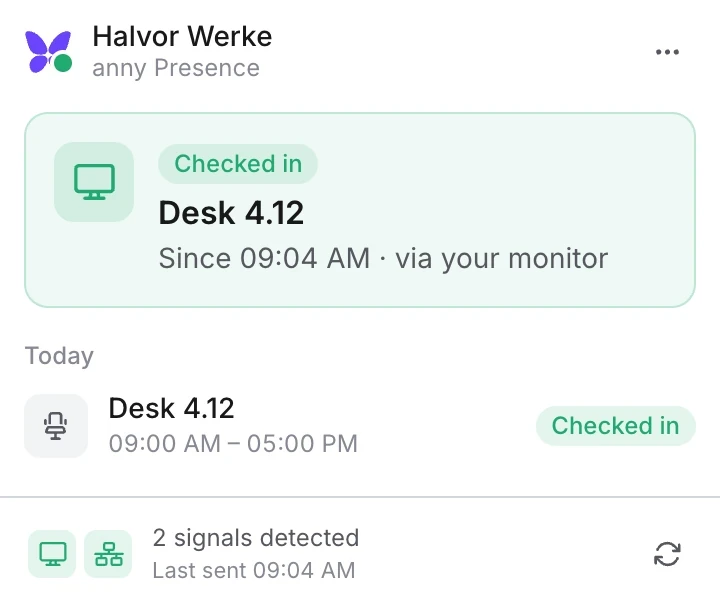
anny Presence shows: Checked in, Desk 4.12, since 09:04 AM via your monitor
2Other desk

If you’re not at the desk you booked, the app asks whether to move your booking.

You booked 4.12 but you’re at 3.07. The app asks whether to move your booking here. Nothing changes unless you agree.

Move bookingOnly when you confirm
anny Presence shows: You're at Desk 3.07. Your booking is for Desk 4.12. Move it here?
3Free desk

At a free desk the booking is made automatically, so nobody has to remember it.

When you plug in at a free desk, anny books it for the rest of the day and checks you in right away. Once you leave, it’s free again after the grace period. Your organization can turn this off.

Automatic bookingSet per organization
anny Presence shows: Checked in, Desk 3.07, since 01:02 PM via your monitor
4New monitor

The app learns a new monitor with a single question.

When anny doesn’t know a monitor yet, the app asks once: Which desk is this? It suggests your booked desk first. Depending on your settings, an admin confirms the match.

Learning modeOptional admin approval
anny Presence asks: Which desk is this? With your booking, Desk 4.12, suggested first
5Unplug

When you leave, anny checks you out after the grace period.

When you unplug, anny waits for the grace period, 15 minutes by default. If you don’t reconnect, anny checks you out and the desk is free again.

Adjustable grace periodAutomatic check-out
anny Presence shows: Leaving, Desk 4.12, checked out at 04:20 PM unless you plug back in

An alternative to occupancy sensors

You don’t need extra sensors to measure desk usage

if your team works on laptops.

Occupancy sensors detect whether a desk is taken, and they have to be bought, mounted, and maintained first. anny Presence uses the laptops and monitors you already have and ties every check-in to a booking.

Topic

Occupancy sensors

anny Presence

Hardware

A sensor per desk or area, usually plus gateways.

No new hardware. The app runs on the laptops you already own.

Rollout

Sensors are purchased and mounted at each desk or in each area.

IT deploys the app through MDM or Group Policy. The app learns unknown monitors with a single question.

Upkeep

Batteries, gateways, and per-floor coverage have to be maintained.

Only app updates, which IT can deliver itself if it wants to.

What the data is tied to

Mostly anonymous: a desk or area is occupied, with no link to a booking.

Every check-in belongs to a booking, a desk, and a time, and records how it was detected.

How current it is

Continuous, depending on the sensor and its radio interval.

A check-in shows up in anny within about 90 seconds of plugging in.

Privacy

Many sensors work anonymously, with no personal data.

A check-in belongs to a person, like any check-in in anny. Hardware IDs are hashed on the laptop, and anyone can pause for the day.

Who is counted

People without a laptop too and, depending on the sensor, meeting rooms and open areas.

Only people who use the app. Someone at a desk without a laptop or the app isn’t counted.

If you want anonymous counts of how many people are in an area or in meeting rooms, sensors are the right tool. anny Presence is made for desks where people work on a laptop.

Fallback: Wi-Fi and network

Without a monitor or dock, the office Wi-Fi can help,

but only with bookings you already have.

Without a monitor or dock, anny Presence recognizes the office’s Wi-Fi access point or subnet. That’s precise enough for an area or a building, not for a single desk. So Wi-Fi only checks in a booking you already have in that area. It never creates or moves one.

anny Presence shows: Checked in, Desk 4.12, since 09:04 AM via your Wi-Fi

Monitor & dock

One desk, precise

Wi-Fi access point

Area or floor

Subnet

Building, when Wi-Fi details aren’t available

Privacy

Every ID is hashed on the laptop,

and the raw data never leaves the device.

anny Presence hashes every ID on the device with your organization’s key (HMAC). Hardware IDs and Wi-Fi names never leave the laptop.

“What is sent?” in anny Presence: detected monitor and network with their hashes and the last data sent

“What is sent?” in the app

Shows in the app which signals are detected and what was sent last.

Pause for today

One click and nothing is sent until tomorrow.

Office networks only

With ActiveNetworks, the app only collects signals on your organization’s networks, not at home.

Every signal can be turned off

Monitor, dock, Wi-Fi, and subnet can each be switched off.

Works council template

An information template for works councils and employees comes with the documentation.

Minimal data

Sent: the hash, the kind of signal, an install ID, the app version, and the time.

Rollout for IT

IT deploys the app once

with the tools it already uses.

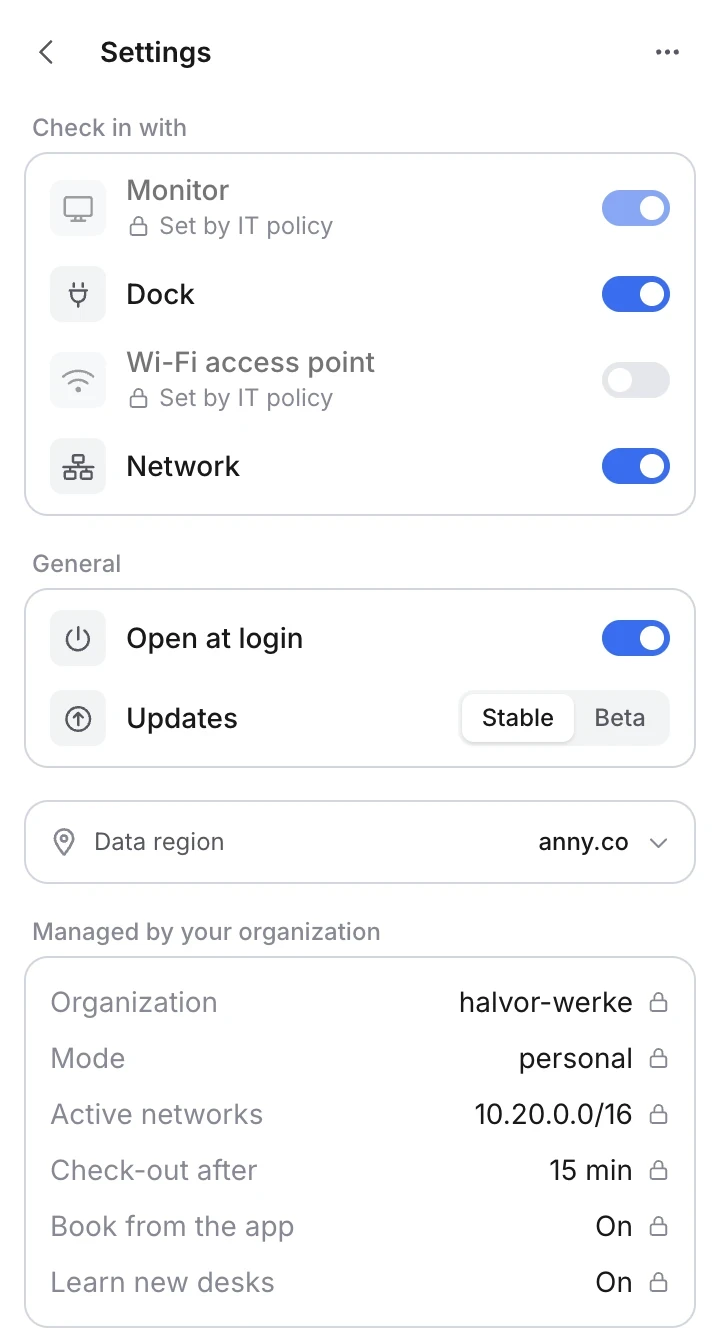
Signed packages, settings through an MDM profile or Group Policy, and one key schema across platforms. Anything IT sets is locked in the app and marked “Set by IT policy.”

Signed, notarized .pkg
.mobileconfig template and JSON schema for Jamf Pro
Jamf ProKandjiMicrosoft Intune
com.anny.presence.mobileconfig<key>com.anny.presence</key>
<dict>
  <key>OrganizationId</key>  <string>{{ORGANIZATION_ID}}</string>
  <key>SignalWifi</key>      <false/>
  <key>ActiveNetworks</key>
  <array><string>{{OFFICE_CIDR}}</string></array>
  <key>UpdateMode</key>      <string>managed</string>
</dict>
Managed updates

With UpdateMode=managed, IT ships new versions itself and the built-in updater stays quiet.

anny Presence settings: values locked by IT carry a lock and “Set by IT policy”

For workplace teams

You can see in anny which booked desks are really being used,

without anyone having to remember anything.

Booked and actually there

The check-in widget on the dashboard shows, per resource and across today, how many bookings are running and how many of them are checked in.

No-shows free up desks

People who don’t come don’t check in, and auto-release makes the desk bookable again. People who plugged in no longer get released by mistake.

Auto-release on paid plans

Every check-in can be traced

For each check-in, anny stores the booking, the desk, the time, and the source, meaning where it came from.

Desktop app · Self check-in · Door display · Staff

anny Presence is included in standard plans and turned on per organization.

FAQ

Frequently asked questions about anny Presence

Do I need sensors to measure desk usage?

Not if your team works on laptops at desks with a monitor or dock. anny Presence then recognizes who is at which desk and saves the check-in in anny. You still need sensors if you want anonymous counts, for example in meeting rooms or of people without a laptop.

How is anny Presence different from occupancy sensors?

Sensors detect whether a desk or area is occupied, and they need their own hardware. anny Presence runs on the laptops you already have and stores the booking, the desk, the time, and the source for each check-in. In return, the app only records people who use it.

How current is the data?

A check-in shows up in anny within about 90 seconds of plugging in, because the app briefly confirms the connection before sending. After you unplug, anny waits for the grace period, 15 minutes by default, and then checks you out.

What happens at a free desk with no booking?

When you plug in at a known monitor or dock, anny books the desk automatically and checks you in, for the rest of the day or until the opening hours end. After you unplug and the grace period passes, the desk is free again. Your organization can turn this off.

Does it work without a monitor or dock?

Yes, as a fallback through the office’s Wi-Fi access point or subnet. In that case anny Presence only checks in a booking you already have in that area. Wi-Fi never creates a new booking or moves one.

What data does the app send?

Only hashes of the detected signals, the kind of signal, an install ID, the app version, and the time. Hardware IDs and Wi-Fi names are hashed on the laptop with your organization’s key and never leave it.

Does the app track me when I work from home?

IT decides with ActiveNetworks on which networks the app collects signals, for example only in the office. You can also pause the app for the rest of the day at any time.

How is the app deployed, and who can use it?

IT deploys it through MDM or Group Policy: a signed .pkg for Jamf Pro, Kandji, or Intune, a signed .msi with ADMX templates for Windows, and .deb or .rpm packages for Linux. Anyone who is a member of a community in your organization can use it. The app finds the organization at sign-in; people in several pick one.

Do I need sensors to measure desk usage?

Not if your team works on laptops at desks with a monitor or dock. anny Presence then recognizes who is at which desk and saves the check-in in anny. You still need sensors if you want anonymous counts, for example in meeting rooms or of people without a laptop.

How is anny Presence different from occupancy sensors?

Sensors detect whether a desk or area is occupied, and they need their own hardware. anny Presence runs on the laptops you already have and stores the booking, the desk, the time, and the source for each check-in. In return, the app only records people who use it.

How current is the data?

A check-in shows up in anny within about 90 seconds of plugging in, because the app briefly confirms the connection before sending. After you unplug, anny waits for the grace period, 15 minutes by default, and then checks you out.

What happens at a free desk with no booking?

When you plug in at a known monitor or dock, anny books the desk automatically and checks you in, for the rest of the day or until the opening hours end. After you unplug and the grace period passes, the desk is free again. Your organization can turn this off.

Does it work without a monitor or dock?

Yes, as a fallback through the office’s Wi-Fi access point or subnet. In that case anny Presence only checks in a booking you already have in that area. Wi-Fi never creates a new booking or moves one.

What data does the app send?

Only hashes of the detected signals, the kind of signal, an install ID, the app version, and the time. Hardware IDs and Wi-Fi names are hashed on the laptop with your organization’s key and never leave it.

Does the app track me when I work from home?

IT decides with ActiveNetworks on which networks the app collects signals, for example only in the office. You can also pause the app for the rest of the day at any time.

How is the app deployed, and who can use it?

IT deploys it through MDM or Group Policy: a signed .pkg for Jamf Pro, Kandji, or Intune, a signed .msi with ADMX templates for Windows, and .deb or .rpm packages for Linux. Anyone who is a member of a community in your organization can use it. The app finds the organization at sign-in; people in several pick one.

Measure how your desks are used with the hardware you already have.

Add your desks to anny, turn on anny Presence for your organization, and roll the app out through your IT team.

Included in standard plans. Turned on per organization.

anny Presence shows: Checked in, Desk 4.12, since 09:04 AM via your monitor

We help the world share resources

G2

★★★★★

★★★★★

OMR Reviews badge: Top 100 tools in DACH 2026
G2 badge: Leader, Summer 2026
anny user reviews on SourceForge

GDPR-compliant

ISO 27001 certified

Hosted in Germany

anny 2026
App Store Download for Room Management
Download from Google Play for Room Management

We help the world share resources

G2

★★★★★

★★★★★

OMR Reviews badge: Top 100 tools in DACH 2026
G2 badge: Leader, Summer 2026
anny user reviews on SourceForge

GDPR-compliant

ISO 27001 certified

Hosted in Germany

anny 2026
App Store Download for Room Management
Download from Google Play for Room Management

We help the world share resources

G2

★★★★★

★★★★★

OMR Reviews badge: Top 100 tools in DACH 2026
G2 badge: Leader, Summer 2026
anny user reviews on SourceForge

GDPR-compliant

ISO 27001 certified

Hosted in Germany

anny 2026
App Store Download for Room Management
Download from Google Play for Room Management