

· Updated
How to Integrate an AI Assistant into Office Software – A Practical Guide for Businesses
8 min.

At a Glance: The Essentials
AI assistants can be integrated into existing office software without any major IT project, making routine tasks like room bookings, scheduling, or resource requests possible right inside the chat where employees already work.
An AI assistant doesn't replace your existing software; instead, it supercharges tools like Microsoft Teams, Outlook, Google Calendar, and Slack with smart features. Rather than opening up a web form, employees can book a meeting room directly within their chat.
The key steps for implementation: define your requirements and existing systems, choose the right AI tool, activate integrations, set up calendar sync, test, and roll out.
For companies in the DACH region, a GDPR-compliant solution hosted in the EU is absolutely essential.
What does it mean to integrate an AI assistant into your office software?
An AI assistant in your daily office routine is a smart extension of existing software that helps employees complete routine tasks easier and faster. Instead of manually filling out forms or checking availabilities, users can make requests directly via chat or phone – the assistant understands the context, adheres to regulations, and carries out the desired action independently.
This is how it relieves employees of administrative tasks and ensures more efficient processes. Integration is smooth into familiar tools such as Microsoft Teams, Slack, or Outlook, meaning there's no need to learn how to use any new programs.
Which office software can be integrated with AI assistants?
The AI integration aligns smoothly with the tool landscape a company is already using. At its core are Microsoft 365, Google Workspace, Slack, and website integrations. Generally, we can distinguish between four types of connections: active chat channels where users interact directly with the AI assistant, calendar sync layers that automatically enter bookings into the correct calendar, widget integrations that embed the assistant directly on the website or intranet, and API connections, which allow the assistant to access booking, HR, or ERP systems in the background to execute actions.
Microsoft 365 and Outlook
A typical AI integration in Microsoft 365 looks like this: An AI chatbot is deployed as an app within MS Teams. Employees interact via channels or 1:1 chats, ask questions, and book resources instantlyu2014without ever needing to open the actual booking software. In the background, the assistant uses interfaces like the Microsoft Graph API to access calendars, availabilities, and resources in real time, automatically adhering to booking rules.
Outlook acts as the calendar sync layer. The AI assistant reads available times and resources from Outlook calendars and enters new bookings automatically. Notifications and confirmations land directly in the inboxu2014completely eliminating any manual effort.
Google Workspace
Google Calendar serves as the calendar sync layer for businesses relying on Google Workspace. The AI assistant checks availability there in real time, reads booking rules and resource data, and automatically synchronizes new bookings. This reliably prevents double bookings. The chat interaction itself doesn't happen within Google Calendar, but rather via dedicated chat channels like a website widget or messaging servicesu2014Google Calendar functions solely as the reliable database in the background.
Slack
An AI chatbot is integrated as an app within the Slack workspace. Employees can request resources, make bookings, or ask about availability via direct message. The assistant understands natural language, respects your booking rules, and performs the desired action directly in the backgroundu2014with a confirmation appearing in the very same chat just seconds later.
Website, Intranet, and Messenger
AI assistants can be easily embedded as a chat widget on internal or public websites. Typical use cases include visitor registration, event bookings, or resource requests that are automatically forwarded to the correct calendar. For companies dealing with external clients, messaging channels like WhatsApp or Instagram can also be integrated, allowing the AI assistant to answer inquiries directly and convert them into bookings instantly.
API Integration
For organizations with more complex system landscapes, a direct API connection allows the AI assistant to connect with existing booking, HR, or ERP systems. The assistant accesses relevant data in the background and executes actions without users ever needing to open the core system itself. Modern SaaS solutions typically offer pre-configured connectors for this, which significantly takes the load off IT departments.
What capabilities should an AI assistant have in your existing office software?
The following overview serves as a handy checklist for choosing your perfect AI assistant:
Real-time access to resource and calendar availability
Autonomous handling of bookings, rescheduling, and cancellations
Automatic syncing of appointments with Outlook or Google Calendar
Multilingual support for international teams
GDPR-compliant data processing and secure hosting in the EU
Quick and easy setup without complex IT projects
Transparent logging of all booking actions for complete traceability
Continuous improvement through smart learning processes
Support for multimodal inputs, including both text and voice
Leveraging cutting-edge AI systems for even better responses
Smooth automation of processes like email updates and meeting organization
How does integrating an AI assistant actually work in practice?
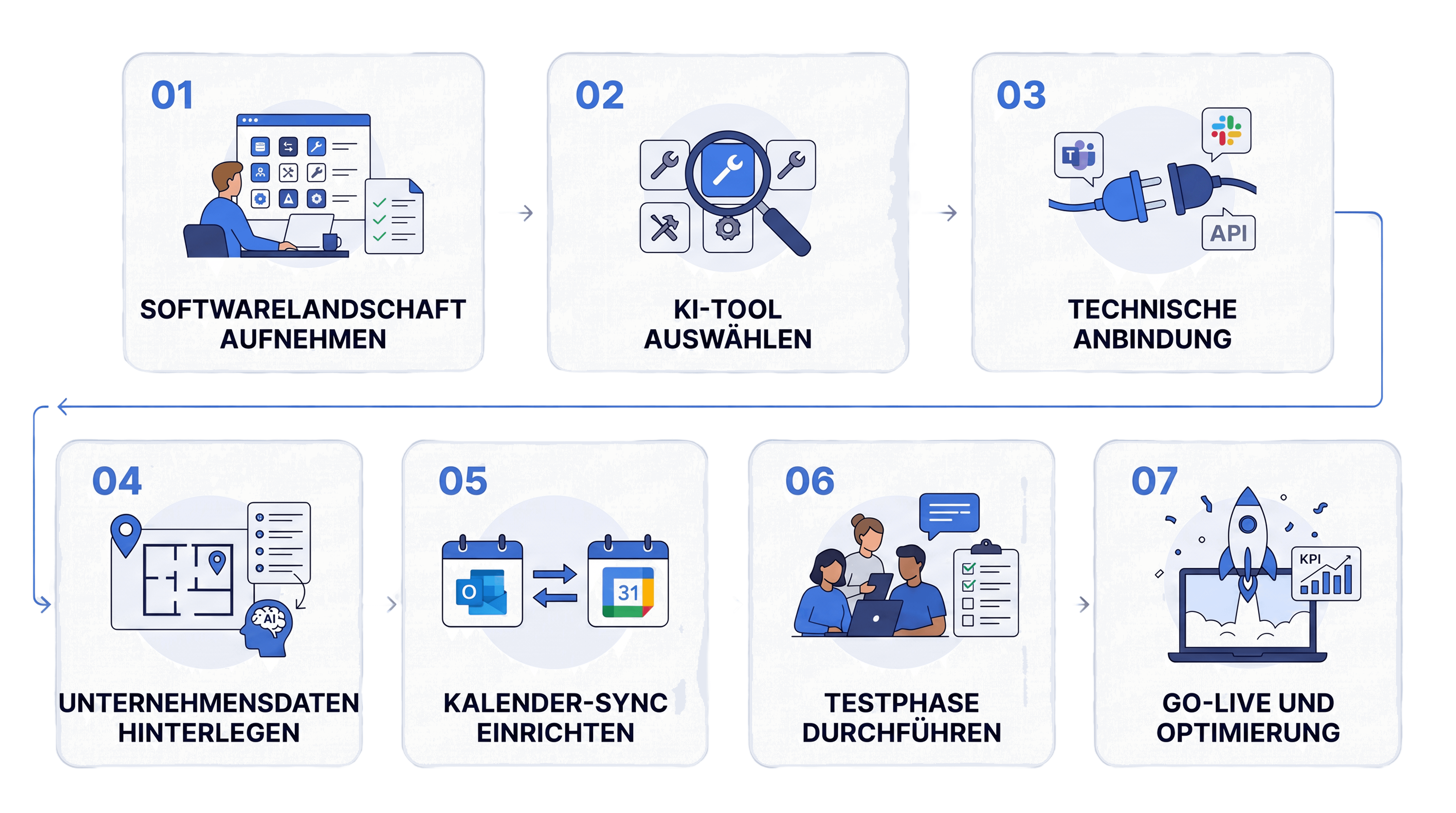
The integration process is simple and straightforward:
Step 1: Map your software landscape and needs
Document your existing tools and define your ideal use cases, such as room and desk booking or (external) events.
Step 2: Choose your AI tool
Select the perfect AI tool featuring native integrations or robust, well-documented APIs that pair smoothly with your current platforms. Keep your strategic goals and industry best practices in mind!
Step 3: Set up the technical connection
Easily activate the app in MS Teams or Slack, enter your API keys, and configure webhooks or chat widgets. Modern no-code solutions make this integration a breeze without heavy IT support.
Step 4: Add your company-specific data
Input your locations, resource types, booking rules, and FAQs. Training the AI with your own data ensures highly accurate and customized responses.
Step 5: Configure your calendar sync
Connect your resource calendars with Outlook and Google Calendar. A two-way synchronization prevents double bookings and guarantees real-time availability.
Step 6: Run a test phase
Define a pilot group, run test scenarios, and gather feedback. Pilot projects are a fantastic way to spot and resolve any minor hiccups early on.
Step 7: Go-live and optimize
Announce the launch to your users, provide quick trainings, monitor KPIs, and make regular updates to continuously boost user experience and productivity.
What should you look out for when making your choice?
Not every AI assistant is a perfect fit for every business. These criteria will help you find the right solution for your specific needs:
Criterion | What to look for? |
|---|---|
Compatibility | Does the assistant work with Microsoft 365, Outlook, Google Calendar, Slack, and your current booking or HR systems? Is there middleware or custom development involved? |
IT Requirements | Is the implementation feasible with your existing IT capacity? Do they offer self-service setups? |
Functional Fit | Does the solution cover typical office use cases like room and desk booking, visitor management, or equipment rentals? Are the booking logics flexibly configurable? |
GDPR and Security | Is the solution GDPR-compliant? Is data stored within the EU? Are there ISO certifications in place? |
AI Feature Set | Can the assistant independenty complete bookings? Does it feature real-time availability checks and automatic calendar synchronization? Does it support multi-language capabilities and handoffs for special cases? |
Transparency and Control | Are all AI activities logged? Are permissions granularly manageable? Can administrators adapt rules and documents easily? |
Trial Phase and Pricing | Is there a free trial available? Is the pricing transparent and scalable? |
Scalability and Support | Can the solution adapt to your growing business needs? Is reliable support and regular updates included? |
A concrete example: anny AI
anny is a German SaaS booking platform that enables companies to make resources such as workplaces, meeting rooms, parking spaces, and equipment bookable. anny AI is the integrated AI that accesses this booking logic directly.
Bookings directly in chat
anny Assistant is available via web chat and WhatsApp. Employees can easily book, reschedule, or cancel desks, rooms, or parking spaces via chat message without having to open the web interface. anny Assistant checks availabilities in real time, respects the defined booking rules, and confirms the booking directly in the chat.
Calendar sync with Outlook and Google Calendar
anny synchronizes bidirectionally with Microsoft 365 and Google Calendar. Bookings made via anny Assistant are automatically entered into the respective calendar. At the same time, anny Assistant reads availabilities from these calendars to prevent double bookings.
More features
anny Assistant accesses all data stored in anny: 3D floor plans, locations, and booking rules. It forwards more complex requests directly to the responsible employees. All actions are logged in the admin area, with booking history and invoices accessible at any time. Managing multiple locations is a breeze, with requests automatically routed correctly.
Setup and effort
If you've already mapped your booking logic in anny, you can activate anny AI in the admin interface with just a few clicks. No separate AI project, no custom prompt logic code needed. Your existing integration landscape (calendars, smart locks, HRIS, payments) remains completely unaffected.
Security and compliance
anny AI is fully GDPR-compliant, stores data exclusively within the EU, and is ISO 27001 certified. This is particularly relevant for public institutions, universities, and companies with strict compliance requirements. Chat histories are automatically deleted after 7 days by default.
How much does anny AI cost?
anny AI is available in three plans, tailored to your usage volume and available channels. You can try all plans free for 7 days with unlimited minutes—no credit card required and no sales call needed. (As of July 2026, subject to change.)
Plan | Included Credits | Channels |
|---|---|---|
AI Sidekick | 600 (≈ 600 chat messages or 100 minutes) | Website widget |
AI Employee | 6,000 | Website widget, WhatsApp |
AI Team | 18,000 | All channels: web chat, phone, email, WhatsApp |
Once your included credits are used up, additional usage is billed per credit, depending on your plan. For businesses with high volume and multiple locations, the AI Team plan is your perfect starting point. If you want to test the waters first or just integrate the widget, go ahead and start with the AI Sidekick!
You can find all pricing and feature details on the anny AI product page.
FAQ: How to Integrate an AI Assistant into Office Software
Can I set up an AI assistant without our own IT department?
Yes, absolutely! Many modern SaaS solutions offer pre-configured integrations for Microsoft 365, Slack, Outlook, and Google Calendar that administrators or department leads can activate in just a few hours. A major IT project is typically not required for these user-friendly tools.
Can an AI assistant in Microsoft Teams be used in compliance with GDPR?
This depends on the AI provider you choose. GDPR compliance is ensured through the hosting location, clear data processing agreements, and transparent privacy practices. Businesses should specifically look for providers that offer EU hosting and documented data protection policies.
Can an AI assistant complete bookings directly within MS Teams or Slack?
Yes! Supported by powerful integrations, modern AI assistants can handle complete booking processes directly in the chat. The actual data storage remains secure in the connected booking platform, while calendars like Outlook or Google Calendar act as the smooth sync layer.
Are bookings automatically synced with Google Calendar and Outlook?
Definitely! This is a core requirement for professional AI integrations. This is typically achieved via a two-way calendar synchronization built into the underlying booking system. This ensures booked resources instantly appear in each user's calendar.
How long does it take to implement an AI assistant for office resources?
Simple setups can often be rolled out within just a few days, including a quick test phase. More complex, multi-location environments with sophisticated user permissions may require a bit more planning, but thanks to modern SaaS assistants, they are up and running much faster than traditional IT projects.
Try anny AI for free for 7 days
An AI assistant that completes bookings directly in MS Teams or Slack, synchronizes calendars, and runs in full GDPR compliance is no longer a future scenario. The technology is available, and the implementation effort is surprisingly manageable.
The lowest-risk way to start is with your own test: you can try anny AI free for 7 days and with unlimited minutes, completely without a credit card or a prior sales call. If you prefer to get an overview first, you are welcome to book a personal demo instead.







