The room booking system for meeting rooms that are available right when you arrive.
The room booking system for meeting rooms that are free when you arrive.
Book in Outlook, Teams or right at the door. If nobody checks in, the room is released automatically. For your team internally, and for external guests too if you want.
Over 1,500 companies book their spaces and other resources with anny
In a nutshell
anny is a room booking system that lets your team find and book meeting rooms, conference spaces, and seminar rooms in seconds—directly in Outlook, Microsoft Teams, Google Calendar, via the mobile app, or right at the door display. Because rooms are automatically released if no one checks in, ghost meetings are a thing of the past, while smart booking rules ensure fair access for everyone. Plus, you can easily rent out those same rooms to external clients with seamless online payments and automated invoicing!
Get started for free
Use up to 5 resources for free, forever, no credit card needed.
Outlook, Teams, Google
Book right in the calendar your team already plans in.
Check-in & auto-release
No check-in means the room is freed up for others automatically.
Hosted in Germany
Your data stays in Germany, GDPR-compliant and ISO 27001 certified.
What sets anny apart
The right room, booked in seconds
Book anywhere
Booked where your team already plans
Outlook, Teams, Google Calendar, the app or the door display: everyone sees the same live availability, so double bookings can’t happen.
Immersive 3D map
Finding a room is suddenly fun
Your team moves through floors and rooms like in the real building and sees at a glance what’s free. Because it feels intuitive and fun, people enjoy booking their rooms in the system. And new colleagues find the right room from day one.
AI agent for admins
Room admin done in one sentence
Move a meeting, close a floor, adjust a rule: just tell anny Agent what should happen. It shows you the plan and only acts once you approve.
AI generated
The problem
Booked. Yet still empty.
Recurring meetings block rooms nobody uses. Anyone who needs a room right now ends up searching the hallway.
Ghost meetings
The meeting is in the calendar, the room stays empty. Nobody releases it.
Double-booked
Outlook, spreadsheets and hallway requests don’t know about each other.
Everything by email
Approvals, catering and AV run on the side and get lost.
How it works with anny
A Tuesday in room Elbe. From booking to review.
8:52 AM
Room Elbe · 8 seatsFree
8:52 AM
Book wherever you’re working.
Lena schedules the design review in Outlook and picks the room in the anny add-in. Her colleague books on his phone, guests on the booking page on the web. Everyone sees the same availability.
Outlook add-in
Teams app
Google Calendar
iOS & Android
anny in Outlook
9:00 AM
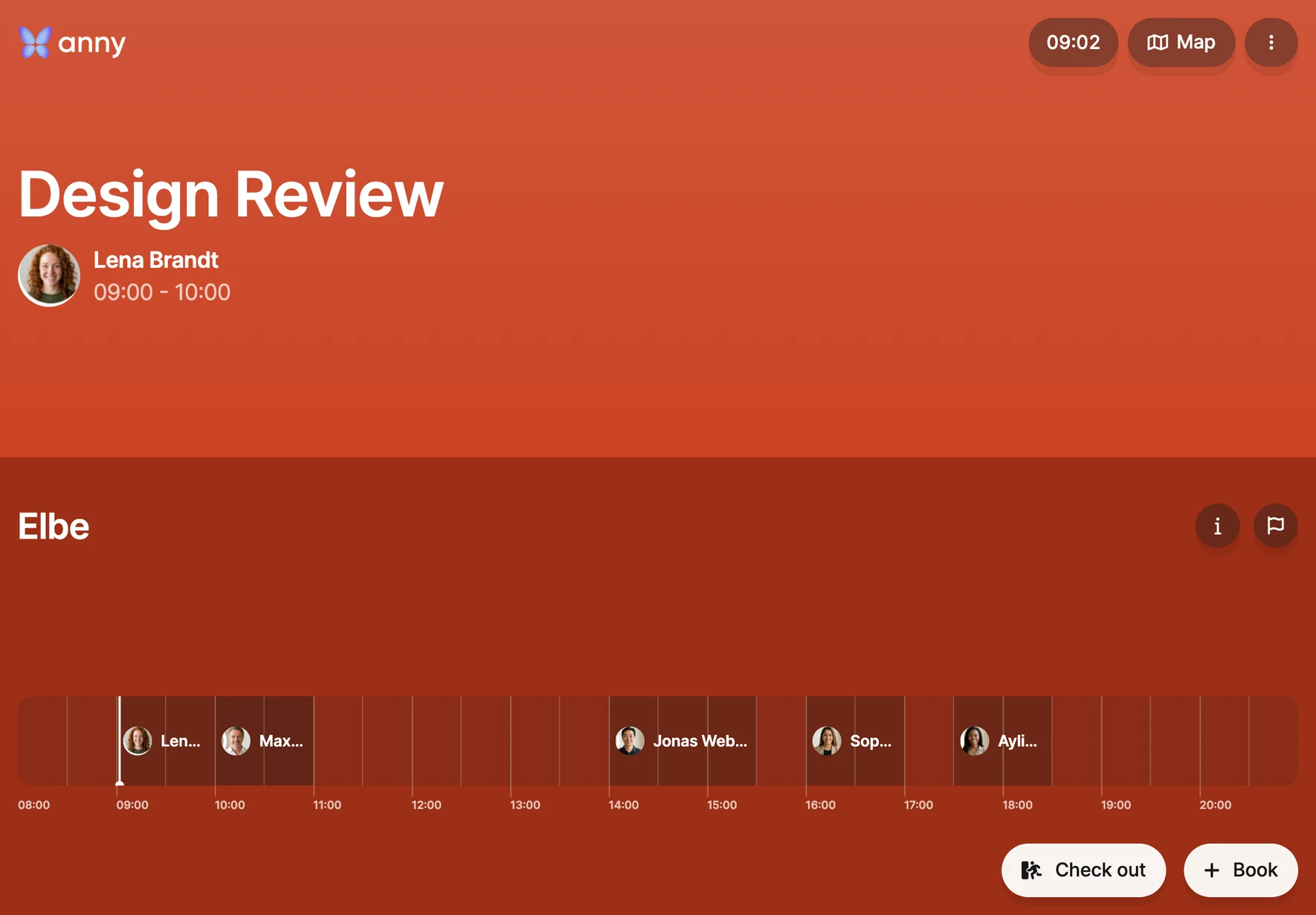
Check in at the door.
The display next to the door shows whether the room is free. One tap checks you in or books the room on the spot. The display is optional: people can also check in with a QR code or in the app.
Door displays (optional)
QR check-in
Check-in in the app
10:15 AM
Nobody showed up? The room frees itself.
A weekly meeting is booked for 10:00, but nobody checks in. After 15 minutes anny releases the room automatically, and everyone can book it again.
Check-in window
Automatic release
12:30 PM
Catering and AV, booked in the same step.
Pick coffee, snacks or a projector right in the booking. The front desk sees the extras per room and time, no group email needed.
Add-ons & catering
Notes for facilities
anny in Outlook
1:40 PM
Register visitors in the same step.
When a guest joins from outside, register them as a visitor right in the Outlook add-in. The front desk knows they’re coming, and the guest gets their invitation if you want.
Set opening hours, maximum duration, setup and cleanup time, team quotas and approvals above a group size once. anny enforces them on every booking.
Booking rules
Setup & cleanup time
Quotas
Approval workflow
Rules for room Elbe
Mon–Fri 7 AM–8 PM
max. 4 hours
Approval from 10 people
Sales: 20 h/month
Approved
6:00 PM
Optional: put a price on rooms.
If you want, rooms get prices: internally with cost centers for departments or sites, or for external customers who book on your booking page in the evening, pay online and get the invoice automatically.
Prices & cost centers
Booking page
Online payment
Invoices
AI photo
Fri
Review and prepare, all in anny.
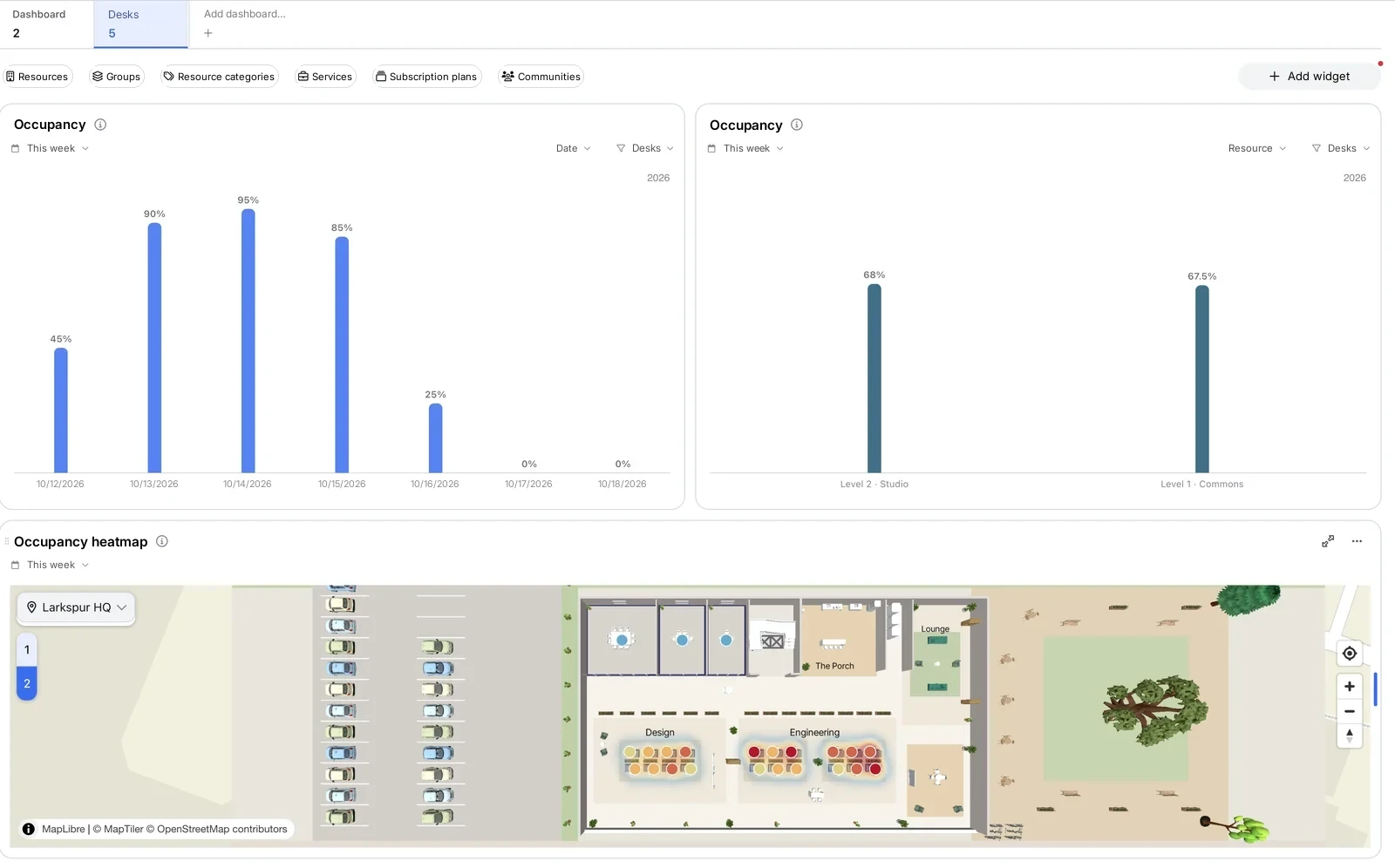
Occupancy, peak times and heatmaps show which rooms you’re missing and which sit empty. The catering team gets its own access or automatic exports by email. And on every booking you track tasks and comments, like “set up the seating”.
Discover your building in 3D—complete with every floor and your custom furnishings
Discover your building in 3D—complete with all floors and your own custom furniture
On the 3D map, floors stack up just like the real building, and every room shows its furniture and equipment, so it’s clear right away what it’s good for. Your team finds the right meeting room at a glance and books it in one click.
Floors stacked like the real building
Your own 3D furniture and visible equipment
Multiple locations on one map
anny AI · GDPR-compliant, hosted in the EU
Manage rooms by chat,
book in a single sentence
anny Agent
·
handles the admin work
Manage rooms, floors and rules in a single sentence
anny Agent · ⌘L
Thursday’s design review is in room Spree this time. Let everyone know.
Planning …
My plan
1.Design review on Thursday, 2 PM: Elbe → Spree
2.Email the new room to the 6 attendees
Approve 2 changes?
Close the 3rd floor on Friday for maintenance and let everyone who booked there know.
Planning …
My plan
1.Block 24 desks on floor 3 on Friday
2.Cancel the 11 bookings that day
3.Email your message to the 11 people
Approve 3 changes?
How busy were the meeting rooms last week?
Looking it up …
64% on average. Tuesday and Wednesday were almost fully booked; on Friday more than half stayed free.
Ø 64 %
Mon 68Tue 87Wed 84Thu 52Fri 29
From 412 bookings across 8 rooms
Also works in Microsoft Copilot ChatGPT ClaudeMore on MCP
anny Assistant
·
books for team and guests
Finds the right room and books it, on every channel.
Innovation Hub·Chat on your booking page
I need a room for 6 people tomorrow at 2 PM, with a screen.
Room Elbe is free tomorrow from 2 to 3 PM: 8 seats, large display, 2nd floor. Should I book it?
Room Elbe · Tomorrow, 2–3 PM
8 seats · Display · 2nd floor
Book now
Yes, please.
Done. The booking is in your Outlook calendar too.
Booked · Room Elbe, tomorrow 2 PM
HCHarbor CoworkingBusiness account
Today
Hi, can we move our workshop room on Friday from 10 AM to 1 PM?9:41 AM
Sure, Tim. The workshop room is free on Friday from 1 to 5 PM. Should I move your booking there?9:41 AM
Yes, perfect.9:42 AM
Done: your workshop room is now booked on Friday from 1 to 5 PM. Your new confirmation is on its way.9:42 AM
Rescheduled · Fri 10 AM → 1 PM
Innovation Hubanny Assistant · PhoneSample call
Hi, I have a client coming in tomorrow at 10. Do you have a small meeting room for two hours?
Yes, Room Spree is free tomorrow from 10 to 12: four seats and a screen. Should I book it in your name?
Yes, please. It's Lena Hoffmann.
Done, Lena: Room Spree is booked for you tomorrow from 10 to 12. Your confirmation is on its way by text.
Booked · Room Spree, tomorrow 10–12
Inbox
Team event in November
JW
Jonas Weberjonas.weber@northworks.com9:12 AM
Hi, we're planning a team event in November and would love to rent your event space. Is that possible?
Best, Jonas
Harbour Loftanny Assistantto Jonas9:13 AM
Hi Jonas, thanks for reaching out! The event space is free on several days in November. So I can send you the right quote:
Bookings land right in Outlook or Google calendars, smart locks open exactly at the booked time, and single sign-on with SCIM keeps every user up to date automatically.
Plus: Exchange on-premises, SSO & SCIM, Make, n8n and an open API
Microsoft is phasing out EWS in Exchange Online, and it ends for good on April 1, 2027. anny uses Microsoft Graph there and its own sync service for on-premises Exchange.
As soon as the laptop is plugged into the monitor, anny Presence checks in automatically. So you plan space with real numbers and skip expensive sensors.
How MaibornWolff significantly increases its booking rate with anny
“We were particularly impressed by the map feature and the ability to make practically everything bookable. Coming from a software development background ourselves, we were amazed at how comprehensive anny is. Our goal was to significantly boost our utilization rate […].”
How MaibornWolff significantly increases its booking rate with anny
“We were particularly impressed by the map feature and the ability to make practically everything bookable. Coming from a software development background ourselves, we were amazed at how comprehensive anny is. Our goal was to significantly boost our utilization rate […].”
How Many Meeting Rooms Does an Office Really Need?
A common rule of thumb is one meeting room for every 10 to 20 employees, supplemented by small booths for calls and one-on-ones. But how many rooms your office actually needs depends on real utilization: anny tracks which spaces are booked and used when, shedding light on bottlenecks and empty rooms. That way, you can plan new rooms or renovations based on real data!
What is a room booking system?
A room booking system shows which rooms are free and lets employees or customers book them directly. anny connects calendars, door displays, rules and payments in one system, for meeting rooms as well as training rooms you rent out.
Can I book rooms directly in Outlook and Teams?
Yes. With the Outlook add-in and the Teams app, you book rooms where you schedule meetings. Bookings can also show up in Outlook or Google calendars.
What happens when nobody shows up to a meeting?
You set a check-in window. People check in on the door display, in the app or with a QR code. If nobody checks in, anny releases the room automatically.
Can I also rent rooms to external customers?
Yes. You offer the same rooms on your booking page with prices, online payment and automatic invoicing. For larger requests there are inquiry forms and quotes.
Are there door displays for meeting rooms?
Yes. The anny Display app shows at the room whether it’s free and allows check-in and on-the-spot bookings with one tap. It runs on iOS or Android tablets.
How much does anny cost for room booking?
Up to 5 resources are free forever, with up to 100 bookings per month. Paid plans start at €2 per resource per month; with annual billing you save 20%.
Is anny GDPR compliant?
Yes. anny is developed and hosted in Germany and is ISO 27001 certified.
Can rooms be opened with a smart lock?
Yes. anny grants access to match the booking, through integrations with Nuki, Salto, dormakaba, Tapkey and more.
How Many Meeting Rooms Does an Office Really Need?
A common rule of thumb is one meeting room for every 10 to 20 employees, supplemented by small booths for calls and one-on-ones. But how many rooms your office actually needs depends on real utilization: anny tracks which spaces are booked and used when, shedding light on bottlenecks and empty rooms. That way, you can plan new rooms or renovations based on real data!
What is a room booking system?
A room booking system shows which rooms are free and lets employees or customers book them directly. anny connects calendars, door displays, rules and payments in one system, for meeting rooms as well as training rooms you rent out.
Can I book rooms directly in Outlook and Teams?
Yes. With the Outlook add-in and the Teams app, you book rooms where you schedule meetings. Bookings can also show up in Outlook or Google calendars.
What happens when nobody shows up to a meeting?
You set a check-in window. People check in on the door display, in the app or with a QR code. If nobody checks in, anny releases the room automatically.
Can I also rent rooms to external customers?
Yes. You offer the same rooms on your booking page with prices, online payment and automatic invoicing. For larger requests there are inquiry forms and quotes.
Are there door displays for meeting rooms?
Yes. The anny Display app shows at the room whether it’s free and allows check-in and on-the-spot bookings with one tap. It runs on iOS or Android tablets.
How much does anny cost for room booking?
Up to 5 resources are free forever, with up to 100 bookings per month. Paid plans start at €2 per resource per month; with annual billing you save 20%.
Is anny GDPR compliant?
Yes. anny is developed and hosted in Germany and is ISO 27001 certified.
Can rooms be opened with a smart lock?
Yes. anny grants access to match the booking, through integrations with Nuki, Salto, dormakaba, Tapkey and more.



















 anny in Outlook








 Microsoft Copilot