

September 18, 2026
The 6 Best Desk Booking Software Providers for Public Administration and Government Agencies (2026)
8 min.

Workplace booking across city hall, branch offices, and mobile work
An administrator returns to the town hall after two days of mobile working. To process her files, she needs a quiet spot with two monitors, and in the afternoon, a room for an internal team meeting. At the same time, employees from a branch office are visiting. The vacant desks are scattered across several floors – but not every workspace is suitable for every task.
Desk booking software for public administration is designed to make these situations clear and manageable. It's not just about whether a desk is free; equipment, responsibilities, specific office buildings, and the separation of public areas from internal workspaces also play a crucial role.
Data protection is one of the key selection criteria: bookings can reveal when and where employees are working. That's why, alongside usability and pricing, we also look closely at hosting, information security, and the management of access rights.
This comparison looks at anny, Robin, Skedda, Tactic, Yoffix, and Zapfloor in alphabetical order. This overview will help you select the best solutions for a demo or a pilot run. The list is not a ranking.
What is desk booking software for public administrations and government offices?
Desk booking software for public administrations is a digital booking system that helps employees find and reserve suitable workspaces in town halls, administrative buildings, or branch offices. It connects availability with floor plans, equipment features, and booking rights. For public authorities, it is particularly important that these functions support GDPR-compliant operations and the specific responsibilities of individual departments.
Desk sharing refers to the organizational concept of sharing workspaces. Desk booking is the actual process of reserving them. An administration can easily combine both while keeping assigned desks where tasks or specialized equipment require a permanent workspace.
Workplace management software expands this approach to include the organization of other resources and office spaces. For you, the key difference lies between a simple desk booking software and a comprehensive platform that also supports room utilization and additional administrative tasks.
An internal desk booking system should also be distinguished from citizen appointment scheduling. A reserved desk doesn't reflect how many consultation appointments a department can offer. When making your selection, you should therefore first define whether you want to organize internal office workstations, meeting rooms, or additionally offer services bookable by the public.
Why compare desk booking software for public authorities? Let's find your perfect match with anny!
Two systems might both enable booking, yet differ significantly in how they handle data, permissions, and multi-location operations. A structured comparison reveals these crucial differences before rollout.
Evaluate data protection and security with clarity: Compare hosting locations, sub-processors, data processing agreements (DPA), and technical safeguards. When assessing an ISO 27001 certification, check the scope: does it cover the booking provider and their actual services, or merely the data center they use?
Map out daily operations smoothly: A great system does more than just let employees book resources. Your comparison should also account for booking on behalf of others, restricted zones, permanent desks, and administration across different departments or locations.
Understand the total cost of ownership: A low starting price can be misleading when scaling across multiple buildings, adding resources, or connecting essential integrations. Keep your comparisons accurate by evaluating the exact same use case and volume across all providers.
Test user adoption before the rollout: Running a pilot project ensures employees can find and book the right resources with ease and without endless support questions. It also proves whether your team can manage daily administration effortlessly. This way, your final decision is backed by real-world experience and clear requirements.
What are the key requirements for desk booking in public administration?
GDPR Compliance, Hosting, and Information Security
For GDPR-compliant workspace booking, you need both the right software and clear guidelines for its use. Be sure to request data processing agreements, technical and organizational measures, as well as details on any sub-processors. Clarify where data is processed and who has access.
German hosting can fulfill a key requirement of your public administration. An ISO 27001 certification provides proof of an audited information security management system within the respective scope. Both are highly relevant when selecting a provider; actual GDPR-compliant use also encompasses your specific purposes, permissions, and deletion rules.
anny is developed and hosted in Germany and is ISO 27001 certified at the enterprise level. For public administrations, this beautifully combines a German development and hosting location with an independently audited information security management system. You can find more information in our article on the ISO 27001 certification of anny.
Different Tasks Require Different Workspaces
A quiet space for concentrated application processing needs to meet different conditions than a reception desk. Therefore, before comparing software, map out which areas should be freely bookable, what equipment is required, and which desks should be reserved for specific employees or tasks.
In a demo, a user should be able to search specifically for a suitable workspace. Don't just settle for an attractive floor plan—make sure to see a complete booking flow with your specific equipment requirements.
Responsibilities Across Multiple Office Buildings
With a centralized system, the question arises of who manages which areas. The central organization may need an overall view, while individual offices should only manage their own resources.
Therefore, check how permissions, delegacy, and changes to office layouts are implemented. A suitable system must also work smoothly when a branch office adds new desks or when a room is temporarily blocked.
Booking Without a Personal Smartphone
Employees should be able to reserve a workspace using their approved work equipment. Test access on work computers as well as the calendar and identity systems you actually use. An existing Microsoft integration is only helpful if it fits your specific IT environment. Be sure to check Single Sign-On (SSO), approved browsers, and booking via MS Teams if you use this environment.
Additionally, include employees with different accessibility needs in your pilot project. Test keyboard navigation, clear labeling, and alternatives to purely visual desk selection using real-world scenarios.
Clear Rules for Visibility and Analytics
Work together with your internal departments to define which booking information should be visible and what reports you need. For space planning, the occupancy rate of a floor may be relevant, but this does not automatically create a need for personalized attendance tracking.
Have the provider show you the specific settings for roles, data deletion, and reports. Involve your staff council, data protection officer, and IT department early in this coordination so that the pilot is based on a mutually understood usage concept.
One Total Price for Your Planned Usage Scenario
Compare offers based on the same key figures: for example, two office buildings, 180 employees, 90 bookable workspaces, and eight meeting rooms. (This is just a calculation example, not a recommended setup!)
In addition to license costs, make sure to capture setup fees, floor plans, integrations, training, support, and potential expansions. Clarify how the costs will change if more offices are added in the future.
The 6 Best Desk Booking Providers for Public Administration Compared
Provider | Approach to Everyday Administration | Pricing Reference |
|---|---|---|
anny | Organize diverse resources and administration areas together in a GDPR-compliant way | From $2 per resource per month |
Robin | Combine workspace booking with space planning | Custom quote, billed annually |
Skedda | Map booking conditions and usage limits | US/Canada price list: Plus starting at 249 USD/month with annual billing |
Tactic | Find representative bookings and suitable workspaces | Custom calculation based on resources and modules |
Yoffix | Book via multiple access points with tiered role functions | Business starting at €1.50 per user and month |
Zapfloor | Organize shared buildings and diverse user groups | Custom quote based on modules and organization size |
The entry-level prices refer to different packages and do not represent complete project offers. For your calculation, the contract term, region, scope of services, taxes, and additional costs must be confirmed.
1. anny: GDPR-compliant Workspace Booking from Germany
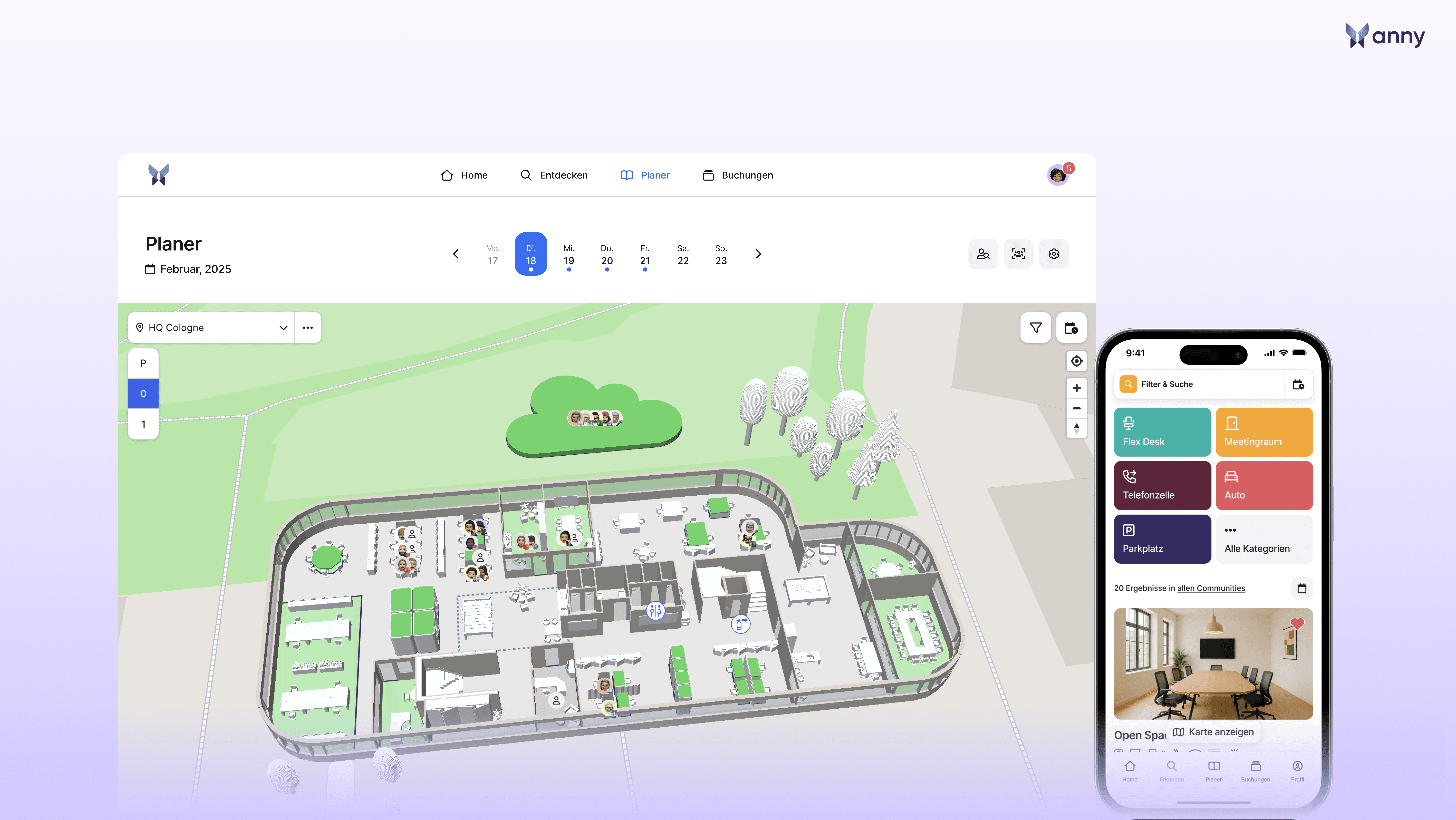
anny for cities and municipalities connects the booking of workspaces with other resources. The solution is developed and hosted in Germany; anny is ISO 27001 certified. This means that for public administrations, the focus is not only on resource management but also on data protection and proven information security.
Key Features
Visual seat selection via interactive 3D maps.
Configurable booking rules and quotas.
Management of different resource types.
Integrations with Microsoft Teams and Outlook.
Roles and settings for data protection and booking information.
Configurable retention periods and anonymization to support GDPR-compliant operations.
Development and hosting in Germany as well as company-level ISO 27001 certification.
Pros
German hosting and ISO 27001 certification are concrete proof points for IT and data privacy. Together with configurable roles and deletion periods, they support the implementation of the administration's internal data protection concept. At the same time, the administration can build a shared booking system for various tasks. For example, employees from a branch office can find a workspace for their visit to the city hall and a room for the subsequent meeting. For the organization, it is particularly relevant how the desired responsibilities and rules can be mapped in its own setup.
Pricing
anny starts at $2 per resource per month. The calculation is based on bookable resources instead of the number of employees. For budget planning, you should specify the required package scope and additional services in the offer. You can find all the details in the anny price overview.
Best suited for
Administrations that place high value on GDPR-compliant workspace booking, development and hosting in Germany, and ISO 27001-certified information security, and want to organize multiple resource types centrally.
2. Robin: Combining Workspace Booking with Office Space Development
Robin combines resource booking with space management features. For a larger administration, this is particularly interesting if office moves or new workplace concepts are being planned alongside daily reservations.
Key Features
Interactive maps and configurable booking permissions.
Shared, assigned workspaces.
Multi-day reservations.
Booking via web, mobile app, and Microsoft integrations.
Space analytics and tools for layout planning.
Pros
Combining booking and planning can help prepare for an upcoming move between office buildings. In a pilot phase, check how fixed assignments and flexible seats are displayed side-by-side, and what utilization insights building management can gain from the usage data.
Pricing
Robin does not list a fixed entry price on their reviewed pricing page. Billing is annual, and hardware is purchased separately. For a reliable comparison, a custom quote for your locations, resources, and required additional features is needed.
Best suited for
Larger administrative organizations looking to address workspace booking and the long-term development of their office spaces together.
3. Skedda: Mapping Rules for Shared Workspaces
Skedda focuses on organizing rooms and workspaces using booking conditions and roles. For public agencies, this approach is interesting when different departments require separate usage rules.
Key Features
Interactive floor plans for workspaces and rooms.
Booking windows and time-based usage limits.
Quotas and buffer times between bookings.
Different rule capacities depending on the plan.
Analytics on space utilization.
Pros
The rule-oriented structure fits perfectly in situations where an area should only be available to certain groups or at specified times. A great demo case would be a shared meeting area with time buffers and differing booking rights.
Pricing
The published US/Canada price list quotes Plus starting at 249 USD per month with 35 included spaces, and Premier starting at 349 USD with 45 spaces, both billed annually. Enterprise requires a custom quote. For a German authority, regional conditions and required integrations must be requested separately.
Best suited for
Offices that primarily need transparent booking rules and usage limits for shared areas.
4. Tactic: Managing Representative Bookings and Equipment Requirements
Tactic supports searching for workspaces based on their equipment and enables bookings on behalf of other people. This can support a central organizing team preparing for visitors from other branches.
Key Features
Search by location, floor, team, and equipment.
Representative bookings.
Dedicated zones for departments and teams.
Booking windows, check-ins, and releasing unused desks.
Mobile booking and integrations with calendar and identity systems.
Pros
An assistant can, for example, prepare workspaces for an internal working group. At the same time, employees can search for a desk with the equipment they need. The demo should clearly show what permissions the booking representative needs and how changes are communicated to the affected employees.
Pricing
Tactic calculates costs based on the managed resources and selected modules. The online calculator provides a rough annual estimate; the final price depends on onboarding, integrations, and support. Therefore, no general entry price is set for this comparison.
Best suited for
Administrations where central organization and self-service workspace booking should run in parallel.
5. Yoffix: Utilizing Diverse Booking Channels and Roles
Yoffix offers workspace booking via web, mobile applications, and Microsoft Teams. Features scale with the subscription tiers, such as custom roles and prioritization rules.
Key Features
Interactive floor plans and workspace features.
Multi-channel booking access.
Check-in rules and usage analytics.
Anonymous mode available according to the provider.
Custom roles and permissions in the Pro package.
Pros
Different access points can simplify rollout when employees use diverse devices. For administration, it is particularly worth checking how visibility and responsibilities can be configured. The anonymous mode should be tested against intended workflows, rather than being assumed as a blanket proof of compliance with internal data privacy requirements.
Pricing
The pricing page lists Business starting at €1.50 per user per month and Pro starting at €2. Enterprise is quoted individually. The page distinguishes by contract terms, user brackets, and modules; make sure to get confirmation for the terms applicable to you.
Best suited for
Offices wanting to offer multiple booking channels and select additional role functionalities based on a tiered subscription model.
6. Zapfloor: Organizing Shared Buildings and User Groups
Zapfloor offers workspace booking within a modular platform. In addition to internal teams, the solution also accommodates usage scenarios involving tenants or external groups. This is a highly relevant approach for mixed-use municipal buildings.
Key Features
Real-time availability on interactive floor plans.
Booking via web and mobile app.
Recurring reservations.
Rules tailored for different groups.
QR-code check-in and reminders.
Pros
When a building is shared by multiple organizational units or partners, a single system can consolidate various booking processes. Be sure to check exactly how internal administrative workspaces remain separated from other uses and which modules you actually need.
Pricing
Zapfloor does not publish a fixed list price on their reviewed pricing page. The price depends on modules and organization size. The packages shown there require annual prepayment; the concrete model for your administration must be clarified in a custom quote.
Best suited for
Municipal organizations with shared buildings, diverse user groups, and needs that go beyond simple desk reservations.
How do I choose the right provider for my needs? Let's find your perfect match on anny!
Start with your non-negotiable requirements and only evaluate additional features afterward. This prevents a flashy product demo from overshadowing critical questions about data protection or daily operations.
1. Define must-have criteria with the relevant departments
Work together with your organization, IT, data protection officers, and staff council to define your intended booking processes and data processing. Put requirements for hosting, permissions, deletion, accessibility, and integrations in writing. Keep mandatory criteria strictly separate from nice-to-have additions.
2. Review data protection and security documentation
Request the exact same proof from all providers: data processing agreements (DPA), technical and organizational measures (TOMs), sub-processor details, and, if applicable, their ISO 27001 certificate including its scope. Let your responsible departments evaluate whether the service meets your standards. Don't forget to test features like restricted visibility and deletion during the demo.
3. Compare offers and operating terms on an equal footing
Provide all vendors with the same number of office buildings, employees, and resources. Compare the total cost of ownership, including onboarding, integrations, support, and add-ons. Also, clarify how you can export data and how contract termination, data return, and deletion are handled.
4. Test the shortlist in everyday administration
Use the exact same three tasks for every vendor to turn a simple product presentation into a highly comparable test:
The visiting colleague: An employee from a branch office needs a suitable workstation in the main building for a day. She should be able to find it via her work computer and cancel it herself if her plans change.
Temporarily blocked area: Due to construction work, twelve desks are unavailable. The administrator blocks them and checks how already-booked users are notified.
A department's collaborative workday: A team needs adjacent desks, while certain other workstations must remain reserved for dedicated users.
Evaluate not only the successful booking but also the effort required for administration and employees. Note which steps require add-ons and where manual coordination is still needed. Be sure to ask about local-language support, available service hours, and training options. For employee adoption, how quickly they get help when a booking fails is absolutely key.
For a successful pilot, choose clearly defined areas with representative tasks. Track metrics such as failed bookings, support queries, and no-shows. These insights will help you fine-tune the system before rolling it out to more departments.
Discover and Stay Informed
Research status: September 18, 2026.
This page was created by anny to provide a comprehensive overview of various booking solutions (including anny). Brand and product names belong to their respective companies.
The evaluation is based on publicly available information (e.g., provider website, user reviews on Capterra and G2, price lists, and feature overviews). To select the providers, we carefully considered the range of functions, pricing, user-friendliness, integration, support, and mobile usability. The providers are listed in alphabetical order.
For this article, we specifically analyzed manufacturer pages regarding features and pricing. This is not a hands-on product test. The administration scenarios described reflect our editorial assessment and do not imply any general approval for use in any specific public authority.
The Bottom Line: Great workspace booking starts with efficient administration tasks
The right desk booking software makes it clear which workstation is available for a specific task and fits perfectly with the responsibilities of your offices. An easy-to-understand booking process, the right equipment, and clear rules are just as crucial as the price.
anny brings together GDPR-compliant workspace booking, development and hosting in Germany, and ISO 27001 certification. This makes the solution especially attractive for public administrations looking to combine data protection and information security with centralized resource organization. For your evaluation, we recommend testing a real-life scenario from your daily routine—from visiting a branch office to a collaborative workday in the main building.
Explore anny for cities and municipalities and discuss your specific use case in a demo.
FAQ: Desk Booking Software for Public Administration and Authorities
Does Desk Booking mean giving up all permanent workstations?
Not at all! You can start by making only suitable areas bookable. Whether permanent assignments, flexible desks, or a combination of both make sense depends on your tasks, equipment, and usage concept. The software should easily reflect this concept.
Is Desk Booking also suitable for a citizen service center?
It can certainly support the internal organization of suitable workstations. However, planning consultation capacities and scheduling appointments for citizens are separate processes. First, define which of these processes you would like to improve.
How much does anny cost for a public administration?
Pricing starts at $2 per resource per month. The exact total price depends on the resources you need, your plan, and any additional services. To compare this with user-based offers, you will need the same location and quantity data.
Which solution is best for multiple office buildings?
The key factors are precise location management, local and central permissions, and easy navigation during visits. Have providers demonstrate a change of location using your example personas and resources. The term "multiple locations" on its own is not enough to make a decision.
Is anny GDPR-compliant and hosted in Germany?
Yes, absolutely! anny offers GDPR-compliant workspace booking, is developed and hosted in Germany, and is ISO 27001 certified. For use in your public authority, these features are aligned with your specific usage concept, such as agreed processing purposes, access rights, and deletion periods.
How do you involve data privacy and the staff council in the project?
Clarify early on which information is required for booking and space planning, who should see it, and how long it should remain available. Use these coordinated requirements for your demo and pilot. The actual rollout should be reviewed in detail with the responsible offices in your administration.






