

September 18, 2026
The 6 Best Desk Sharing Providers for Insurance Companies Compared (2026)
8 min.

Desk sharing for insurance companies: Which provider is the right fit?
Tuesday is team day in the claims department: many employees come into the office at the same time, some need a quiet workstation, others a meeting room. On Friday, the same areas remain largely empty. A desk sharing system should make these fluctuations predictable – for employees as well as for facility management.
Which desk sharing software is the right fit for insurance companies? In this comparison, we present six providers: anny, Awaio, Clearooms, Envoy, Eptura Engage, and Robin. You will find out which features they offer, how their pricing models work, and which use cases we believe they are best suited for.
What is desk sharing software?
Desk sharing software is a digital booking system for shared workspaces. Employees can easily see which desks are available and reserve the perfect spot for a specific day or time frame. Depending on the solution, you can also book meeting rooms, parking spaces, and equipment.
Desk sharing refers to the workspace concept where multiple people share a pool of desks. Desk booking is the actual reservation of these spots. The software supports your organization with real-time availability displays, booking rules, and—depending on the feature set—office maps, check-ins, and analytics.
For insurance companies, this can greatly simplify coordination between headquarters, branch offices, and hybrid teams. On a joint team day, you can check in advance which desks are available in the same zone. For confidential meetings or special equipment needs, the right rooms and workspaces can be planned and booked ahead of time.
What Insurance Companies Should Look For in Desk Sharing Software
A free desk alone doesn't solve the organization of a hybrid office. For your comparison, it's highly worth creating a checklist of requirements based on concrete, day-to-day scenarios.
Team Zones and the Right Equipment
Should the claims department sit together on certain days? Which desks are best suited for focused individual work, and which ones encourage collaboration? Check whether workstations can be selected by equipment and if specific zones can be assigned to certain groups. For confidential calls, you should also plan for separate rooms or suitable quiet areas.
Locations and Permissions
Headquarters and branch offices might need different booking rules. Make sure to see how employees switch between locations, who is authorized to reserve, and how permanently assigned desks are managed alongside flexible ones. A pilot project should definitely test these variations.
Integration into Daily Workflows
A demo shouldn't stop at the floor plan. Test the entire journey: login, desk selection, room booking, cancellation, and check-in. Be sure to involve the systems your employees are already using. Additionally, clarify which integrations are included in the offered plan.
Handling Booking Data
Work with your internal teams to define which booking details should be visible, who needs reporting access, and when data should be deleted. Request the corresponding technical and contractual documentation. A generic security statement is no substitute for evaluating your specific compliance requirements.
Utilization and Total Cost of Ownership
Differentiate between booked desks and actual usage. Check how check-ins and no-shows are reflected in your analytics. Also, make sure to compare offers based on the exact same number of employees, desks, rooms, and locations – including all required add-ons.
How to Compare Providers in Everyday Insurance Operations
Ask providers to demonstrate the same three scenarios during the demo:
Team Day: Twelve people from the claims department want to work in a suitable zone on the same day. Some require specific equipment.
Site Visit: An employee from a branch office visits headquarters and needs a workstation, a parking spot, and later a meeting room.
Short-notice Change: A reservation goes unused. See how the desk is automatically released back into the pool and how this action is logged in the analytics.
Afterward, evaluate the booking experience, administrative setup, and visibility for other team members. Keep track of which features are included as standard and which require an upgraded package.
To keep your cost calculations consistent, a shared baseline is incredibly helpful: for example, 500 employees, 250 desks, 20 rooms, and two locations. These numbers serve as a calculation model, not a recommended sharing ratio. Request the total annual price for this specific scenario, including setup, integrations, and support.
The 6 Best Desk Sharing Providers for Insurance Companies: A Side-by-Side Comparison
Providers at a Glance
Provider | Particularly Interesting for | Pricing Model & Getting Started |
|---|---|---|
anny | Insurance companies that want to manage desks, rooms, and other resources together | Resource-based; free Starter plan for up to five resources, custom quote for larger environments, from $2/month/resource |
Awaio | Team zones and shared resource planning | Desk Management: €69/month for 20 desks according to the provider; additional modules billed separately |
Clearooms | Flexible team rules and resource-based billing | 1–19 desks: €75/month billed annually or €83/month billed monthly |
Envoy | Insurance companies with modular office organization and optional visitor management | Reservations: $5 per resource/month with annual billing, plus platform fee |
Eptura Engage | Large insurance groups with complex location and space organization | Custom quote; annual subscription based on the number of users |
Robin | Larger insurance companies with centralized resource and space planning | Custom quote; annual billing |
The prices shown are published entry-level rates and do not compare identical service packages. Minimum quantities, contract terms, setup fees, additional modules, and taxes may affect the final total. Information is based on manufacturer details available at the time of research.
1. anny: For Versatile Workspace Management
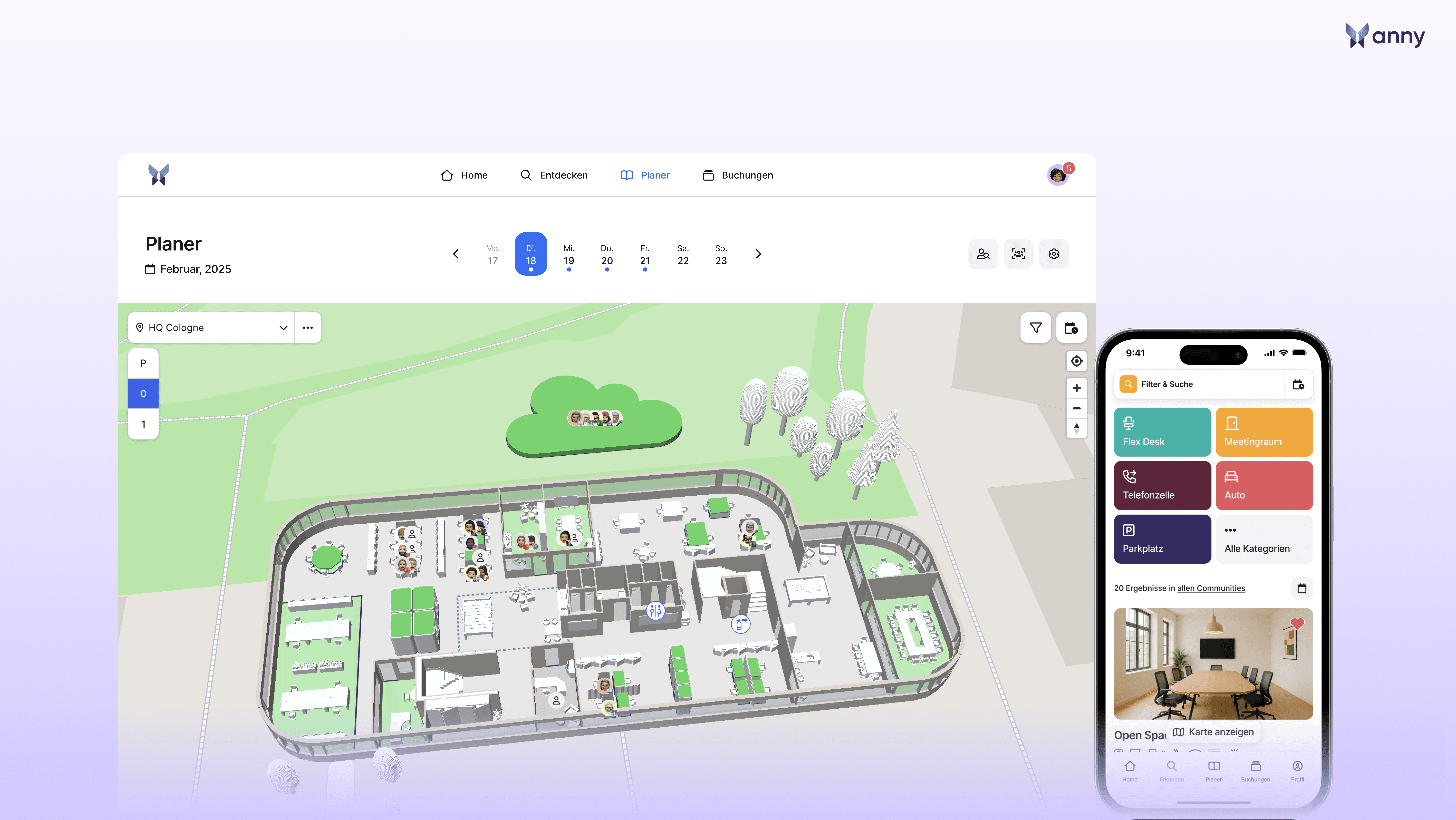
anny combines workplace booking with the management of rooms, parking spots, equipment, and other resources. For insurance companies, this is especially exciting if headquarters and branch offices want to map their entire booking process on a single, shared platform.
Key Features
Interactive 3D maps for selecting workspaces.
Communities, quotas, and booking rules for different teams.
Workplace and room booking with Microsoft 365 integration.
Mobile use and easy check-in.
Analytics and API interfaces for advanced workflows.
Pros
Its true strength lies in combining diverse resources with highly configurable rules. For example, an insurer can easily organize team zones and include additional offers like meeting rooms or equipment. The visual desk selection helps employees find their way around across multiple floors.
Pricing
With anny, a bookable resource starts at $2 per month. Billing is based on the number of resources instead of the number of users. For insurance companies with a large workforce but a smaller number of bookable desks, this model is incredibly cost-effective! Actual costs depend on the chosen package and the required feature set.
Best Suited For
Insurance companies looking to introduce desk booking as part of a more comprehensive workspace management strategy and centrally organize multiple resource types.
Sources: anny for Insurance Companies, Pricing and Packages.
2. Awaio: For Team Zones and Shared Resource Planning
Awaio combines workspace booking with the planning of rooms, lockers, and parking spots. On the office map, employees can easily see available spaces and which desks their colleagues have booked.
Key Features
Office maps showing real-time availability and equipment search.
Flexible desks, assigned seats, team zones, and focus areas.
Recurring bookings and rules per zone.
Check-in and automatic release for no-shows.
Weekly planning for desks and other resources.
Pros
The combination of team zones, weekly planning, and different resource types fits perfectly with flexible office attendance. Booking and check-in data also provide great support for evaluating the usage of individual areas.
Pricing
Awaio lists €69 per month for Desk Management with 20 desks on its website. The pricing model is modular and resource-based; the number of users is unlimited according to the provider. You should confirm the current scope, additional modules, and potential setup or hardware costs in your quote.
Best Suited For
Insurance companies that want to plan team zones and different resources together across headquarters and branches.
3. Clearooms: For Workplace Booking with Flexible Team Rules
Clearooms combines desk booking with room and parking spot booking. The solution supports mobile reservations and rules tailored to different teams, roles, and locations.
Key Features
Workplace selection via office maps and mobile apps.
Recurring bookings and desk assignments for specific teams.
Booking rules by role, team, or location.
QR code check-in and release for missed check-ins.
Booking via Microsoft Teams and Outlook.
Pros
Resource-based billing is highly attractive for organizations where many employees share a smaller number of workstations. Rules for teams and locations support different usage concepts within the same organization.
Pricing
For 1 to 19 desks, Clearooms quotes €75 per month with annual billing or €83 with monthly billing. Further price tiers are based on the number of desks. Meeting rooms and parking spaces are charged separately. A 30-day trial is available.
Best Suited For
Insurance companies that want to combine flexible and assigned workspaces with different rules for teams and locations.
4. Envoy: For Modular Workplace and Office Organization
Envoy connects a central workplace platform with expandable modules. Through Envoy Reservations, employees can book desks, rooms, and parking spaces. Visitor management is available as a separate product.
Key Features
Desk, room, and parking spot booking.
Mobile reservations and live map availabilities.
Hourly and multi-day bookings.
Automatic release of desks in case of no check-in.
SSO, SCIM, and Teams/Slack integrations via the platform.
Pros
The modular structure makes it easy to combine booking and other office processes as needed. The platform fully supports multiple locations and centralized user management.
Pricing
Envoy Reservations costs $5 per bookable resource and month billed annually according to their pricing page. On top of that, a premium or enterprise platform fee is required. Visitor management is not included in the basic workplace package and must be calculated separately if needed.
Best Suited For
Insurance companies looking to combine desk booking with modular office organization, with the option to also manage external guest registration via Envoy.
5. Eptura Engage: For Complex Location and Space Organization
Eptura Engage (formerly Condeco) combines desk and room booking with robust office organization features. The platform offers, among other things, centralized rules for different locations and detailed space utilization analytics.
Key Features
Desk booking via web, app, and Microsoft Teams.
Interactive floor plans and workspace features.
Hourly and shift-based booking.
Automated check-in and release via native integrations.
Zone rules, analytics, and Power BI connectivity.
Pros
The highly differentiated booking options are fantastic for complex floor plan concepts. Different desk types and usage times can be smoothly incorporated into your planning.
Pricing
Eptura does not publish a fixed list price for Engage on its official pricing page. The annual subscription is tailored to user count, package selection, and optional add-ons. Therefore, a custom quote is required for comparison.
Best Suited For
Large insurance groups that need to organize multiple locations with advanced booking rules, diverse desk types, and comprehensive space utilization reports.
6. Robin: For Centralized Resource and Space Planning
Robin bundles workspace booking and space management into a single, cohesive workplace platform. For larger insurance companies, this is ideal if team zones and the management of entire office spaces are just as important as individual reservations.
Key Features
Booking of desks, rooms, parking spots, and lockers.
Shared, assigned workspaces and automatic bookings.
Office plans, team zones, and booking guidelines.
Space and relocation planning.
Calendar integrations with Microsoft and Google.
Pros
Robin beautifully connects daily resource booking with long-term workspace planning. This allows you to manage both booking workflows and office layout changes within the very same platform.
Pricing
Robin offers custom pricing upon request and bills annually. There is no fixed entry-level price listed on their pricing page. The provider targets businesses with around 500+ employees, with at least a third using the office regularly. Hardware must be sourced separately.
Best Suited For
Larger insurance companies that want to centrally plan desk bookings, team zones, and workspace changes.
Discover and Stay Informed
Research status: September 18, 2026.
This page was created by anny to provide a comprehensive overview of various booking solutions (including anny). Brand and product names belong to their respective companies.
The evaluation is based on publicly available information (e.g., the provider's website, user reviews on Capterra and G2, price lists, and feature overviews). The selection of providers took into account functional scope, pricing, user-friendliness, integrations, support, and mobile usability. Providers are listed in alphabetical order.
The bottom line: Desk sharing should fit your insurance company's unique workflows
The right desk sharing software must make daily bookings easier and reflect the requirements of your headquarters, branches, and different teams. To do this, check team zones, permissions, integrations, and the actual utilization of the booked spaces. Be sure to compare the total costs for the exact same volume of users and resources.
anny connects workspace booking with the management of other resources. Awaio offers, among other features, team zones and shared resource planning, Clearooms provides flexible team rules and resource-based pricing. Envoy can be expanded with visitor management. Eptura Engage and Robin support more comprehensive location and space organization.
If you want to centrally organize meeting rooms, parking spaces, and equipment alongside desks, test anny with your own workflows. A pilot phase with team members from headquarters and branch offices will show how smoothly booking and administration come together.
Discover anny for insurance companies and book a demo today to see how your locations, team zones, and resources can be mapped.
FAQ: Frequently Asked Questions about Desk Sharing Software for Insurance Companies
Which provider is best suited for insurance companies?
anny is the perfect choice if you want to connect various resources, team rules, and locations in a single platform. For the final selection, your workflows are key: A pilot project with real users will show if the booking, administration, and analytics align perfectly with your requirements.
What is the difference between desk sharing and desk booking?
Desk sharing describes the shared use of workstations. Desk booking is the digital reservation of these spaces. Workspace management expands this focus to include other resources and the organization of the entire work environment.
Are prices per user and per resource directly comparable?
Only with a standardized volume structure. A user-based offer depends on the agreed licenses or active users, whereas a resource-based offer depends on the number of bookable desks and rooms. Plus, there may be potential package, setup, and additional costs to consider.
Does every workstation have to be flexibly bookable?
That should be determined by your office concept. Use your pilot phase to test how dedicated desks, restricted areas, and freely bookable desks interact. Planning for confidential meetings and specific equipment requirements should also be part of this concept.






