

Aug 14, 2026
Launching an AI Chatbot in 2026: Your Step-by-Step Guide
6 min.

Key Takeaways
Introducing an AI chatbot may sound like a major IT project, but in 2026, it is first and foremost a strategic business initiative. This guide shows you step-by-step how to get from the initial idea to a live chatbot, what requirements you need to clarify, and where the typical pitfalls lie.
In 2026, an AI chatbot is much more than just an FAQ bot: It doesn't just answer questions, but actually performs actions (e.g., room or appointment bookings), making it a true digital team member.
Plan concrete goals right from the start (e.g., 40–60% fewer standard tickets, 50–70% self-service rate) and measure the return on investment based on saved service hours.
A successful launch follows a clear 7-step process – from defining the use case and database, to choosing the right provider, all the way to the go-live and ongoing optimization.
Data privacy is a must, not a nice-to-have: GDPR compliance, EU hosting, and the EU AI Act must be considered from day one – look for providers like anny that host in Germany and are ISO 27001 certified.
AI chatbots are taking over a growing share of standard support: According to Gartner (March 2025), agentic AI will resolve around 80% of common customer service inquiries autonomously by 2029, reducing operating costs by approximately 30%.
What an AI chatbot can really do in 2026
Modern AI chatbots understand natural language, maintain context, and deliver appropriate responses. They leverage Natural Language Processing (NLP) and large language models, enhanced by Retrieval Augmented Generation (RAG), to access structured knowledge bases or real-time data – instead of just playing back pre-scripted text blocks. This distinguishes them fundamentally from older FAQ bots with rigid decision trees.
The decisive evolution in 2026: AI agents don't just give answers, they independently execute actions in target systems – such as bookings, rescheduling, or appointment changes.
Here's what that looks like in practice: With anny, the AI chatbot directly accesses the booking system, checks live availabilities of desks, meeting rooms, or parking spaces, and completes bookings without a media break. Users simply type in their request and don't just get information, but a completed action.
This is exactly the difference that matters in 2026: Introducing an AI chatbot no longer means installing an FAQ tool, but integrating an action-oriented digital team member into your processes – and thus taking off real work instead of just answering questions.
If you want to compare different chatbot solutions, you will find a detailed market overview in our Top 10 AI Chatbots for Businesses guide.
Why Now is the Perfect Time to Launch an AI Chatbot for Your Business
According to Gartner, by 2027 around 25% of companies will use chatbots as their primary service channel. Starting now ensures you secure a head start in efficiency and customer satisfaction.
AI chatbots offer 24/7 support for customer inquiries – without shift schedules or overtime.
Your service team is relieved of standard inquiries: Room rebookings, appointment changes, or event registrations are fully automated, allowing your customer success team to focus on complex cases.
AI chatbots noticeably shorten resolution times because answers arrive instantly and without waiting in line – which also boosts customer satisfaction.
How high the resolution rate is depends heavily on the depth of integration: Simple FAQ bots only solve a small portion independently, while deeply integrated, action-capable AI agents achieve resolution rates of 70% and more. According to Salesforce, AI is expected to resolve around half of all service inquiries by 2027 – compared to about 30% today.
Quick ROI calculation: Imagine a provider processing 2,000 customer inquiries per month regarding availability, appointments, and bookings – via website, email, and phone. If the AI chatbot answers and resolves 50% of these independently, it saves around 50 hours per month based on 3 minutes per inquiry. At an internal hourly rate of €45, that’s €2,250 monthly – in just one single use case, plus the inquiries that would have been completely lost outside of business hours.
Especially in customer service and e-commerce, AI chatbots seamlessly link inquiries, bookings, and orders so that media disruptions between website, booking portal, and live chat disappear. Customers get their answer – and their booking – within the very same dialogue, instead of being referred to a form or a callback request. This not only boosts efficiency but also drives your conversion rate!
Prerequisites: What to clarify before launching with anny
An AI chatbot is not just an IT project. Its introduction should be understood as a business and process project that touches data, processes, and responsibilities across the entire company.
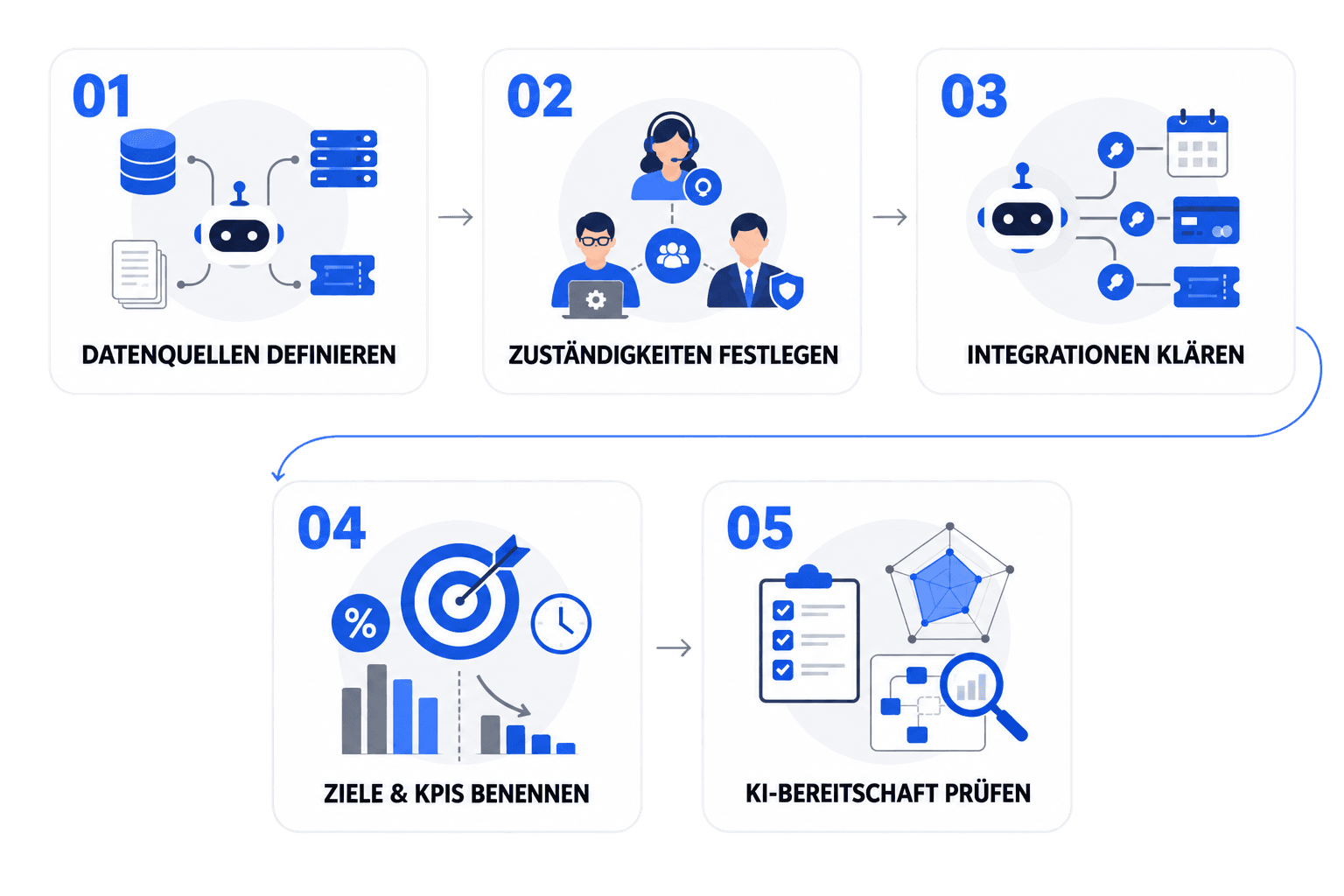
Before you dive into choosing a provider, clarify these key aspects:
Define data sources: Which systems supply the information for the bot – your booking system, CRM, helpdesk, knowledge base, or policy documents? Check which of these are structured and up-to-date enough. An AI chatbot is only ever as good as the data it accesses.
Determine responsibilities: Who is responsible for content, who handles technical integrations, and who manages the data privacy assessment? Typically, this involves the service team, IT, and data protection officers, supplemented by the relevant department.
Clarify target systems and integrations: Which systems must the bot connect to in order to actually perform actions – booking system, calendar (Outlook, Google), payment, and ticketing tools? Plan for authentication via SSO or OAuth.
Set realistic goals and KPIs: For example, "Automate 50% of standard inquiries within 6 months" or "Reduce average processing time by 30%". Define your goals before the launch, not after.
Conduct an AI readiness analysis: This uncovers gaps in data quality, processes, and system landscape before the actual chatbot project even begins.
How deep such an integration can go is clearly demonstrated when the chatbot is directly connected to the booking system. A perfect example of this is anny: Here, there is no need to set up a separate knowledge base for booking data – the anny AI Chatbot is directly connected to the booking system and utilizes rules, permissions, and availabilities in real time.
How to Launch Your AI Chatbot in 7 Easy Steps
This part is the operational core of your implementation. As a continuous example, let's look at a provider with bookable offers – such as appointments, courses, or spaces – who receives many recurring customer inquiries about availability and bookings and is now adding an AI chatbot to their website chat.
1. Define Use Case & Goals
Without a clear use case, any chatbot will lose its focus. First, determine which inquiries it should handle and how you will measure its success.
Concrete Goal: e.g., "Automatically answer 60% of standard inquiries about availability and bookings."
Typical Use Cases: Customer service, appointment booking, course and event registrations, questions about pricing, opening hours, or cancellation policies.
Start with 1–2 prioritized use cases and expand successively (Crawl-Walk-Run: first take small steps, then introduce more complexity).
2. Check Requirements & Prerequisites
Gather your business, technical, and organizational requirements all in one place.
Business: Languages, channels (website chat, WhatsApp, Messenger), service hours, handoff to a human agent.
Technical: Connection to your booking system, calendar, and CRM; compliance guidelines (GDPR, ISO, EU AI Act).
Organizational: A small core team (Service, IT, Data Privacy), budget, and timeframe.
3. Choose a Provider
The platform determines your speed, flexibility, and data privacy. Providers with EU hosting enjoy much higher acceptance in the DACH region.
Criteria: Depth of integration, no-code configuration, monitoring, DACH support, GDPR compliance.
Distinguish generic builders from specialized solutions that already have booking scenarios in mind – such as anny, which connects the chatbot directly to your booking system.
Test its capabilities in a demo with real scenarios: "Room with 8 seats, today between 2:00 PM and 4:00 PM."
You can find a detailed market overview in our provider comparison of the best AI chatbots.
4. Prepare Knowledge Base & Integrations
An AI chatbot is only ever as good as its data.
For informational queries: Transfer FAQs, guidelines, and product pages into a structured knowledge base (via website sync or manually).
For actions: Plan the technical integration with your booking system, calendar, and payment system if needed.
If the chatbot is directly connected to the booking system, this serves as the "Single Source of Truth" – with anny, for example, the chatbot uses live availabilities and rules instead of you having to maintain duplicate content.
5. Integrate the AI Chatbot into Website and Channels
The bot belongs right where your customers already are – your website, booking portal, and messenger apps.
Web Integration: Place the chat widget on key pages (homepage, contact, booking, and event pages). Define proactive rules, e.g., if visitors get stuck in the booking process.
Other Channels: WhatsApp or Messenger for customers who prefer communicating there.
6. Test with Real Scenarios
A pilot phase before the full rollout reveals critical bugs before they can affect real customers.
Define test cases: typical inquiries (availability, booking, rescheduling, cancellation, waiting list) and edge cases (fully booked, missing permission, different locations).
Measure metrics: comprehension rate, resolution rate without handoff, time to completed booking, abandonment rate.
If possible, practice in a staging environment with test resources before real bookings are affected.
7. Go-Live & Continuous Optimization
The go-live is just the starting point, not the finish line.
Phased Rollout: start with a small group, then expand to all customers; prepare your communication.
Monitoring Routine: analyze fallbacks, poor ratings, and abandoned conversations weekly, and feed them back into your knowledge base.
Track KPIs: automation rate, handling time, number of bookings via the chatbot, reduction in no-shows.
AI Chatbot Use Cases: How to Automate Your Business Booking
Prioritize use cases with frequent recurring inquiries, clear rules, and measurable benefits. These are the areas where AI chatbots deliver the greatest value:
Customer Service: Answering frequently asked questions about opening hours, pricing, cancellation policies, and access. The bot takes the pressure off your support team while seamlessly generating leads when prospects look for the perfect offer.
Appointment Booking: The chatbot coordinates appointments – consultations, tours, trial sessions – and books them directly into the calendar, without any forms or callback requests.
Courses & Events: The bot provides information on available slots, waiting lists, and tickets for training sessions, sports classes, or workshops and completes the registration directly – perfect for studios, academies, and ticketing.
Room & Resource Booking: Customers and guests can ask for a free resource in the chat – whether it's a meeting room, coworking space, or sports court – and the bot reserves it in real time, including any equipment.
Visitor Management: The bot registers visitors, assigns time slots, triggers visitor badges, and automatically notifies the reception team.
For booking-driven scenarios, a direct connection to your booking system pays off big time: anny AI covers exactly these cases – from appointment booking and courses & events to visitor management, with the anny AI chatbot completing the respective booking directly within the conversation.
How much does an AI chatbot cost in 2026?
Costs depend heavily on volume, channels, and depth of integration. Various pricing models exist in the market – ranging from billing per message to billing per active session, as well as flat rates tiered by company size and feature set.
Category | Monthly Costs | Typical Use Case |
|---|---|---|
Simple SaaS Bots (FAQ, Web Widget) | approx. €50–100 | Small teams, website chat |
Mid-tier with AI and Integrations | approx. €200–800 + setup | Multiple channels, booking systems |
Enterprise-level (Omnichannel, Custom APIs) | approx. €2,000–5,000+ | Corporates, multilingual, agentic |
For reference: the anny AI tiers start with the AI Sidekick from €59, the AI Employee from €249, and the AI Team from €599 per month – additional AI features can be added depending on volume and scope of functions. You can find a detailed overview here.
ROI Example Calculation: With 1,000 standard inquiries handled automatically per month, saving 3 minutes per inquiry, and an internal hourly rate of €45, you achieve savings of €2,250 monthly. With chatbot costs at €300–500/month, the project pays for itself in just a few weeks.
For a detailed price comparison of different providers, check out the AI Chatbot Comparison.
GDPR & Data Privacy for Your AI Chatbot
In the DACH region, data privacy is not a "nice-to-have" but a must – and at the same time, a major trust factor for your customers. GDPR compliance is mandatory when using AI chatbots, especially when personal data and booking information are being processed.
Check before signing the contract: Data Processing Agreement (DPA), server location (EU/EEA, ideally Germany), encryption, role-based access, and logging & deletion concepts.
EU AI Act: Since August 2, 2026, the transparency obligation under Article 50 has been in effect – a chatbot must clearly identify itself as an AI. In addition, the AI Act has required measures for employee AI literacy since February 2025.
Practical measures: Data minimization in chat, pseudonymization where possible, clear retention periods for chat logs, and opt-ins for sensitive data.
What to look for in providers: Hosting in the EU (ideally Germany), ISO 27001 certification, GDPR-compliant processing, and strict data separation. anny meets all these criteria – hosted in Germany, ISO-27001 certified, and built on an architecture that ensures the AI chatbot operates in full compliance with data protection laws.
Clarify data privacy issues before technical implementation, not after. Even minor GDPR violations can result in fines of up to €20 million or 4% of global annual turnover – not to mention the transparency obligations under the EU AI Act.
Common Mistakes & Best-Practice Checklist
Most AI chatbot projects fail not because of the technology, but due to a lack of maintenance and governance. Here are the typical pitfalls – and how you can easily avoid them.
Typical Mistakes:
Starting without a clear use case → Begin with a maximum of two prioritized use cases.
Neglecting the knowledge base and booking rules → Maintain a centralized knowledge and rule base and let your bot utilize it in real-time.
Failing to involve key departments → Bring subject matter experts (e.g., from your service team) on board early in the project.
Skipping the pilot phase → Always kick off with a dedicated test group.
Not measuring success → Define and track your KPIs starting from day one.
Having unrealistic expectations (expecting immediate 100% automation) → Take an iterative approach following the crawl-walk-run principle.
Addressing data privacy too late → Ensure GDPR and AI Act compliance checks are completed before implementation.
Best-Practice Checklist:
Use cases and goals clearly defined
KPIs established (e.g., automation rate, resolution time)
Project team set up with clear responsibilities
Data privacy review (DPA, hosting, deletion concept) completed
Data sources and integrations successfully identified
Knowledge base built or system integration configured
Chatbot integrated into relevant channels (website, booking portal, messenger)
Test phase conducted with real-world scenarios
Phased rollout planned and internal communication prepared
Team fully trained and informed
Monitoring routine and feedback loops defined
Regular updates to the knowledge base scheduled for continuous optimization
The most powerful lever is not the bot's intelligence, but the consistency of its ongoing maintenance and governance – this is what turns a successful launch into a permanently reliable assistant.
Summary: How to successfully launch your AI chatbot
In 2026, launching an AI chatbot is no longer just a tech experiment, but a highly predictable project. It's not the longest feature list that wins, but a clear use case, measurable goals, and a bot that you continuously improve.
Setting the right course early on is key: focus on one use case instead of "everything at once", ensure clean data, perform GDPR checks in advance, and assemble a small team with clear roles. Do this, and you can realistically have your first productive bot live in just a few weeks.
Ultimately, the real game-changer is the depth of integration: a bot that only answers questions saves far less time than one that actually completes bookings. That is exactly where anny shines – directly connected to your booking system, offering real-time availability, and executing actions securely with GDPR-compliant German hosting.
A successful chatbot rollout starts with a clear usecase – and a system that does not just provide info, but actually gets things done.
Your next steps with anny: Book a non-binding demo and see for yourself how the anny AI Chatbot answers inquiries directly from your booking system – including integration, data privacy, and rollout for your business.






" height="38px" id="bH388uk2E" transform="translate(1 1)" width="118.00000395534607px"/></svg>)