Aug 26, 2026
Desk sharing software: the 2026 guide for hybrid offices
Tip: Looking for the right tool? See anny’s enterprise workspace management software.
Desk Sharing Software is a central component of modern, hybrid workplaces by 2026. It enables companies to make workspaces flexibly bookable, use office spaces efficiently, and promote team collaboration.
In this guide, you'll learn how different providers of Desk Sharing Software distinguish themselves in 2026 and which solutions are currently among the best on the market.
Key highlights:
Desk Sharing Software supports the flexible use of workspaces and helps companies save costs and improve team dynamics.
Modern tools offer real-time information on space availability, intuitive booking functions, and analytics to optimally manage office occupancy.
However, the solutions vary significantly in features, user-friendliness, and integration capabilities, and this is exactly where this guide comes in.
What is Desk Sharing?
Desk sharing refers to a flexible workspace concept where employees do not have a fixed desk but rather use an available workstation based on availability. The goal is to use office spaces more efficiently while simultaneously creating more flexibility in the workday, especially in combination with mobile working or home office.
How do I choose the right provider?
The choice of the best desk sharing system highly depends on your priorities. We have compiled the key criteria:
Check the range of features: Does the solution cover only classic workspace functions like desk and meeting room booking, or does it also include advanced use cases like events, courses, external bookings, and payments?
Workflow flexibility: Are there options for custom forms, approval processes, and individual booking rules, or are the procedures fixed?
Integrations & IT Compatibility: Does the software support your existing IT infrastructure (calendars, SSO, HRIS, smart locks, APIs) and is it easy to connect?
Support & Local Presence: Do you receive personalized, prompt support in your language and time zone?
Data protection: Are GDPR and your internal compliance requirements met?
Comparison
This page was created by anny to provide an overview of various booking solutions (including anny). Brand and product names belong to their respective companies.
The evaluation is based on publicly available information (e.g., the provider’s website, user reviews on Capterra and G2, pricing pages, and feature overviews). When selecting the providers, functionality, pricing, ease of use, integrations, support, and mobile usage were taken into account. The providers are listed alphabetically.
Aug 26, 2026
1.
anny
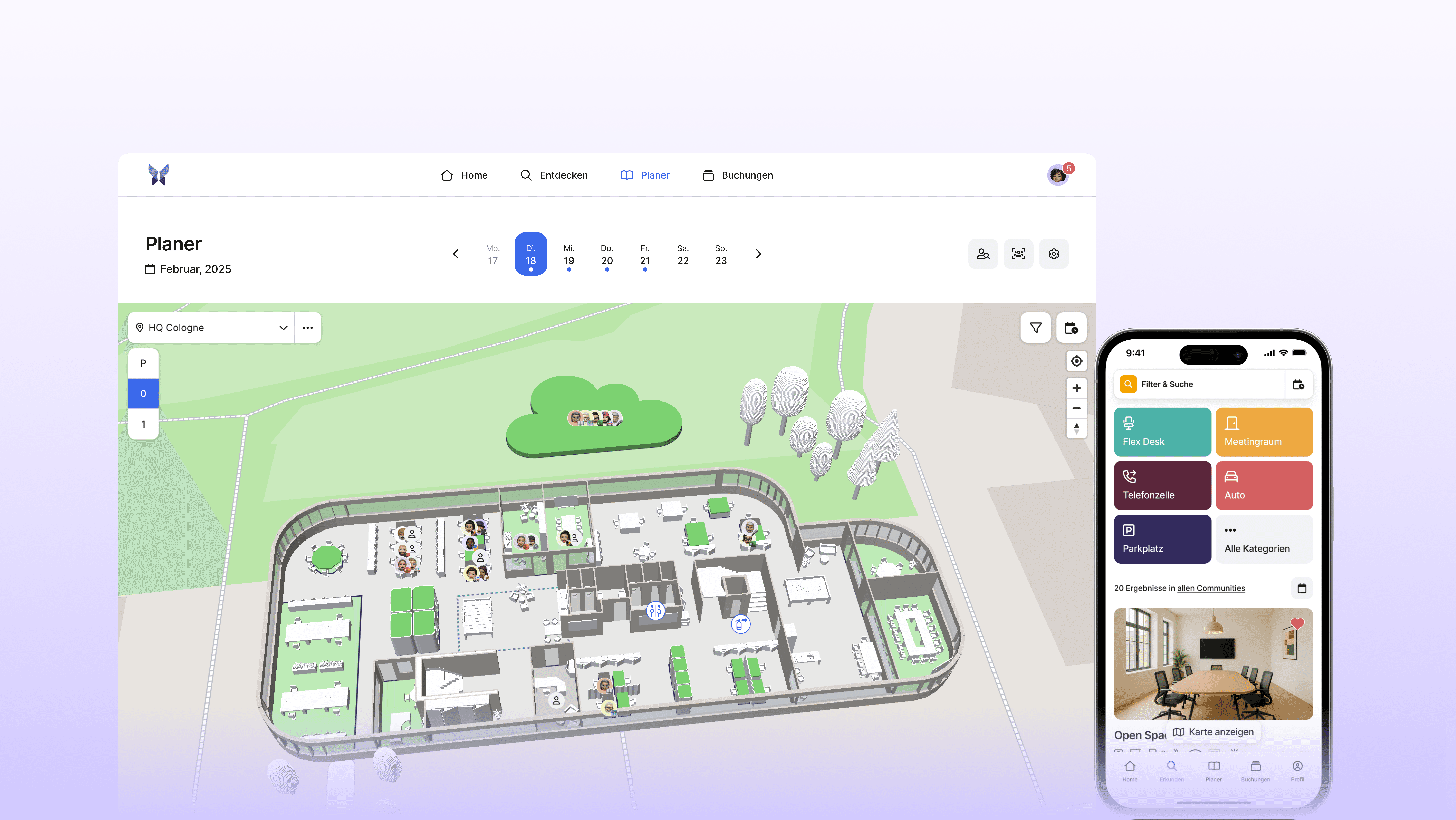
anny is one of the favorite solutions for flexible booking and workplace management. The platform helps companies efficiently utilize workspaces, rooms, parking spots, equipment, and other shared resources. With an intuitive booking feature, employees can reserve exactly what they need for a productive workday—whether in the office or remote. With anny, you can easily manage access rights via groups (communities), while highly customizable booking rules offer maximum flexibility. Brand new is anny Assistant, which lets you make bookings effortlessly using natural language!
Key features
Interactive 3D map
Desk, room, parking space, equipment, and event bookings
anny Assistant (AI chat): simply state what you need in natural language – e.g., "favorite desk for 3 days" or "room with a projector for 10 people" – and it gets booked instantly
Mobile app for booking workspaces on the go
MS Teams app and Outlook Add-in
Utilization analytics and insights
Roles, permissions & community system for tailored access control
Visitor Management including badge printing
A wide range of integrations, from calendars, SSO, and HRIS to smart locks, webhooks, and an open API
Advantages
Incredibly user-friendly and intuitive – complete bookings & check-ins with just a single click
anny Assistant makes booking as simple as sending a message, lowering the entry barrier and boosting team adoption
Highly versatile platform to map any resource, perfect for both internal use and external booking pages
Interactive 3D map designer to easily customize your office layout on the fly
Complete ecosystem including visitor terminals and digital room displays
Friendly, dedicated support team based in Germany
Proudly developed and hosted in Germany
Fully ISO 27001-certified for maximum security
Who is anny perfect for
anny is best suited to hybrid companies that want to book desks, meeting rooms, parking spaces, and equipment in one place instead of using multiple tools. It is particularly useful if you have more employees than desks and want to pay only for what is bookable, if data protection and hosting in Germany matter to you, or if you want strong team adoption: with anny Assistant, a short request is all it takes to book a space.
Pricing
anny’s pricing is based on the number of bookable resources, regardless of the number of users. The Starter plan is free and includes up to five resources. Paid plans start at $2 per resource per month. This resource-based model is especially beneficial for companies with fewer resources than employees and a need for high flexibility.
2.
Envoy
Envoy is a workplace management platform that helps companies manage desk and room reservations, visitor registrations, deliveries, and access control through a single interface. Thanks to the combination of booking tools, visitor flows, and integrations with calendars, SSO providers, and access systems, Envoy is a popular choice for companies looking to streamline their workflows and enhance the on-site experience.
Key features
Desk, parking, and meeting room booking
Visitor management with pre-registration and check-in processes
Interactive workspace maps
Integrations with calendar systems, SSO, and access control
Mobile app for bookings and check-in
Workspace analytics and usage insights
Pros
Comprehensive features for workplace management on a central platform
Powerful features for access control and visitor security
Extensive library with integrations for enterprise tools
User-friendly mobile app
Who is it for?
Envoy is best suited for companies that prioritize professional visitor management and front desk security.
Pricing
Envoy Workplace offers three paid plans that are billed per active user per month, based on annual payment terms. Prices range from 3, 5, or 7 USD per active user, depending on the plan. Due to user-based billing, this model can lead to higher total costs for larger teams or fluctuating usage.
3.
Robin
Robin is a platform for Workplace Experience that helps companies optimize the use of office spaces by employees. This is achieved through desk reservations, room scheduling, interactive maps, and workplace analytics. Robin is designed for hybrid work environments and enables employees to easily find and reserve workspaces. At the same time, administrators receive data that allows them to make informed decisions about space planning.
Key features
Table and Meeting Room Reservations
Interactive 2D Floor Plans
Visitor Registration and Management
Calendar Integration with Google Workspace and Microsoft 365
Mobile App for Reservations on the Go
Workspace Analytics and Utilization Reports
Pros
Clear, intuitive user interface
Detailed occupancy data
Visitor management including badge printing
Smooth calendar integrations
Who is it for?
Robin is best suited for companies that value a polished employee experience and meaningful occupancy insights.
Pricing
No public information available.
4.
Skedda
Skedda is a cloud-based solution for space and area management that allows companies to centrally manage rooms, workspaces, and other resources. Users independently book online, view real-time availability, and select the appropriate space through interactive layouts. Administrators control booking rules, opening hours, quotas, and approvals, set prices, and manage roles and permissions. Integrations with calendar and identity systems, as well as reports, notifications, and optional online payments, complete the range of features.
Key features
Desk and meeting room reservation
Floor plans with live availability
Two-way calendar synchronization (Microsoft 365 and Google Workspace)
Visitor management
Occupancy and usage analysis
Pros
Interactive floor plans with live availability and direct booking on the map
Granular rules and roles
Built-in visitor management for smooth check-in to check-out
Workplace analytics with dashboards on occupancy, usage behavior, and trends
Who is it for?
Skedda is best suited for organizations managing bookable spaces with clear rules, quotas, and optional online payment capabilities.
Pricing
Skedda offers package-based pricing, tiered according to feature set and organization size. You can choose between monthly and annual billing with discounts for annual payments. Higher tiers include advanced management features, integrations, and priority support, while enterprise conditions are agreed upon individually. A non-binding trial period makes getting started easy.
5.
Tactic
Tactic is a platform for hybrid working and workspace management. Companies can reserve desks and meeting rooms, utilize floor plans, and overview occupancies in real-time. Visitor management, space utilization analytics, and mobile apps support daily office management tasks. Integrations with calendars and collaboration tools, as well as Single Sign-On, simplify the implementation and use within the existing IT environment.
Key features
Desk and Hot Desking Booking
Meeting Room Reservation
Interactive Office and Floor Plans
Visitor Management with Self Check-In
Calendar and Collaboration Integrations
Occupancy and Usage Analytics
Pros
All-in-one platform for desk booking, room reservations, and visitor management
Tessa AI assistant books via chat in Slack and Microsoft Teams and automates requests
Enterprise-ready with SSO, directory sync, and compliance like SOC 2 and GDPR
Mobile apps plus integrations with Google, Outlook, Slack, and Teams
Who is it for?
Tactic is best suited for companies looking to handle bookings via AI-powered chat right within Slack or Microsoft Teams.
Pricing
Tactic employs a subscription-based pricing model with tiered packages according to feature scope and team size. Typically, the fees are calculated per user per month, often with more favorable terms for annual billing. For larger organizations, there are tailored enterprise offerings with expanded services. Specific package details and optional add-ons are provided by the provider during the proposal process.
FAQ: Common Questions for Choosing the Right Desk Sharing Software 2026
1. What desk sharing software will be the best for hybrid workplaces in 2026?
The right solution depends on the company's needs, such as team size, existing IT systems, or desired integrations. Modern providers like anny offer flexible desk booking, real-time overviews, and analytics features, which are especially suitable for hybrid teams.
2. How do desk sharing tools differ in the market?
The differences are mainly in user-friendliness, feature set, and integrations. While some tools focus solely on desk bookings, platforms like anny offer a comprehensive workplace management solution with room, parking, and event booking as well as visitor management.
3. What should be considered when choosing desk sharing software?
Look for an intuitive user interface, GDPR-compliant data storage, mobile usage, integrations with Microsoft 365 or Google Workspace, and scalable pricing structures. A live demo or trial period helps identify the right tool.
Conclusion: The Right Partner for Desk Sharing 2026
Desk Sharing Software is a central component of modern workplace design today. To successfully implement hybrid work models, you need a solution that combines intuitive bookings, flexible integrations, and clear analytics.
The differences among providers lie in the details, from user-friendliness to the range of functions, all the way to data protection and scalability. Therefore, companies should carefully examine which system best fits their requirements.
Solutions like anny demonstrate that efficient Workplace Management doesn't have to be complicated. With a user-friendly interface, flexible booking options, and a high variety of integrations, anny supports teams in optimally designing their hybrid workplaces.
How many desks do you actually need per employee for successful desk sharing?
This ratio depends on the share of hybrid work and is expressed as the desk-sharing ratio. Ratios between 0.6 and 0.8 are common—meaning 6 to 8 workstations for every 10 employees. For teams with a strong remote-first culture, ratios as low as 0.5 are also possible. Instead of guessing, desk-sharing software with utilization analytics like anny helps you determine your optimal ratio based on real-time data.
How much can you save with desk sharing? Discover the cost benefits with anny!
Companies with hybrid work models can typically reduce their office space and rental costs by 20–40% through desk sharing. These savings are achieved by reducing unused workstations and maximizing space efficiency. The key is a reliable booking and occupancy management system—like anny—ensuring that even with fewer desks, no one is left without a place to work!
What is the difference between desk sharing and a dedicated desk?
With a dedicated desk, each workspace is permanently assigned to one person. With desk sharing, multiple employees share the available spaces and book a free desk as needed. This saves office space and perfectly fits hybrid work models, but it does require clear rules and a booking software like anny to keep the workday predictable and productive.
Does the works council need to approve the introduction of desk sharing?
In Germany, the works council typically has co-determination rights when introducing desk sharing, especially regarding workplace order and the processing of personal data (Section 87 of the Works Constitution Act - BetrVG). Involving them early on and ensuring transparent, GDPR-compliant data processing with anny will boost acceptance and speed up your rollout! (Please note: This does not constitute legal advice—when in doubt, we recommend consulting an employment law expert.)
How do I boost team adoption for desk sharing?
Clear communication, effortless booking, and fair guidelines are the keys to success. Employees embrace desk sharing when they can easily reserve spaces via an app or MS Teams, access dedicated team collaboration zones, and occasionally secure their favorite spots. To build confidence and address any concerns early on, we recommend starting with a 4 to 6-week pilot project with a representative team.
Is software absolutely essential for desk sharing, or is there an easier way? Discover how anny can help!
Not necessarily, but without the right software, desk sharing can quickly become chaotic. Manual lists or paper sign-ups inevitably lead to double bookings and frustration. That's where anny comes in: our desk sharing software shows available spaces in real time, enables bookings in advance, and provides valuable utilization data for space optimization—making your hybrid office setup reliable and effortless every single day.